
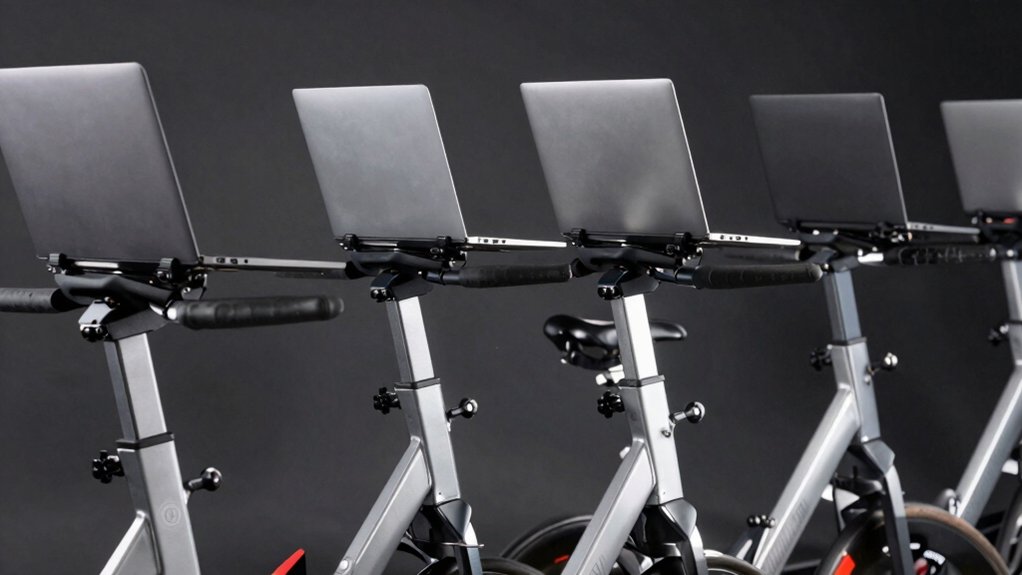

When you’re pedaling on a stationary bike, you need a laptop stand that won’t shift or wobble with your movement. You’ll find that most stands fail because they lack proper stabilization or compatible mounting systems. The best options combine steel construction, non-slip surfaces, and adjustable features that secure laptops up to 17 inches. But which specific stands actually deliver the stability you need?
| VEVOR Cycling Desk Adjustable Bike Trainer Fitness |

| Best All-in-One Desk | Device Compatibility: Most bikes and treadmills | Weight Capacity: 44 lbs / 20 kg | Non-Slip Surface: Non-slip mats | VIEW LATEST PRICE | Read Our Analysis |
| Tabletop Tray Holder Compatible with Peloton Bike |

| Best for Peloton Bikes | Device Compatibility: Peloton Bike (not Bike+) | Weight Capacity: Not specified | Non-Slip Surface: Silicone non-slip sheet | VIEW LATEST PRICE | Read Our Analysis |
| Adjustable Bike Trainer Fitness Desk Portable Workstation Standing Desk |
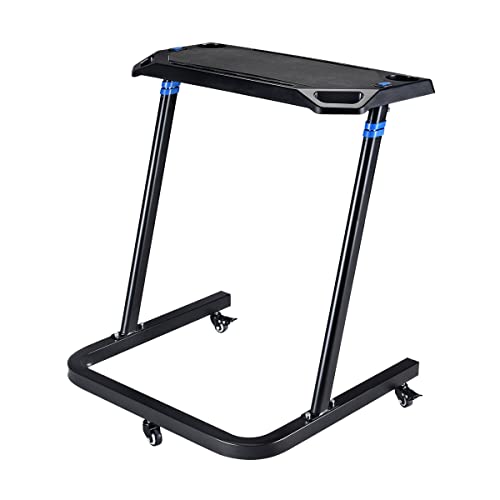
| Best Portable Workstation | Device Compatibility: Indoor bike trainers | Weight Capacity: 44 lbs | Non-Slip Surface: Non-slip surface | VIEW LATEST PRICE | Read Our Analysis |
| WALI Laptop Desk Mount for 17 Inch Notebook |

| Best Professional Setup | Device Compatibility: Laptops up to 17 inches | Weight Capacity: 22 lbs | Non-Slip Surface: Ventilated tray | VIEW LATEST PRICE | Read Our Analysis |
| TFD Acrylic Laptop Holder for Exercise Bikes |
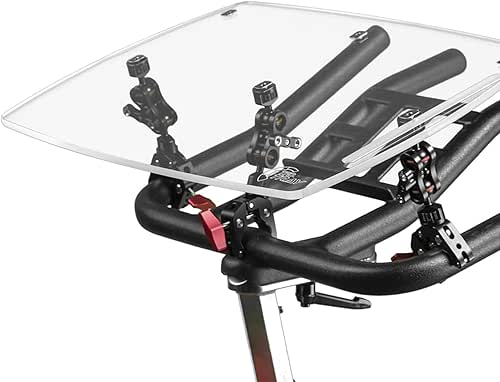
| Best Budget-Friendly Pick | Device Compatibility: Universal exercise bikes | Weight Capacity: Not specified | Non-Slip Surface: Acrylic construction | VIEW LATEST PRICE | Read Our Analysis |
More Details on Our Top Picks
VEVOR Cycling Desk Adjustable Bike Trainer Fitness
Looking for a laptop stand that won’t shift while you’re pedaling? The VEVOR Cycling Desk offers eight height levels ranging from 31.5 to 44.7 inches, letting you position your screen at eye level. The steel and aluminum frame includes two support rods connecting the base and legs, plus two additional rods securing the tabletop for stability. You’ll find a 28.3-inch desktop that holds up to 44 pounds, with non-slip mats keeping your devices in place. The stand features cup holders on each side and tablet slots for convenient access to hydration and reference materials. Four swivel wheels with two locking brakes allow easy movement while preventing unwanted shifting during workouts. Synchronized lift buttons on both sides enable even height adjustment for personalized ergonomics.
- Device Compatibility:Most bikes and treadmills
- Weight Capacity:44 lbs / 20 kg
- Non-Slip Surface:Non-slip mats
- Height Adjustability:8-level adjustment (31.5–44.7 inches)
- Mobility/Portability:4 swivel wheels with brakes
- Additional Accessories:Dual cup holders, cable management
- Additional Feature:Synchronized dual lift buttons
- Additional Feature:Dual-sided cup holders
- Additional Feature:Cable management aid
Tabletop Tray Holder Compatible with Peloton Bike
If you’re riding a standard Peloton Bike and want to multitask during your workouts, the Tabletop Tray Holder offers a straightforward solution for securing your laptop, tablet, or other devices on your handlebars. Installation requires no tools—simply place the tray on your bike grips without removing them. The holder’s high-quality plastic construction features rounded edges that protect your grips from damage. Silicone non-slip pads at both ends and a non-slip sheet across the surface keep your devices stable throughout your ride. You can hold laptops, books, phones, and headphones, enabling you to work, study, or video conference while exercising. The product includes a one-year warranty and seller support for any questions.
- Device Compatibility:Peloton Bike (not Bike+)
- Weight Capacity:Not specified
- Non-Slip Surface:Silicone non-slip sheet
- Height Adjustability:Fixed height
- Mobility/Portability:Simple handlebar placement
- Additional Accessories:One-year warranty
- Additional Feature:One-year warranty included
- Additional Feature:Rounded edges protect grips
- Additional Feature:Simple handlebar installation
Adjustable Bike Trainer Fitness Desk Portable Workstation Standing Desk
Want a laptop stand that transforms from workout accessory to office furniture without requiring separate purchases? The RAD Cycle Products Adjustable Bike Trainer Fitness Desk delivers both functions. You adjust the height from 33.5 to 47 inches using push-button controls, fitting your bike and seated position. The 14 x 28-inch steel surface holds your laptop securely with a non-slip top and dedicated tablet slots. Two cup holders keep beverages accessible during workouts. After exercising, you unlock the casters and roll the desk into your office space, converting it instantly to a standing desk. The locking wheels stabilize the unit when stationary, preventing shifting during use.
- Device Compatibility:Indoor bike trainers
- Weight Capacity:44 lbs
- Non-Slip Surface:Non-slip surface
- Height Adjustability:Adjustable (33.5–47 inches)
- Mobility/Portability:Locking casters for movement
- Additional Accessories:Dual cup/bottle holders, cable management
- Additional Feature:Converts to standing desk
- Additional Feature:Built-in cable management holes
- Additional Feature:Molded top handles
WALI Laptop Desk Mount for 17 Inch Notebook
The WALI Laptop Desk Mount works best if you’re setting up a stationary bike workspace and need secure, stable support for laptops up to 17 inches. This mount holds devices weighing up to 22 pounds and features a ventilated tray measuring 14 by 11 inches to prevent overheating during workouts. You’ll choose between a C-clamp or grommet mounting option depending on your desk thickness. The adjustable arm extends and retracts with 16-inch pole height, offering +/-15° tilt, +/-90° swivel, and 360° rotation for optimal viewing angles. Installation includes detachable mounting plates and a comprehensive hardware kit, backed by a 10-year warranty and US-based customer support.
- Device Compatibility:Laptops up to 17 inches
- Weight Capacity:22 lbs
- Non-Slip Surface:Ventilated tray
- Height Adjustability:Height adjustable with 16-inch pole
- Mobility/Portability:Desk mount (stationary)
- Additional Accessories:10-year warranty, mounting hardware kit
- Additional Feature:Ventilated cooling tray design
- Additional Feature:10-year warranty coverage
- Additional Feature:Two-stage locking system
TFD Acrylic Laptop Holder for Exercise Bikes
For anyone who wants to transform their stationary bike into a productive workstation, the TFD Acrylic Laptop Holder offers a universal mounting solution that attaches directly to your handlebars. This durable acrylic stand adjusts to fit different device sizes and setups, holding laptops, tablets, phones, and books securely during workouts. You’ll keep your devices accessible and connected while cycling, enabling you to work, attend meetings, read, or stream content simultaneously. The holder’s strong construction ensures stability throughout your ride. Made in the USA and backed by TFD’s customer service promise, this multi-purpose tray converts your exercise bike into a functional dual-purpose workspace for home, work, or travel use.
- Device Compatibility:Universal exercise bikes
- Weight Capacity:Not specified
- Non-Slip Surface:Acrylic construction
- Height Adjustability:Adjustable to fit different setups
- Mobility/Portability:Handlebar attachment
- Additional Accessories:Made in USA, TFD Promise support
- Additional Feature:Universal handlebar attachment
- Additional Feature:Made in USA
- Additional Feature:Multi-purpose device support
Factors to Consider When Choosing Laptop Stands for Stationary Bikes
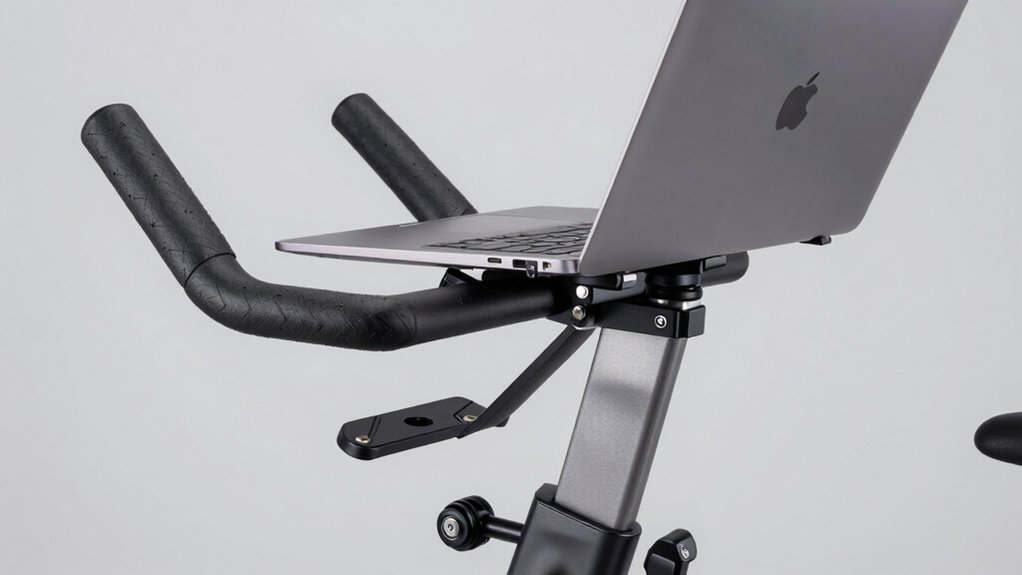
When selecting a laptop stand for your stationary bike, you’ll need to evaluate five key factors: compatibility with your bike’s frame and design, the workspace surface area the stand provides for your screen, height and adjustability options to match your eye level and riding position, stability and safety features that prevent wobbling during workouts, and material quality and durability to ensure the stand withstands daily use and sweat exposure. Start by measuring your bike’s frame diameter and checking the stand’s compatibility specifications, then assess whether the stand’s surface can accommodate your laptop size without overhang. Finally, verify that the stand offers secure mounting mechanisms and materials like aluminum or reinforced plastic that’ll resist corrosion and maintain structural integrity over time.
Compatibility With Your Bike
How do you know if a laptop stand will actually work with your specific stationary bike? Start by measuring your handlebar diameter—most stands fit bars between 0.75 and 1.25 inches. Check whether your bike uses flat bars, drop bars, or riser bars, since different styles require different mounting mechanisms. Next, examine the stand’s clamping or clipping system to ensure it secures firmly without damaging your handlebars. Verify that the mounted stand won’t obstruct your pedaling range or interfere with your body position during workouts. Finally, confirm the stand accommodates your device’s weight and dimensions. Test the stand’s clearance from your legs and torso before purchasing. These compatibility checks prevent equipment mismatches and ensure safe, stable use during exercise sessions.
Workspace Surface Area
What size workspace do you actually need on your stationary bike stand? The surface area determines how many items you can place simultaneously—laptop, tablet, phone, and cup. Extended desks around 28 inches long accommodate larger setups and multiple accessories without cramping. Measure your typical equipment layout first, then select a stand that fits everything comfortably.
A non-slip surface keeps devices stable while you pedal, preventing sliding during movement. Built-in slots for tablets or smartphones organize your workspace and eliminate clutter. Check the weight capacity to ensure the surface supports all your equipment without bending or tipping. Overloading a stand risks damaging both your devices and the stand itself. Calculate your total equipment weight, then choose a stand rated well above that amount for safe operation.
Height And Adjustability
Your laptop stand’s height adjustability determines whether you’ll maintain proper ergonomics while cycling, and it’s one of the most critical factors in your selection. Look for models offering adjustment ranges between 31.5–44.7 inches or 33.5–47 inches to accommodate both seated and standing positions. Most quality stands use push-button or lever mechanisms that let you quickly raise or lower the work surface without stopping your workout. Check whether your stand features two-side lift capabilities or locking casters to keep the desk stable at your chosen height. Proper height alignment keeps your laptop at eye level, reducing neck and shoulder strain during extended pedaling sessions. Test the adjustment mechanism before purchasing to ensure it responds smoothly and locks securely.
Stability And Safety Features
Why does stability matter so much when you’re cycling? A wobbling stand risks dropping your device onto moving pedals or the bike frame. You need a sturdy base with locking mechanisms that prevent tipping during pedaling and movement.
Check the weight capacity first. Your stand must support your laptop’s total weight using reinforced materials like metal or thick acrylic. Non-slip surfaces and device pads keep your equipment from sliding during workouts.
Adjustable angle and height features let you position your screen safely. You can reduce glare and neck strain by tilting the stand to match your natural viewing line.
Finally, examine integrated cable management channels. These prevent cords from tangling in moving bike parts, eliminating hazards during exercise. Prioritize these safety features before purchasing.
Material Quality And Durability
Once you’ve secured your laptop in place, you’ll want a stand that’ll withstand months of regular use without degrading. Steel frames offer superior strength and resist bending under weight and vibration. Durable acrylic provides lightweight stability without corrosion. Check the weight capacity rating—it must exceed your device’s total weight plus accessories by at least 20%. Inspect end pads and grip surfaces for quality rubber or silicone that won’t crack or slip. Examine welds and joints for solid construction without gaps. Test the tray’s thickness; thin materials flex and create safety hazards. Verify that all fasteners are stainless steel to prevent rust. Finally, review warranty information and customer reports about long-term durability to confirm the stand maintains structural integrity after extended use.
Portability And Storage Options
When you’re choosing a laptop stand for your stationary bike, you’ll want to evaluate how easily it moves and stores, since space constraints and workout flexibility matter in most home gyms. Look for lightweight, foldable designs that collapse for quick storage between sessions. Stands with locking casters let you reposition them without lifting. Integrated handles make repositioning simpler when moving the stand on or off your bike. Check for compact top surfaces or detachable components that shrink the overall footprint when not in use. Built-in storage features like cup holders or device slots reduce clutter around your workout area. Verify that the stand stows vertically or tucks beside your bike to maximize your available space.
Weight Capacity Requirements
How much weight can your laptop stand actually hold? Check the manufacturer’s stated load limit in pounds or kilograms, then verify it exceeds your heaviest device’s weight. Add accessories like chargers, mice, and documents to calculate your total load. Confirm the stand’s tray or mounting surface has sufficient capacity, as this rating may differ from the overall product capacity. For adjustable stands, ensure the weight limit applies across the full range of motion to prevent tipping during height or angle changes. Keep your total expected load safely under the stated capacity. This prevents bending, instability, and potential equipment damage during cycling sessions.
Final Thoughts
You’ve reviewed five solid laptop stand options for stationary bikes. Choose based on your bike model and laptop size. Prioritize stands with steel construction, non-slip surfaces, and adjustable height. Check that clamps fit your screen securely and that stabilizing rods prevent wobbling during workouts. Verify warranty coverage and USA-made components when possible. Test stability before purchasing to ensure you’re getting equipment that’ll stay put reliably.

Meet Ry, “TechGuru,” a 36-year-old technology enthusiast with a deep passion for tech innovations. With extensive experience, he specializes in gaming hardware and software, and has expertise in gadgets, custom PCs, and audio.
Besides writing about tech and reviewing new products, he enjoys traveling, hiking, and photography. Committed to keeping up with the latest industry trends, he aims to guide readers in making informed tech decisions.