

You’re juggling notes across multiple apps, losing important thoughts in the process. AI note-taking tablets streamline this chaos by combining handwriting recognition, intelligent transcription, and automatic organization into single devices. Whether you prioritize e-ink displays for eye comfort, multitasking capabilities, or robust cloud syncing, the right tablet transforms how you capture and structure information. Understanding what features matter most to your workflow determines which option…
| iflytek AINOTE Air 2 AI Note-Taking Tablet with Pen |

| Best for Meetings | Display Type: 8.2-inch E Ink screen with dual-color adjustable reading light | Writing Experience: 4,096 pressure levels, near-zero latency, paper-like writing | AI-Powered Features: AI Notetaker for to-do lists, Smart Planner for schedule management | VIEW LATEST PRICE | Read Our Analysis |
| iflytek AINOTE 2 E-Ink AI Note Taking Tablet |

| Most Versatile | Display Type: 10.65-inch frontlight-free E Ink display | Writing Experience: Paper-like writing with 8 brush styles, low-latency handwriting | AI-Powered Features: AI-assisted note-taking with text interaction, summarization, and organization | VIEW LATEST PRICE | Read Our Analysis |
| Amazon Kindle Scribe 64GB with Premium Pen |

| Best for Reading | Display Type: 10.2-inch glare-free front-lit display | Writing Experience: Premium Pen with tactile paper-like experience | AI-Powered Features: Built-in AI tools to convert handwriting to readable font and summarize notes | VIEW LATEST PRICE | Read Our Analysis |
| Samsung Galaxy Tab S10 Lite 128GB with S Pen |
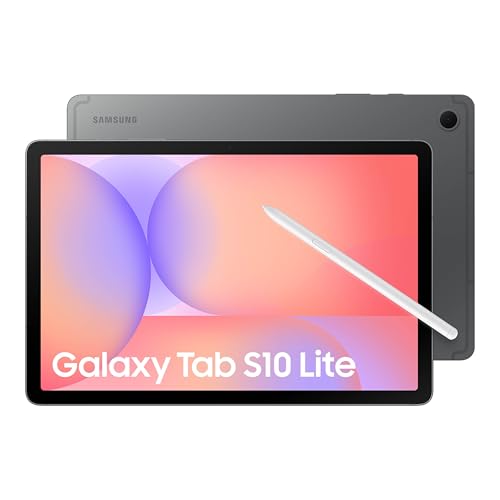
| Best Multimedia | Display Type: 10.9-inch LCD display with Vision Booster | Writing Experience: S Pen with intelligent features for writing and drawing | AI-Powered Features: AI features via AI Hot Key for web search and scheduling | VIEW LATEST PRICE | Read Our Analysis |
| Penstar eNote Pro 10.3″ E-Ink Tablet with Stylus |

| Best Color Display | Display Type: 10.3-inch Kaleido 3 color E Ink display with front light | Writing Experience: B6 premium aluminum-alloy stylus with five customizable shortcut buttons | AI-Powered Features: Real-time AI voice-to-text (52+ languages), meeting summaries, OCR, note organization | VIEW LATEST PRICE | Read Our Analysis |
More Details on Our Top Picks
iflytek AINOTE Air 2 AI Note-Taking Tablet with Pen
Are you juggling notes from meetings, lectures, or patient consultations and struggling to organize them into actionable items? The iflytek AINOTE Air 2 converts your spoken words into text across 17 languages in real time, then transforms handwritten notes into digital text supporting 83 languages. Its 8.2-inch E Ink display provides paper-like writing with 4,096 pressure levels and near-zero latency. The AI Notetaker generates to-do lists automatically, while Smart Planner manages your schedule. You’ll get eye-friendly reading with an adjustable dual-color light, making it suitable for professionals, doctors, and students who need organized, actionable notes.
- Display Type:8.2-inch E Ink screen with dual-color adjustable reading light
- Writing Experience:4,096 pressure levels, near-zero latency, paper-like writing
- AI-Powered Features:AI Notetaker for to-do lists, Smart Planner for schedule management
- Multilingual Support:17-language multilingual transcription; 83-language handwritten text conversion
- Screen Size:8.2 inches
- Storage Capacity:Not specified
- Additional Feature:Real-time speech-to-text transcription
- Additional Feature:ChatGPT-powered meeting summaries
- Additional Feature:Dual-color adjustable reading light
iflytek AINOTE 2 E-Ink AI Note Taking Tablet
The iflytek AINOTE 2 suits professionals and students who need a portable, long-lasting device for handwritten notes without screen glare. This 10.65” e-ink tablet weighs 1.79 pounds and measures just 4.2 mm thick, making it easy to carry. You’ll write on its paper-like surface using eight brush styles with low latency. The battery lasts up to 14 days with 30 minutes daily use. Connect via Wi-Fi to access AI transcription in 16 languages, text-to-handwriting conversion, and study summaries. Use the AINOTE Mobile and PC apps to view and edit notes across devices. The display shows 2048×1536 resolution without frontlight, so you’ll need external lighting in dark rooms.
- Display Type:10.65-inch frontlight-free E Ink display
- Writing Experience:Paper-like writing with 8 brush styles, low-latency handwriting
- AI-Powered Features:AI-assisted note-taking with text interaction, summarization, and organization
- Multilingual Support:16-language transcription support
- Screen Size:10.65 inches
- Storage Capacity:4 GB flash memory
- Additional Feature:14-day battery life
- Additional Feature:Google Calendar integration
- Additional Feature:Multi-device cross-access apps
Amazon Kindle Scribe 64GB with Premium Pen
If you want a distraction-free writing environment that mimics pen-and-paper note-taking without the clutter of multiple notebooks, the Amazon Kindle Scribe 64GB with Premium Pen is built for you. The device features AI tools that convert your messy handwriting into readable text, summarize notes with adjustable length and tone, and let you mark up imported PDFs directly. Its 10.2-inch glare-free display works indoors and outdoors, while Active Canvas lets you capture insights while reading by expanding margins for notes. A single charge powers weeks of writing and months of reading, so you’ll focus on your thoughts instead of charging schedules. No notifications interrupt your work.
- Display Type:10.2-inch glare-free front-lit display
- Writing Experience:Premium Pen with tactile paper-like experience
- AI-Powered Features:Built-in AI tools to convert handwriting to readable font and summarize notes
- Multilingual Support:Not specified
- Screen Size:10.2 inches
- Storage Capacity:Not specified
- Additional Feature:Handwriting-to-font conversion
- Additional Feature:Active Canvas margin expansion
- Additional Feature:Multi-month battery endurance
Samsung Galaxy Tab S10 Lite 128GB with S Pen
Samsung’s Galaxy Tab S10 Lite works best for you if you want a tablet that combines note-taking precision with reliable everyday performance. Use the S Pen to write and draw naturally on the 10.9″ LCD display. Access AI features through the AI Hot Key for web searches, scheduling, and note organization. The Exynos 1380 processor handles multitasking smoothly while you switch between apps. Expand storage up to 2TB with microSD if you accumulate many notes and files. Battery life reaches 16 hours, supporting extended work sessions. Super Fast Charging restores a full charge in approximately two hours, minimizing downtime between uses.
- Display Type:10.9-inch LCD display with Vision Booster
- Writing Experience:S Pen with intelligent features for writing and drawing
- AI-Powered Features:AI features via AI Hot Key for web search and scheduling
- Multilingual Support:Not specified
- Screen Size:10.9 inches
- Storage Capacity:128 GB base, expandable up to 2 TB with microSD
- Additional Feature:Circle to Search feature
- Additional Feature:Galaxy ecosystem device sync
- Additional Feature:Super fast two-hour charging
Penstar eNote Pro 10.3″ E-Ink Tablet with Stylus
Looking for a tablet that converts your handwritten notes into searchable text while syncing across all your devices? The Penstar eNote Pro features a 10.3″ color E-Ink display that mimics real paper writing. You’ll write with the included B6 stylus, then use MyScript to transform handwritten notes into editable text. The device captures voice-to-text in 52 languages, perfect for recording meetings. You can organize notes through OCR and search functions, then sync everything to Google Drive, OneDrive, or Dropbox. The tablet includes a magnetic leather cover, extra stylus nibs, and a 2-year warranty. Its 128GB storage and 4GB RAM handle substantial note libraries efficiently.
- Display Type:10.3-inch Kaleido 3 color E Ink display with front light
- Writing Experience:B6 premium aluminum-alloy stylus with five customizable shortcut buttons
- AI-Powered Features:Real-time AI voice-to-text (52+ languages), meeting summaries, OCR, note organization
- Multilingual Support:52+ languages for real-time voice-to-text
- Screen Size:10.3 inches
- Storage Capacity:128 GB storage
- Additional Feature:Color E-Ink Kaleido display
- Additional Feature:52-language voice-to-text support
- Additional Feature:Cloud sync multi-platform access
Factors to Consider When Choosing AI Note Taking Tablets
You’ll want to evaluate five key areas before purchasing an AI note-taking tablet: display quality and resolution, which affects how clearly you see your notes; AI transcription capabilities, which determine how accurately the tablet converts your handwriting to text; battery life and portability, which influence how long you can use the device away from a charger; writing experience and latency, which shape how natural your stylus feels on the screen; and cloud sync and connectivity, which control whether your notes automatically save and sync across your devices. Each factor directly impacts your daily productivity and long-term satisfaction with the tablet. Review your specific needs in these categories to match them with the right device for your workflow.
Display Quality and Resolution
When you’re selecting an AI note-taking tablet, the display type fundamentally affects how comfortably you’ll write and read your notes over extended periods. E-Ink displays reduce eye strain during long sessions and consume minimal power, but they lack full-color support and backlighting. LCD/LED screens deliver vibrant colors and smooth animations, though they may cause fatigue from extended brightness exposure. Resolution matters significantly—higher PPI values sharpen handwriting and document markup clarity on smaller screens. Evaluate lighting options carefully: frontlit or backlit displays improve readability in dim conditions, while dual-color adjustable lighting optimizes contrast at various ambient light levels. Match your display choice to your primary environment and usage pattern for optimal comfort and productivity.
AI Transcription Capabilities
Transcription accuracy—how well a tablet converts your speech or handwriting into text—depends on three main factors: audio quality, speaker accent, and environmental noise. Check whether your tablet offers real-time or post-processing transcription, as real-time features require active internet connectivity. Many tablets support 16–17 languages for meetings and lectures, so verify multilingual support matches your needs. Understand that handwritten-to-text transcription operates separately from voice transcription and requires waiting for voice processing to finish first. Note that transcription features integrate with AI capabilities like note organization, summaries, and study aids rather than producing word-for-word professional transcripts. Test transcription with your typical speaking pace and environment before purchasing to ensure accuracy meets your requirements.
Battery Life and Portability
How much battery life do you actually need from your note-taking tablet? Consider your daily usage patterns first. If you take notes during meetings and classes, prioritize models offering 14+ days on light activity. For continuous use throughout workdays, seek tablets providing 16 hours per charge. Check the display type: E-Ink screens consume less power than LCD displays, extending battery longevity during reading sessions. Evaluate standby time if you’ll leave your tablet unused for extended periods—some models maintain charge for months. Next, assess portability by examining weight and thickness. Ultra-thin devices under 5 mm and models weighing around 1.8 pounds travel easily in bags. Finally, review charging speed. Two-hour full recharge cycles keep your tablet ready for meetings and travel without lengthy delays.
Writing Experience and Latency
What role does latency play in your note-taking experience? Latency—the delay between your pen stroke and what appears on screen—directly affects how natural writing feels. You’ll want a tablet with latency between 8–60 milliseconds to minimize lag and maintain smooth handwriting flow.
Check the pen’s pressure sensitivity levels, typically measured at 4,096 levels. Higher sensitivity lets you vary line weight and capture stroke precision more accurately.
Consider your internet situation. Tablets offering offline handwriting capability let you write continuously even when connection drops. Some devices require you to complete handwriting conversion before starting voice transcription, so verify the workflow matches your needs.
Brush-style options can enhance expressiveness, though rendering complexity may increase latency slightly.
Cloud Sync and Connectivity
When you’re choosing an AI note-taking tablet, consider how cloud synchronization affects your workflow across devices. First, verify which cloud platforms the tablet supports—Google Drive, OneDrive, or Dropbox. Next, check whether the tablet enables offline note-taking with automatic syncing once you reconnect. Then, understand that AI features like transcription and suggestions typically require active internet connections, so plan your usage accordingly. Additionally, evaluate the tablet’s cross-device compatibility for seamless viewing and editing between mobile and PC. Finally, review the cloud platform’s security protocols and backup reliability to protect your data. These steps ensure your notes stay accessible and organized regardless of location or device, while accommodating AI functionality limitations.
Storage and Processing Power
Beyond ensuring your notes sync smoothly across devices, you’ll want to examine the tablet’s internal hardware, which determines how well it handles AI tasks and stores your content locally. Check the storage capacity first—options range from 64GB to 128GB, with expandable choices reaching 2TB via microSD or cloud integration. RAM typically sits around 4GB, affecting how smoothly you’ll multitask between apps and documents. Next, evaluate the processor. Chipsets like Rockchip and Exynos directly impact handwriting recognition speed and AI feature responsiveness. Finally, consider local storage importance. Larger storage lets you keep numerous offline notes, PDFs, and transcripts without constant cloud syncing. However, remember some AI features require internet connectivity, so assess your connectivity needs against storage capacity accordingly.
Final Thoughts
You’ve reviewed five solid AI note-taking tablets. To choose yours, list your priorities: e-ink comfort (Iflytek models), distraction-free writing (Kindle Scribe), multitasking power (Samsung Galaxy Tab S10 Lite), or balanced features with offline storage (Penstar eNote Pro). Check which devices support your preferred handwriting-to-text language. Compare storage needs and cloud sync options. Test stylus responsiveness if possible. Match your budget to features you’ll actually use daily.

Meet Ry, “TechGuru,” a 36-year-old technology enthusiast with a deep passion for tech innovations. With extensive experience, he specializes in gaming hardware and software, and has expertise in gadgets, custom PCs, and audio.
Besides writing about tech and reviewing new products, he enjoys traveling, hiking, and photography. Committed to keeping up with the latest industry trends, he aims to guide readers in making informed tech decisions.