
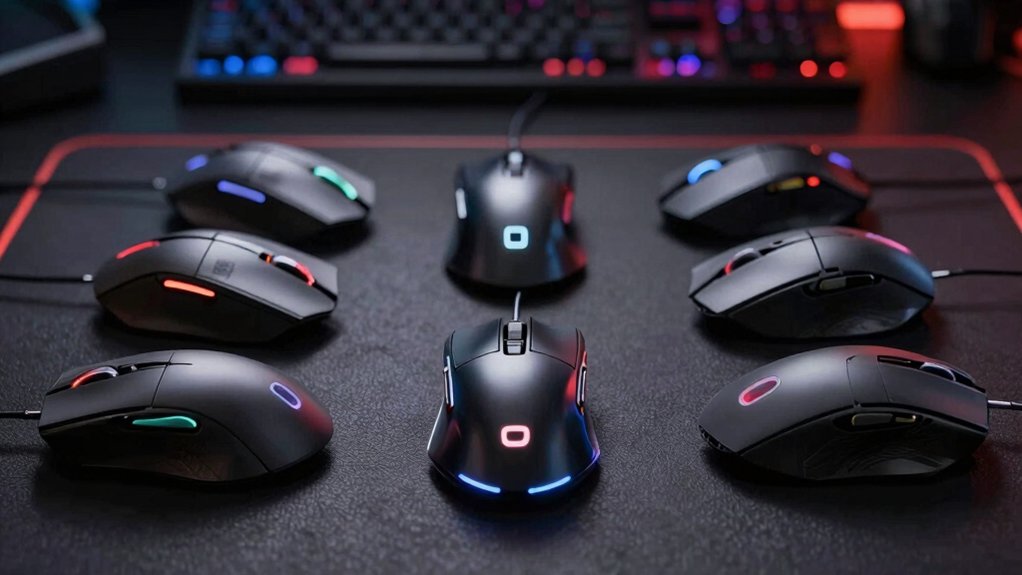

You need a gaming mouse that matches your playstyle, grip type, and sensitivity preferences to gain a competitive edge. The market offers numerous options with varying DPI settings, weight, button layouts, and connectivity features. Each mouse serves different needs—some prioritize speed, others emphasize ergonomics or customization. To find your ideal match, you’ll want to understand what separates professional-grade mice from standard options, and we’ve identified the top choices that…
| Logitech G502 Hero Wired Gaming Mouse |

| Best Overall | Max DPI: 25,600 DPI | Connectivity Type: Wired USB | Programmable Buttons: 11 buttons | VIEW LATEST PRICE | Read Our Analysis |
| ErgoStrike7 Next-Gen FPS Gaming Mouse Ergonomic Wireless/Wired |

| Most Immersive | Max DPI: 26,000 DPI | Connectivity Type: Wireless/Wired USB | Programmable Buttons: Trigger-based controls with zoom/burst-fire | VIEW LATEST PRICE | Read Our Analysis |
| Razer Viper V3 Pro Wireless Gaming Mouse |

| Professional Grade | Max DPI: 35,000 DPI | Connectivity Type: Wireless (HyperSpeed) + USB | Programmable Buttons: 8 buttons | VIEW LATEST PRICE | Read Our Analysis |
| Acer Wired Gaming Mouse 12,800 DPI RGB Ergonomic |

| Budget-Friendly Pick | Max DPI: 12,800 DPI | Connectivity Type: Wired USB | Programmable Buttons: 8 buttons | VIEW LATEST PRICE | Read Our Analysis |
| Corsair NIGHTSWORD RGB Gaming Mouse 18,000 DPI |
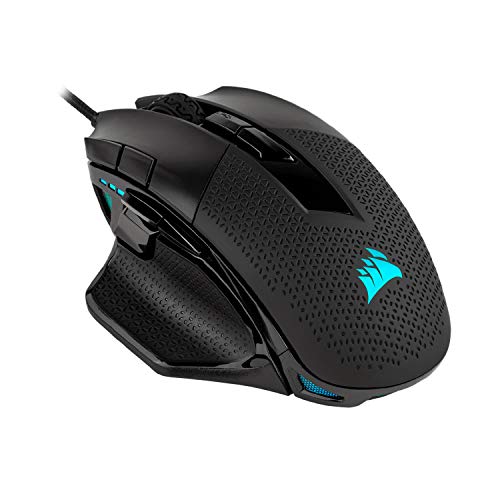
| Best Customization | Max DPI: 18,000 DPI | Connectivity Type: Wired USB | Programmable Buttons: 10 buttons | VIEW LATEST PRICE | Read Our Analysis |
| Razer Basilisk V3 X HyperSpeed Wireless Gaming Mouse |

| Best Value | Max DPI: 18,000 DPI | Connectivity Type: Wireless (HyperSpeed/Bluetooth) + USB | Programmable Buttons: 9 buttons | VIEW LATEST PRICE | Read Our Analysis |
| GravaStar Mercury M2 Wireless Gaming Mouse 26000 DPI |

| Lightweight Champion | Max DPI: 26,000 DPI | Connectivity Type: Wireless (2.4G/Bluetooth) + Wired USB | Programmable Buttons: 5 buttons | VIEW LATEST PRICE | Read Our Analysis |
| Razer Viper V3 HyperSpeed Wireless Gaming Mouse |

| Esports Essential | Max DPI: 30,000 DPI | Connectivity Type: Wireless (HyperSpeed) + USB | Programmable Buttons: 8 buttons | VIEW LATEST PRICE | Read Our Analysis |
| Logitech G PRO X Superlight 2 Wireless Gaming Mouse |

| Ultra-Premium Pick | Max DPI: 44,000 DPI | Connectivity Type: Wireless (LIGHTSPEED) + USB-C | Programmable Buttons: 5 buttons | VIEW LATEST PRICE | Read Our Analysis |
| Redragon M908 Impact RGB MMO Gaming Mouse |

| MMO Specialist | Max DPI: 12,400 DPI | Connectivity Type: Wired USB | Programmable Buttons: 18 buttons | VIEW LATEST PRICE | Read Our Analysis |
More Details on Our Top Picks
Logitech G502 Hero Wired Gaming Mouse
The Logitech G502 Hero stands as the top-tier choice for FPS players who demand precision tracking and customization. Its HERO 16K sensor delivers 25,600 DPI with zero acceleration or filtering, ensuring consistent aim. You’ll adjust sensitivity between 200–16,000 DPI to match your playstyle. The 11 programmable buttons let you assign abilities or actions to side buttons for quick access. Add up to five 3.6g weights to fine-tune balance and control. The dual-mode scroll wheel adjusts sensitivity on demand. Connect via USB wired connection for zero latency. Configure custom profiles through Logitech Gaming Software, storing settings on-board memory for instant switching between games.
- Max DPI:25,600 DPI
- Connectivity Type:Wired USB
- Programmable Buttons:11 buttons
- Weight (grams):122 g (0.27 lbs)
- RGB Lighting:LIGHTSYNC RGB (customizable)
- Warranty Coverage:1-year hardware limited
- Additional Feature:Sub-micron movement detection
- Additional Feature:Adjustable weight system (five weights)
- Additional Feature:Dual-mode hyper-fast scroll
ErgoStrike7 Next-Gen FPS Gaming Mouse Ergonomic Wireless/Wired
Want a mouse that feels like an actual weapon in your hand? The ErgoStrike7 delivers exactly that through its vertical grip design, which reduces wrist strain during extended gaming sessions. You’ll experience genuine recoil feedback via a built-in linear motor that mimics gun recoil for authentic FPS immersion. The left click functions as a true trigger pull, while dedicated zoom and burst-fire buttons give you immediate access to essential controls. You can customize everything through Ragnok software—remap buttons, adjust recoil strength, and save settings for specific games. With a 26000 DPI PixArt sensor, you’ll track targets with precision across any playstyle. Choose between wireless or wired USB connectivity for your PC setup.
- Max DPI:26,000 DPI
- Connectivity Type:Wireless/Wired USB
- Programmable Buttons:Trigger-based controls with zoom/burst-fire
- Weight (grams):Not specified
- RGB Lighting:Not specified
- Warranty Coverage:Not specified
- Additional Feature:Built-in linear motor recoil
- Additional Feature:Ergonomic gun-grip vertical design
- Additional Feature:Trigger-based control system
Razer Viper V3 Pro Wireless Gaming Mouse
Esports competitors demanding tournament-ready precision will find Razer’s professional-grade solution in the Viper V3 Pro Wireless. This 54-gram mouse features the Focus Pro 35K Optical Sensor Gen-2 and Optical Mouse Switches Gen-3, delivering 0.2ms actuation with no debounce for instant response. The 8000 Hz HyperPolling technology provides 8x responsiveness versus standard wireless mice. You’ll get up to 95 hours of battery life with HyperSpeed Wireless connectivity. Configure the eight programmable buttons through Razer Synapse to match your playstyle. The symmetrical design and lightweight construction enable precise flick shots and fast actions essential for scrims and tournaments.
- Max DPI:35,000 DPI
- Connectivity Type:Wireless (HyperSpeed) + USB
- Programmable Buttons:8 buttons
- Weight (grams):54 g
- RGB Lighting:Not specified
- Warranty Coverage:2-year manufacturer
- Additional Feature:8000 Hz HyperPolling technology
- Additional Feature:95 hours battery life
- Additional Feature:Optical Mouse Switches Gen-3
Acer Wired Gaming Mouse 12,800 DPI RGB Ergonomic
Looking for solid FPS performance without breaking your budget? The Acer Wired Gaming Mouse delivers 12,800 DPI optical sensing with eight programmable buttons for competitive play. Its ergonomic mid-hand design provides stable control during fast-reaction scenarios. Configure your buttons through the driver software for macros and rapid-fire options suited to FPS games. Toggle between four preset DPI levels (1200, 2400, 3200, 6400) directly on the mouse, or use software to reach 12,800 DPI. The 1000Hz polling rate and 20G acceleration support precision aiming. Customize 12 RGB lighting modes to your preference. This wired connection eliminates battery concerns while onboard memory saves your settings permanently across sessions.
- Max DPI:12,800 DPI
- Connectivity Type:Wired USB
- Programmable Buttons:8 buttons
- Weight (grams):190 g (0.19 kg)
- RGB Lighting:12 RGB backlit modes
- Warranty Coverage:1-year manufacturer
- Additional Feature:12 backlit RGB modes
- Additional Feature:1000Hz polling rate
- Additional Feature:Durable braided cable
Corsair NIGHTSWORD RGB Gaming Mouse 18,000 DPI
Customizing your mouse’s weight and balance dramatically improves your FPS performance, and the Corsair NIGHTSWORD RGB lets you do exactly that. You’ll adjust weight across six mounting locations using included 4.5g and 2.8g blocks, creating over 100 configurations to match your grip style. The 18,000 DPI optical sensor delivers precision tracking in 1 DPI increments. You’ll access real-time weight tuning and macro creation through Corsair iCUE software, then store profiles directly onboard for seamless transitions between systems. Ultra-durable Omron switches handle sustained competitive play, while 10 programmable buttons expand your control options significantly.
- Max DPI:18,000 DPI
- Connectivity Type:Wired USB
- Programmable Buttons:10 buttons
- Weight (grams):119–141 g (adjustable)
- RGB Lighting:Dynamic four-zone RGB
- Warranty Coverage:2-year manufacturer
- Additional Feature:Real-time center-of-gravity detection
- Additional Feature:Six weight mounting locations
- Additional Feature:Ultra-durable Omron switches
Razer Basilisk V3 X HyperSpeed Wireless Gaming Mouse
Why settle for a standard gaming mouse when you can get a competitive edge without breaking your budget? The Razer Basilisk V3 X HyperSpeed delivers precision tracking through its 18K optical sensor, giving you pixel-accurate aim in FPS matches. You’ll benefit from nine programmable controls for customized commands and macros tailored to your gameplay. The mechanical switches handle up to 60 million clicks, ensuring durability through intense sessions. Battery life reaches 285 hours on HyperSpeed wireless or 535 hours via Bluetooth. To optimize accuracy, disable Enhance Pointer Precision in Windows and use the Razer Synapse app for fine-tuning. The ergonomic right-handed design supports extended gaming without fatigue, making this mouse reliable for competitive play.
- Max DPI:18,000 DPI
- Connectivity Type:Wireless (HyperSpeed/Bluetooth) + USB
- Programmable Buttons:9 buttons
- Weight (grams):110 g
- RGB Lighting:16.8 million Chroma colors
- Warranty Coverage:2-year manufacturer
- Additional Feature:9 customizable control buttons
- Additional Feature:285 hours battery life (HyperSpeed)
- Additional Feature:Bluetooth multi-device support
GravaStar Mercury M2 Wireless Gaming Mouse 26000 DPI
The GravaStar Mercury M2 is a lightweight champion at just 79 grams, making it ideal for FPS players who need quick flick shots and sustained control during competitive matches. Its 26,000 DPI sensor delivers precision for long-range targeting and close-quarters combat. You’ll benefit from the 1K Hz polling rate, which ensures your clicks register instantly. The wireless connectivity options—2.4GHz, Bluetooth, or wired USB—let you choose your preferred setup. Configure the five programmable buttons through the software to assign macros and DPI presets matching your playstyle. The rechargeable battery provides extended gameplay without interruption, keeping you competitive throughout long sessions.
- Max DPI:26,000 DPI
- Connectivity Type:Wireless (2.4G/Bluetooth) + Wired USB
- Programmable Buttons:5 buttons
- Weight (grams):79 g
- RGB Lighting:GLOWSYNC RGB (5 dynamic modes)
- Warranty Coverage:1-year manufacturer
- Additional Feature:Hollowed-out airflow design
- Additional Feature:Five dynamic lighting modes
- Additional Feature:1K Hz polling rate
Razer Viper V3 HyperSpeed Wireless Gaming Mouse
Razer’s Viper V3 HyperSpeed delivers an esports-essential wireless mouse at just 82 grams, making it ideal for competitive FPS players who demand lightweight performance without sacrificing responsiveness. The Focus Pro 30K optical sensor tracks movement up to 30,000 DPI, and you can toggle between five customizable DPI stages directly on the mouse. HyperSpeed Wireless provides low-latency connectivity across noisy environments, while a single AA battery lasts up to 280 hours—supporting extended scrims and tournaments. Gen-2 mechanical switches rated for 60 million clicks ensure durability through intense competition. The ambidextrous design accommodates claw or fingertip grips, and eight programmable controls let you map functions to your preferred layout. Disable Windows pointer precision and use Razer Synapse to optimize performance on your preferred surface.
- Max DPI:30,000 DPI
- Connectivity Type:Wireless (HyperSpeed) + USB
- Programmable Buttons:8 buttons
- Weight (grams):82 g
- RGB Lighting:Not specified
- Warranty Coverage:Manufacturer warranty available
- Additional Feature:Mass centralized design (82g)
- Additional Feature:280 hours battery life
- Additional Feature:Ambidextrous grip compatibility
Logitech G PRO X Superlight 2 Wireless Gaming Mouse
Competitive FPS players consistently choose this ultra-premium pick for its exceptional lightweight design and tournament-grade performance. The 60-gram frame reduces arm fatigue during extended matches, while the HERO 2 sensor delivers 44,000 DPI with zero smoothing for precise aiming. Its 8kHz report rate ensures minimal input lag. You’ll benefit from five programmable buttons customizable for your preferred layout. The LIGHTFORCE hybrid switches provide tactile feedback with reliable actuation. Battery life reaches 95 hours between USB-C charges. POWERPLAY compatibility offers wireless charging options. Windows and macOS support both platforms seamlessly.
- Max DPI:44,000 DPI
- Connectivity Type:Wireless (LIGHTSPEED) + USB-C
- Programmable Buttons:5 buttons
- Weight (grams):60 g
- RGB Lighting:Not specified
- Warranty Coverage:1-year limited hardware
- Additional Feature:HERO 2 optical sensor (44K)
- Additional Feature:LIGHTFORCE hybrid switches
- Additional Feature:POWERPLAY compatibility
Redragon M908 Impact RGB MMO Gaming Mouse
Looking for an MMO specialist mouse built for complex gameplay? The Redragon M908 Impact RGB gives you 18 programmable buttons arranged across the device, with 12 dedicated side buttons for ability access. You’ll adjust sensitivity from 500 to 12,400 DPI using five preset levels or fine-tune via software in 100-DPI increments. The Pixart PAW3327 sensor delivers 1000 Hz polling and 30G acceleration for precise tracking. You can store five distinct profiles with custom lighting and macros. The ergonomic design includes a comfort grip and TEFLON feet pads for smooth movement. At 175 grams, it’s relatively lightweight, and the 8-piece weight tuning set lets you customize feel.
- Max DPI:12,400 DPI
- Connectivity Type:Wired USB
- Programmable Buttons:18 buttons
- Weight (grams):175 g
- RGB Lighting:16.8 million RGB colors
- Warranty Coverage:1-year manufacturer
- Additional Feature:18 programmable buttons total
- Additional Feature:8-piece weight tuning set
- Additional Feature:5 memory profiles with colors
Factors to Consider When Choosing an FPS Gaming Mouse
When you’re choosing an FPS gaming mouse, you’ll need to evaluate five key factors: sensor precision and DPI settings that match your sensitivity preferences, ergonomic design that fits your grip style and prevents hand fatigue, wired versus wireless connectivity based on your priority for latency or mobility, button configuration and programmability to assign macros and commands, and weight plus balance customization to suit your aiming speed. Start by testing the mouse’s DPI range and sensor accuracy, then assess the grip comfort during extended play sessions, compare the connection type’s responsiveness for your game, check how many programmable buttons you need, and finally adjust the weight if the mouse offers replaceable components. These five elements work together to determine whether a mouse will enhance or hinder your competitive performance.
Sensor Precision And DPI
What role does sensor precision play in your FPS performance? Sensor precision directly affects your aiming accuracy and consistency. Look for mice with zero smoothing, acceleration, or filtering—features like HERO 2 and 35K sensors deliver calibrated, unfiltered tracking. These sensors maintain accuracy at high speeds, with ratings up to 888+ IPS (inches per second), so your crosshair responds exactly to your hand movements without lag or distortion.
DPI settings control your cursor speed and sensitivity. Choose mice offering 1 DPI step increments, allowing you to fine-tune sensitivity precisely for your playstyle. Higher DPI ranges—26,000 to 44,000—enable smoother adjustments at high sensitivity levels. Use onboard profile storage to save separate DPI configurations for each game, ensuring your sensitivity feels consistent when switching between titles.
Ergonomic Design For Comfort
Your choice of mouse shape and grip style directly impacts comfort during extended FPS sessions, so you’ll want to evaluate several key factors before deciding. First, consider the mouse’s weight—models under 60–80 grams reduce fatigue and enable faster target acquisition. Next, examine grip design options: gun-grip vertical shapes and ambidextrous builds minimize wrist strain. Assess the coating material; rubberized surfaces and contoured grips improve stability and prevent slipping during intense play. Check if the mouse offers customizable weight systems, allowing you to adjust balance to match your specific grip style. Finally, determine whether you need right-handed or ambidextrous configuration based on your natural hand position. Testing these elements ensures your mouse supports comfort across long competitive sessions.
Wired Versus Wireless Performance
Should you prioritize wired or wireless when selecting your FPS mouse? Wired mice deliver lower latency and consistent polling rates, reducing input delay during fast-paced gameplay. You’ll benefit from uninterrupted power without battery concerns. Wireless mice now close this gap using 8000 Hz polling and advanced dongles, achieving comparable performance. However, they may experience minor latency variations from radio interference or battery inconsistency. Consider your setup: if you play in electromagnetically noisy environments or demand absolute responsiveness, choose wired. If you prefer desk mobility and accept negligible performance differences, wireless works well. Check the polling rate—8000 Hz outperforms 1000 Hz. Evaluate your power preferences: wired needs no charging; wireless requires battery management. Your choice depends on whether you prioritize maximum consistency or convenience.
Button Configuration And Programmability
How you configure your mouse’s buttons directly impacts your FPS performance and reaction speed. Start by identifying which in-game actions you perform most frequently, then assign them to easily accessible side buttons and programmable macros. This reduces the need to move your fingers away from movement keys, lowering your reaction time significantly.
Next, use your mouse’s onboard memory to store multiple button profiles. You can switch between loadout-specific configurations without restarting your game or adjusting software settings. For example, sniper rifles might use different button layouts than assault weapons.
Finally, utilize software-supported remapping to create per-game settings. Record macros for recoil control sequences or rapid-fire patterns tailored to specific weapons. Test each configuration during practice sessions to ensure buttons feel natural and responsive during competitive play.
Weight And Balance Customization
What role does mouse weight play in your aiming precision and control? Weight directly affects how quickly you can reposition your mouse and maintain stability during sustained gameplay. You can customize your mouse’s weight using adjustable weight blocks or modular systems. Most gaming mice offer multiple mounting slots—typically six—letting you fine-tune your center of gravity across X and Y axes. You’ll find weight ranges spanning 79 grams to over 140 grams, depending on your preference and grip style. Lighter setups enable faster movements, while heavier configurations provide stability during long sessions. Onboard weight adjustments mean you don’t reconfigure settings when switching between computers. Test different weight placements to discover your optimal balance for both comfort and responsive aiming.
Final Thoughts
You’ll improve your FPS performance by selecting a mouse that matches your grip style, sensitivity preference, and budget. Test each option’s weight, button placement, and sensor accuracy before committing. Consider wireless models for freedom of movement, or wired versions for consistent latency. Prioritize ergonomic design to prevent fatigue during extended gaming sessions. Your choice directly impacts your competitive advantage.

Meet Ry, “TechGuru,” a 36-year-old technology enthusiast with a deep passion for tech innovations. With extensive experience, he specializes in gaming hardware and software, and has expertise in gadgets, custom PCs, and audio.
Besides writing about tech and reviewing new products, he enjoys traveling, hiking, and photography. Committed to keeping up with the latest industry trends, he aims to guide readers in making informed tech decisions.