

You’re looking for an MMO mouse that handles complex raid sequences and competitive gameplay. The right choice depends on your needs: programmable buttons for macros, wireless reliability, high DPI tracking, and onboard profile storage. Seven standout options deliver these features across different price points and playstyles. Here’s what separates the top performers—and how to pick the one that fits your setup.
| Redragon M908 Impact RGB MMO Gaming Mouse |

| Most Customizable | Programmable Buttons: 18 programmable buttons (12 MMO side buttons) | Maximum DPI: 12,400 DPI | Connectivity: Wired USB (6ft braided cable) | VIEW LATEST PRICE | Read Our Analysis |
| Razer Naga V2 HyperSpeed Wireless MMO Gaming Mouse |

| Best Wireless Performance | Programmable Buttons: 19 programmable buttons | Maximum DPI: 30,000 DPI (Focus Pro 30K sensor) | Connectivity: Wireless (Bluetooth & 2.4GHz HyperSpeed) | VIEW LATEST PRICE | Read Our Analysis |
| Corsair Scimitar RGB Elite Gaming Mouse (18,000 DPI) |

| Most Durable | Programmable Buttons: 17 programmable buttons | Maximum DPI: 18,000 DPI | Connectivity: Wired USB (braided cable) | VIEW LATEST PRICE | Read Our Analysis |
| Redragon M913 Impact Elite Wireless Gaming Mouse |
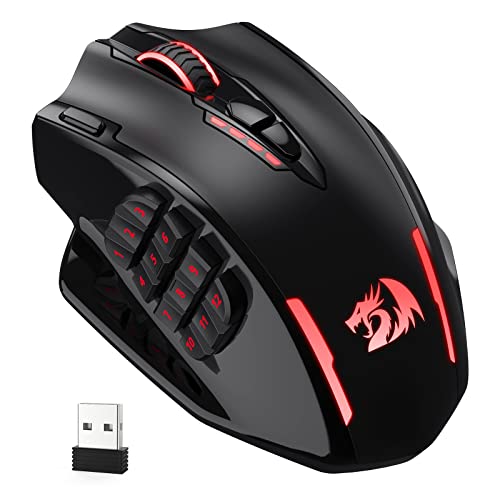
| Best Battery Life | Programmable Buttons: 16 programmable buttons (12 side buttons) | Maximum DPI: 16,000 DPI | Connectivity: Dual-mode (2.4GHz wireless & USB-C wired) | VIEW LATEST PRICE | Read Our Analysis |
| UtechSmart Venus Pro RGB Wireless Gaming Mouse |

| Best Value Pick | Programmable Buttons: 18 programmable buttons (12 side buttons) | Maximum DPI: 16,000 DPI | Connectivity: Dual-mode (2.4GHz wireless & USB wired) | VIEW LATEST PRICE | Read Our Analysis |
| UtechSmart Venus Gaming Mouse RGB Wired 16400 DPI |

| Budget-Friendly Option | Programmable Buttons: 12 programmable side buttons | Maximum DPI: 16,400 DPI | Connectivity: Wired USB (6ft braided cable) | VIEW LATEST PRICE | Read Our Analysis |
| SOLAKAKA SM809 Pro Gaming Mouse with 9 Side Buttons |
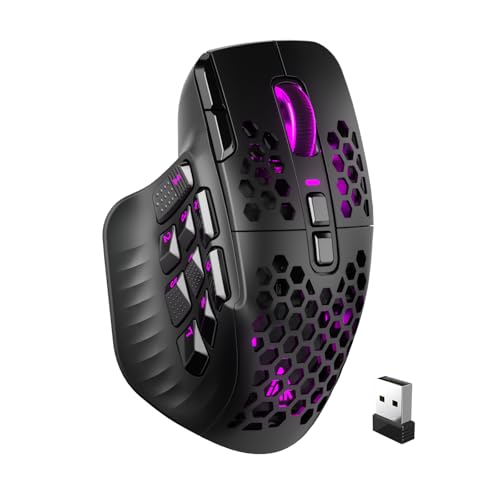
| Most Versatile Connectivity | Programmable Buttons: 16 programmable macros (9 side buttons) | Maximum DPI: 24,000 DPI | Connectivity: Triple-mode (2.4GHz, Bluetooth 5.0, USB Type-C) | VIEW LATEST PRICE | Read Our Analysis |
More Details on Our Top Picks
Redragon M908 Impact RGB MMO Gaming Mouse
Looking for the most customizable mouse for MMO gaming? The Redragon M908 Impact offers eighteen programmable buttons—twelve dedicated side buttons for abilities and six default buttons for standard functions. You’ll adjust DPI across five preset levels from 500 to 12,400, or fine-tune settings between 200 and 12,400 via software. The mouse features five memory profiles, each with distinct light colors, letting you switch configurations for different games instantly. You can assign macro shortcuts to all eighteen buttons, creating complex command sequences. The Pixart PAW3327 optical sensor delivers 1000 Hz polling rate and 30G acceleration. An eight-piece weight tuning set lets you customize how the mouse feels in your hand, ranging from 2.4 grams per piece. USB wired connectivity ensures consistent performance without battery concerns.
- Programmable Buttons:18 programmable buttons (12 MMO side buttons)
- Maximum DPI:12,400 DPI
- Connectivity:Wired USB (6ft braided cable)
- RGB Lighting:16.8 million colors (disableable)
- Ergonomic Design:Aggressive ergonomic with comfort grip
- Warranty:1 year
- Additional Feature:8-piece weight tuning set
- Additional Feature:12 MMO side buttons
- Additional Feature:1000 Hz polling rate
Razer Naga V2 HyperSpeed Wireless MMO Gaming Mouse
The Razer Naga V2 HyperSpeed delivers wireless performance through dual connectivity options: Bluetooth for up to 400 hours of battery life or 2.4 GHz HyperSpeed Wireless for 250 hours. You’ll configure 19 programmable buttons for macros and commands using the Razer Synapse App. The Focus Pro 30K optical sensor tracks accurately on varied surfaces, including glass. Position the wireless dongle at desk level within 30 centimeters for optimal performance, avoiding USB 3.0 hubs and WiFi routers that cause interference. Disable Windows Enhance Pointer Precision to maximize accuracy. The mechanical switches Gen-2 withstand 60 million clicks, making this mouse durable for extended MMO gameplay sessions.
- Programmable Buttons:19 programmable buttons
- Maximum DPI:30,000 DPI (Focus Pro 30K sensor)
- Connectivity:Wireless (Bluetooth & 2.4GHz HyperSpeed)
- RGB Lighting:Not specified
- Ergonomic Design:Ergonomic MMO design with dual-mode scroll wheel
- Warranty:2-year manufacturer warranty
- Additional Feature:HyperScroll technology dual mode
- Additional Feature:Mechanical switches 60M clicks
- Additional Feature:400 hr battery life
Corsair Scimitar RGB Elite Gaming Mouse (18,000 DPI)
Want a mouse that’ll handle thousands of ability rotations without wearing out? The Corsair Scimitar RGB Elite delivers 17 programmable buttons and a patented slider system that lets you reposition 12 side buttons to match your playstyle. Its 18,000 DPI optical sensor tracks movements precisely, while 50 million click-rated switches ensure durability through extended raid sessions. You’ll configure macros through iCUE software and store profiles onboard for portability. The contoured right-hand design accommodates various grip styles. USB connectivity works across PC, Mac, and consoles. A 2-year warranty backs your investment.
- Programmable Buttons:17 programmable buttons
- Maximum DPI:18,000 DPI
- Connectivity:Wired USB (braided cable)
- RGB Lighting:Four-zone RGB with dynamic synchronization
- Ergonomic Design:Contoured shape with right-side finger rest
- Warranty:2-year manufacturer warranty
- Additional Feature:Patented Key Slider Control
- Additional Feature:50 million click-rated switches
- Additional Feature:Multi-platform console compatibility
Redragon M913 Impact Elite Wireless Gaming Mouse
Redragon’s M913 Impact Elite Wireless Gaming Mouse delivers extended play sessions with battery life reaching 80 hours in eco mode, making it ideal for MMO gamers who can’t afford frequent charging interruptions. You’ll access 12 side buttons arranged in an MMO-optimized layout, plus four main buttons for a total of 16 customizable inputs. The Pixart 3335 optical sensor registers clicks within 1 millisecond, ensuring precise tracking during combat. You can choose between wireless 2.4 GHz or USB-C wired connectivity based on your preference. Customize all 16 buttons and select from 16.8 million color lighting effects using dedicated software. Adjust DPI across five preset levels—1000, 2000, 4000, 8000, or 16000—with ±100 personalization options to match your playstyle requirements.
- Programmable Buttons:16 programmable buttons (12 side buttons)
- Maximum DPI:16,000 DPI
- Connectivity:Dual-mode (2.4GHz wireless & USB-C wired)
- RGB Lighting:16.8 million colors (eco mode available)
- Ergonomic Design:Ergonomic MMO design
- Warranty:Not specified
- Additional Feature:2.4 GHz wireless connectivity
- Additional Feature:80 hours battery life
- Additional Feature:1 ms click responsiveness
UtechSmart Venus Pro RGB Wireless Gaming Mouse
For MMO players who want extensive customization without premium pricing, UtechSmart’s Venus Pro RGB delivers outstanding value through 18 programmable buttons and dual-mode wireless connectivity. You’ll configure complex macros using the software to combine multiple actions into single button presses, reducing spell-casting load during combat. The 16,000 DPI optical sensor adjusts across five switchable stages from 100 to 16,000 DPI. The 1000 mAh battery runs up to 70 hours wirelessly before requiring a two-hour recharge. Its ergonomic right-handed design with textured grip suits extended gaming sessions. The 2.4 GHz nano receiver maintains stable latency at 10 meters, while a USB wired option provides backup connectivity. Windows compatibility and 12-month warranty support long-term use.
- Programmable Buttons:18 programmable buttons (12 side buttons)
- Maximum DPI:16,000 DPI
- Connectivity:Dual-mode (2.4GHz wireless & USB wired)
- RGB Lighting:16M Chroma RGB lighting
- Ergonomic Design:Ergonomic with textured grinding coating for sweat resistance
- Warranty:12-month refund & replacement
- Additional Feature:10-meter wireless transmission range
- Additional Feature:70 hours battery life
- Additional Feature:Complex macro coding support
UtechSmart Venus Gaming Mouse RGB Wired 16400 DPI
Looking for a mouse that won’t drain your wallet? The UtechSmart Venus delivers 16400 DPI with a high-precision laser sensor and 12000 FPS performance. You’ll get twelve programmable side buttons across five customizable profiles, letting you map macros and keyboard combos directly to the mouse. The adjustable weight system uses eight removable weights so you can fine-tune how the mouse feels in your hand. Its ergonomic right-handed design includes a textured frosted surface for grip control, and dual TEFLON feet pads enable smooth sliding across your mousepad. The 1000 Hz polling rate ensures responsive gameplay, while 16+ million RGB color options let you personalize your setup. You’ll appreciate the 6-foot braided cable with gold-plated USB connectivity and the 18-month manufacturer warranty backing your purchase.
- Programmable Buttons:12 programmable side buttons
- Maximum DPI:16,400 DPI
- Connectivity:Wired USB (6ft braided cable)
- RGB Lighting:16+ million colors with breathing mode
- Ergonomic Design:Ergonomic right-handed with textured frosted surface
- Warranty:18-month manufacturer warranty
- Additional Feature:12000 FPS laser sensor
- Additional Feature:Special Setting Switch Button
- Additional Feature:8 adjustable weight pieces
SOLAKAKA SM809 Pro Gaming Mouse with 9 Side Buttons
The SOLAKAKA SM809 delivers most versatile connectivity for MMO gamers juggling multiple devices. You’ll choose between 2.4GHz wireless, Bluetooth 5.0, or Type-C wired connection based on your setup. The PAW3311 sensor tracks movement up to 24000 DPI, giving you precision for both fast-paced combat and detailed targeting. You can customize all 16 programmable macros through solakakadriver.com without downloading software. Swap between four magnetic side plates to match your playstyle, and adjust RGB lighting to your preference. This setup handles extended MMO sessions while supporting work tasks equally well.
- Programmable Buttons:16 programmable macros (9 side buttons)
- Maximum DPI:24,000 DPI
- Connectivity:Triple-mode (2.4GHz, Bluetooth 5.0, USB Type-C)
- RGB Lighting:RGB lighting customizable
- Ergonomic Design:MMO-focused ergonomic design
- Warranty:Not specified
- Additional Feature:Triple mode connection capability
- Additional Feature:4 interchangeable magnetic side plates
- Additional Feature:Online web driver support
Factors to Consider When Choosing a Mouse for MMO Gaming
When you’re selecting an MMO mouse, you’ll need to evaluate five critical features: programmable button configuration that lets you bind abilities and commands, sensor precision and accuracy that registers your movements without lag, and ergonomic design that keeps your hand comfortable during long gaming sessions. You’ll also need to decide between wireless connectivity for freedom of movement and wired connectivity for guaranteed low latency, then choose a mouse with a DPI range wide enough for both precise aiming and quick camera sweeps. Test these factors against your specific MMO class and playstyle to ensure the mouse matches your in-game demands.
Programmable Button Configuration
How essential is button customization to your MMO performance? Programmable buttons let you map complex macros and quick actions directly to your mouse, reducing reliance on keyboard inputs. You’ll configure these buttons through software or onboard hardware switches, assigning keyboard keys and multi-step sequences to single presses. Most MMO mice offer 12 or more side buttons, enabling per-profile customization tailored to different classes or encounters. Check whether your mouse stores settings onboard, allowing you to carry profiles across devices without reinstalling software. Evaluate the macro layer support—multiple layers let you access more commands by holding modifier buttons. Test the responsiveness of mechanical switches, as durable, precise switches handle frequent repeated commands reliably. This setup streamlines your gameplay and reduces action delays.
Sensor Precision And Accuracy
What separates a responsive mouse from one that feels sluggish in combat? Sensor precision directly determines your targeting accuracy in MMO raids and PvP encounters.
Look for mice with optical sensors like the Pixart PAW3311 or PAW3327, which provide consistent tracking across different surfaces. Check the DPI range—quality MMO mice offer up to 24,000 DPI with 1 DPI increments, letting you fine-tune movement sensitivity exactly to your preference.
Verify the acceleration limit, typically up to 30G, which controls how quickly your cursor responds to fast motions. Disable Windows’ Enhance Pointer Precision setting to preserve true one-to-one movement translation.
Use your mouse’s onboard DPI profiles to store multiple sensitivity settings for different classes or situations. Test surface calibration through software like iCUE or Synapse to optimize responsiveness for your specific mousepad and grip style.
Ergonomic Design For Comfort
While sensor precision keeps your crosshair on target, your hand’s comfort during those extended raid nights depends entirely on the mouse’s physical design. Look for a contoured shape with dedicated finger rests for your index or ring finger to reduce fatigue. Choose a side-button layout matching your grip style—12 or more buttons place macros within reach without excessive hand movement. Verify the mouse features anti-slip materials and textured surfaces to maintain stability during fast, precise actions. Check weight distribution options; adjustable weight systems let you customize the feel to your hand size and playstyle. Select a design supporting your grip type, whether high palm or claw, with pronounced thumb and pinky rests. These features combine to prevent strain during marathon gaming sessions.
Wireless Vs Wired Connectivity
When you’re deciding between wireless and wired connectivity for your MMO mouse, you’re fundamentally choosing between mobility and guaranteed performance. Wireless options using 2.4 GHz or Bluetooth let you move freely, but they introduce potential latency and battery concerns. Position the dongle close to your PC within line of sight to minimize interference. Avoid placing it near USB 3.0 hubs or WiFi routers, which cause signal disruption. Wired mice eliminate latency entirely, delivering consistent response times during critical raids or PvP encounters. Consider dual-mode wireless mice that switch to USB when you need maximum performance. Battery life varies significantly—some models last hundreds of hours on Bluetooth, while high-performance wireless modes drain faster. Evaluate your play style and environment before deciding.
DPI Range And Adjustability
Why does DPI matter so much for MMO gaming? Your cursor speed directly affects your ability to target enemies and execute rotations quickly. You’ll want a mouse offering a broad DPI range—typically 100 to 16,000+ DPI—so you can adjust sensitivity to match your play style and monitor resolution.
Look for mice with fine DPI increments of 1–100 steps, enabling precise tuning during complex combat situations. Software allows you to switch between preset levels like 1000, 2000, 4000, and 8000 DPI instantly during gameplay.
Onboard memory is essential. This feature lets you store multiple DPI profiles per game or character role, eliminating reconfiguration mid-session. Higher maximum DPI improves responsiveness on high-resolution displays, though sensor quality ultimately determines accuracy.
Battery Life And Endurance
How long can you actually game before your mouse dies? Wireless MMO mice offer battery life ranging from 45 hours with backlighting to 400 hours in Bluetooth mode. You’ll extend endurance by disabling RGB effects and using eco modes. If you want continuous operation without battery concerns, choose dual-mode mice that switch between wired and wireless connectivity. Monitor your power settings closely—higher DPI settings and macro-heavy profiles drain batteries faster. Activate auto-sleep features when idle to preserve charge. Recharge times typically take 1–3 hours depending on battery capacity. Larger batteries around 1000 mAh last longer but need more charging time. Calculate your gaming sessions against advertised battery specs to ensure your mouse won’t die mid-raid.
Build Quality And Durability
Your MMO mouse will endure thousands of clicks during raids, dungeons, and PvP encounters, so durability directly impacts how long you’ll keep the device before replacement becomes necessary. Look for mice with robust shells and switches rated for 50 million clicks or higher, such as Omron switches, which withstand extended gaming sessions. Check the cable type—braided or fiber options resist fraying better than standard plastic. Inspect the feet: TEFLON pads reduce friction and wear compared to standard materials. Examine side buttons for reinforced mechanisms that prevent wobbling during rapid inputs. Assess the overall weight distribution and material finishing, such as textured coatings, which resist sweat damage and degradation. These construction elements directly determine whether your mouse remains reliable through months of competitive play.
Software Customization Capabilities
Three core customization features separate capable MMO mice from basic peripherals: programmable buttons, profile storage, and software control systems. You’ll want 16–18 programmable buttons that let you assign key combinations and macros for complex ability rotations. Next, prioritize onboard profile storage, which saves your settings directly to the mouse’s memory. This means your configurations travel between devices without requiring software reinstallation. Finally, evaluate the software ecosystem. Some mice use dedicated applications like iCUE or Razer Synapse for DPI adjustments and macro mapping. Others rely on web-based drivers or vendor-specific tools. Check whether the software allows per-button lighting customization and profile switching with distinct color schemes. These features let you visually distinguish different setups and quickly access multiple action layers during raids or PvP encounters.
Final Thoughts
You’ve reviewed seven top MMO mice offering programmable buttons, multi-profile storage, and high DPI settings. Choose based on your needs: select wired models for reliability, wireless options for mobility, or side-button configurations matching your class. Verify switch durability, DPI range, and software compatibility before purchasing. Test ergonomics if possible. These mice deliver the macros and precision you need for competitive raiding and endgame content.

Meet Ry, “TechGuru,” a 36-year-old technology enthusiast with a deep passion for tech innovations. With extensive experience, he specializes in gaming hardware and software, and has expertise in gadgets, custom PCs, and audio.
Besides writing about tech and reviewing new products, he enjoys traveling, hiking, and photography. Committed to keeping up with the latest industry trends, he aims to guide readers in making informed tech decisions.