

When you’re choosing a 4-bay NAS unit, you’ll need to evaluate several key factors: CPU performance, RAM capacity, network speed, and expansion options. Different models serve different purposes—some excel at file syncing and security, while others prioritize raw processing power for virtualization. You’ll find significant variations in price, cooling efficiency, and warranty coverage. Understanding what each unit offers helps you select the right fit for your specific data needs—but which model truly matches your requirements?
| Synology 4-Bay DiskStation DS423 (Diskless) |

| Reliable Standard Choice | Bay Configuration: 4-bay diskless | Processor: Not specified | Maximum Storage Capacity: Not specified | VIEW LATEST PRICE | Read Our Analysis |
| UGREEN NAS DXP4800 Pro 4-Bay Network Attached Storage |

| Professional Power User | Bay Configuration: 4-bay diskless with 2x M.2 NVMe slots | Processor: Intel Core i3-1315U (6 cores, 8 threads, up to 4.5GHz) | Maximum Storage Capacity: Up to 144TB (4x HDD + 2x M.2 SSD) | VIEW LATEST PRICE | Read Our Analysis |
| TERRAMASTER F4-425 4-Bay NAS Storage Server |
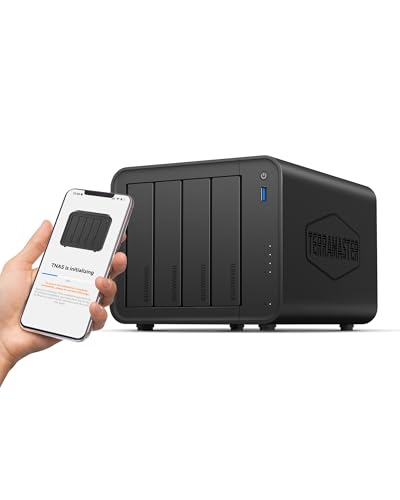
| Best Value | Bay Configuration: 4-bay diskless | Processor: Intel x86 quad-core | Maximum Storage Capacity: Up to 120TB (4x 30TB HDDs) | VIEW LATEST PRICE | Read Our Analysis |
| TERRAMASTER D4-320 4-Bay USB 3.2 Hard Drive Enclosure |

| External Storage Alternative | Bay Configuration: 4-bay external USB enclosure (DAS, not NAS) | Processor: N/A (external enclosure only) | Maximum Storage Capacity: Up to 120TB (4x 30TB HDDs) | VIEW LATEST PRICE | Read Our Analysis |
| UGREEN NAS DXP4800 Plus 4-Bay Desktop Storage |

| Best Overall | Bay Configuration: 4-bay diskless with 2x M.2 NVMe slots | Processor: Intel Pentium Gold 8505 (5-core) | Maximum Storage Capacity: Up to 144TB (4x HDD + 2x M.2 SSD) | VIEW LATEST PRICE | Read Our Analysis |
More Details on Our Top Picks
Synology 4-Bay DiskStation DS423 (Diskless)
The Synology DS423 stands as a reliable standard choice for professionals who need secure file access across multiple devices. This four-bay diskless unit lets you store files privately and access them from servers, desktops, or laptops anywhere. You’ll use DSM software to sync and share files across your team. The metal enclosure measures 9 by 6.6 by 7.24 inches and weighs 2210 grams, fitting easily on a tabletop. You can monitor up to 30 IP cameras with its built-in surveillance tools and protect your data through snapshots against malware. Synology provides a two-year warranty and support through their knowledge center.
- Bay Configuration:4-bay diskless
- Processor:Not specified
- Maximum Storage Capacity:Not specified
- Connectivity:Not specified
- Warranty:2 years
- Form Factor:Tabletop metal enclosure (9D x 6.6W x 7.24H)
- Additional Feature:Up to 30 IP cameras surveillance
- Additional Feature:Multi-destination media backup
- Additional Feature:Malware protection snapshots
UGREEN NAS DXP4800 Pro 4-Bay Network Attached Storage
Looking for a professional-grade NAS that handles demanding workloads? The UGREEN DXP4800 Pro delivers with an Intel Core i3-1315U processor and 8GB DDR5 RAM expandable to 96GB. You’ll access up to 144TB total storage across four drive bays plus two M.2 NVMe slots. The dual high-speed ports—10GbE and 2.5GbE—support network throughput reaching 1.25GB/s. Install drives using tool-free trays for quick swaps. Choose your RAID configuration from options 0, 1, 5, or 10 based on your speed and protection needs. Run Docker containers or virtual machines directly. Encrypt sensitive files with the Data Vault feature. You’re covered with a two-year warranty and 24-hour specialist support.
- Bay Configuration:4-bay diskless with 2x M.2 NVMe slots
- Processor:Intel Core i3-1315U (6 cores, 8 threads, up to 4.5GHz)
- Maximum Storage Capacity:Up to 144TB (4x HDD + 2x M.2 SSD)
- Connectivity:1x 10GbE + 1x 2.5GbE
- Warranty:2 years
- Form Factor:Desktop aluminum enclosure (tabletop/floor-standing)
- Additional Feature:AI-powered photo album processing
- Additional Feature:Docker/virtual machine support
- Additional Feature:Up to 1.25GB/s throughput
TERRAMASTER F4-425 4-Bay NAS Storage Server
TERRAMASTER’s F4-425 delivers practical value for users who need reliable data storage without excessive spending. You get an Intel quad-core processor, 4GB RAM, and 2.5GbE connectivity in a compact unit. Install drives using tool-free trays—each bay accepts up to 30TB for 120TB total capacity. The system supports TRAID arrays, giving you 30% more usable storage than traditional RAID with data redundancy. You’ll access files via Windows, Mac, Linux, and mobile devices. Real-time synchronization keeps your data current across locations. Quiet operation at 21 dB(A) suits office environments. The 2-year warranty covers hardware defects during normal use.
- Bay Configuration:4-bay diskless
- Processor:Intel x86 quad-core
- Maximum Storage Capacity:Up to 120TB (4x 30TB HDDs)
- Connectivity:2.5GbE LAN
- Warranty:2 years
- Form Factor:Tabletop plastic enclosure (8.74D x 7.05W x 6.06H)
- Additional Feature:Hardware-accelerated 4K H.265 decoding
- Additional Feature:30% more storage (TRAID+)
- Additional Feature:21 dB(A) quiet operation
TERRAMASTER D4-320 4-Bay USB 3.2 Hard Drive Enclosure
If you need an external storage alternative that connects directly to your computer without requiring network setup, this TERRAMASTER D4-320 enclosure works as a plug-and-play solution for professionals managing large file collections. Insert up to four 3.5″ or 2.5″ drives without tools using the push-lock tray system. Data transfers reach 1,016 MB/s combined with multiple drives or 510 MB/s with SSDs. The USB 3.2 Gen2 Type-C connection supports Windows, Mac, and Linux systems instantly. An intelligent cooling fan manages heat while keeping noise below 21 dB(A). Hot-swappable bays let you replace drives without shutting down, and you’ll achieve storage capacity up to 120TB total.
- Bay Configuration:4-bay external USB enclosure (DAS, not NAS)
- Processor:N/A (external enclosure only)
- Maximum Storage Capacity:Up to 120TB (4x 30TB HDDs)
- Connectivity:USB 3.2 Gen2 Type-C (10Gbps)
- Warranty:2 years
- Form Factor:External plastic enclosure (8.74L x 7.05W x 6.06H)
- Additional Feature:USB 3.2 Gen2 10Gbps
- Additional Feature:Hot swappable drive bays
- Additional Feature:Up to 1,016 MB/s combined
UGREEN NAS DXP4800 Plus 4-Bay Desktop Storage
The UGREEN NAS DXP4800 Plus stands out for small office teams that need reliable, high-speed data management without complexity. This unit features an Intel Pentium Gold processor, 8GB DDR5 RAM, and 128GB built-in storage. You’ll connect via 10GbE or 2.5GbE ports for fast data transfers. The four drive bays accept third-party hard drives from WD, Seagate, and Toshiba—purchase separately based on your capacity needs. You gain RAID protection, automated backups, and remote access across Windows, macOS, Linux, iOS, and Android devices. The AI-powered photo album organizes images by facial recognition, location, and scenes. Setup uses the UGREEN NASync app for straightforward file sharing and management.
- Bay Configuration:4-bay diskless with 2x M.2 NVMe slots
- Processor:Intel Pentium Gold 8505 (5-core)
- Maximum Storage Capacity:Up to 144TB (4x HDD + 2x M.2 SSD)
- Connectivity:1x 10GbE + 1x 2.5GbE
- Warranty:2 years
- Form Factor:Desktop NAS (storage dimensions not specified)
- Additional Feature:Facial/scene/object recognition AI
- Additional Feature:Docker and virtual machines
- Additional Feature:Flexible RAID options included
Factors to Consider When Choosing a 4 Bay NAS
When selecting a 4-bay NAS unit, you’ll need to evaluate five key factors: the processor speed and RAM to handle your workload, the drive capacity and upgrade potential to fit your storage needs, the backup and encryption features to protect your files, the Ethernet ports and transfer speeds to match your network, and the fan systems and build quality to assure the device runs reliably over time. Start by determining how much data you currently store and how quickly it’ll grow, then match that to the NAS’s maximum capacity and expandability options. Next, confirm the unit supports your required security standards, offers adequate network connectivity, and includes cooling solutions rated for continuous operation in your environment.
Processing Power And Performance
How much processing power does your 4-bay NAS actually need? You should evaluate your workload first. If you’re running Docker containers, media transcoding, or remote backups simultaneously, you’ll need a multi-core CPU with adequate clock speed and cache. Entry-level processors handle basic file storage, but high-end Intel Core or Pentium processors manage demanding tasks better. Next, consider RAM capacity. Eight gigabytes supports standard operations, while 16GB to 96GB DDR5 options accommodate multiple virtual machines and concurrent applications. Finally, check for hardware acceleration features. Integrated 4K transcoding and hardware-accelerated decoding reduce CPU load substantially. On-device AI features for photo management require capable processors or dedicated accelerators. Match these specifications directly to your intended use cases for optimal performance.
Storage Capacity And Expandability
What capacity do you actually need, and can you expand it later? Start by calculating your current storage requirements, then add 20–30% for future growth. Four-bay units typically support 120–144 TB when fully populated with large-capacity drives. You can expand capacity by installing larger HDDs or SSDs in empty bays. Some models include PCIe or M.2 NVMe slots for additional storage pools or caching, improving both capacity and speed. Consider RAID configurations carefully—RAID 5 and RAID 10 reduce usable capacity due to redundancy requirements, while RAID 0 offers maximum capacity but no protection. If you need more space beyond internal bays, check whether your NAS supports external JBOD or DAS units. Diskless models let you choose drive sizes to match your exact capacity needs.
Data Protection And Security
Once you’ve settled on capacity and expansion options, protecting that data becomes your next priority. Start by examining RAID configurations available on your NAS unit. RAID 1 mirrors data across drives for redundancy, while RAID 5 and RAID 6 distribute data with parity for better protection and usable space. Next, verify that your unit supports automatic backups to external destinations and real-time synchronization. Check for encryption features to defend against malware and unauthorized access. Look for on-device security measures like private storage vaults and multi-user permission controls. Finally, confirm that the NAS supports secure remote access protocols if you’ll retrieve files from off-site locations. These protections work together to guard your data against drive failures, data loss, and security breaches.
Connectivity And Network Speed
Because network speed directly affects how quickly you can access and transfer files across your home or office, you’ll want to prioritize connectivity options when selecting your 4-bay NAS. Look for units with dual high-speed ports, such as 10GbE and 2.5GbE connections, which deliver aggregate throughput around 1.25 GB/s in practical setups. These multiple interfaces enable faster multi-user access and reduce transfer bottlenecks. Additionally, check if your NAS includes M.2 NVMe slots for caching, as this boosts network-access performance and lowers latency. Avoid USB-connected DAS alternatives, which lack network capabilities and restrict sharing to direct computer connections only. Verify that your chosen model’s operating system, like UGOS Pro, includes hardware acceleration to sustain optimal transfer rates.
Cooling And Reliability Features
While network connectivity determines how fast you can move data, the cooling system inside your NAS determines whether it’ll reliably handle that workload day after day. Look for units with multi-zone cooling that uses separate fans for the system, drives, and dust filtration. This setup maintains stable temperatures during heavy use and prevents throttling. Check that the chassis features tool-free drive trays and well-ventilated enclosures, which reduce heat buildup when you swap drives frequently. Prioritize models with advanced heat dissipation materials and proven thermal management. Lower operating temperatures directly extend drive longevity and reduce thermal-induced failures. Pay attention to noise levels too—systems designed for quiet operation typically incorporate efficient cooling that sustains performance without excessive fan noise.
Budget And Total Cost
How should you approach budgeting for a 4 bay NAS unit? Start by determining whether you need a diskless model or one with pre-installed drives, since diskless units require separate drive purchases that significantly increase total cost. Next, calculate long-term expenses beyond the initial price, including potential camera licenses, cloud syncing subscriptions, and AI analytics fees. Review warranty coverage duration and included support options, as extended warranties reduce future repair costs. Assess built-in features like 10GbE networking or M.2 NVMe slots that eliminate the need for costly adapters. Finally, factor in expansion capacity to your maximum needs, avoiding expensive hardware upgrades later. This systematic approach ensures you understand your complete financial commitment before purchasing.
Final Thoughts
You’ll want to match your NAS choice to your specific needs. If you need secure syncing and surveillance tools, choose the Synology DS423. For high performance with virtualization support, pick a UGREEN model. If silent operation matters most, select TERRAMASTER. Compare CPU specs, RAM capacity, and networking options across your top three choices. Check warranty coverage and expansion slots before deciding. Your selection should align with your budget and future storage requirements.

Meet Ry, “TechGuru,” a 36-year-old technology enthusiast with a deep passion for tech innovations. With extensive experience, he specializes in gaming hardware and software, and has expertise in gadgets, custom PCs, and audio.
Besides writing about tech and reviewing new products, he enjoys traveling, hiking, and photography. Committed to keeping up with the latest industry trends, he aims to guide readers in making informed tech decisions.