
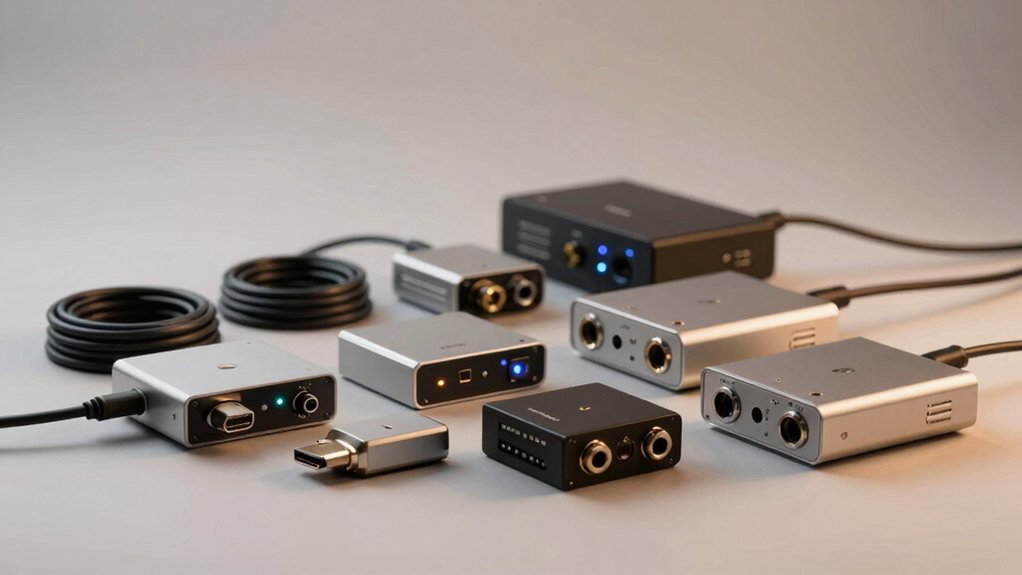

When you’re setting up a home audio system, you’ll need to extract high-quality sound from your TV’s eARC port and route it to your speakers or receiver. An eARC audio extractor handles this job by converting the HDMI signal into formats your equipment can use—like optical or analog outputs. You’ve got several solid options available, each with different features and price points. Here’s what you should know before choosing the right one for your setup.
| HDMI eARC Audio Extractor with Optical & Coaxial Output |
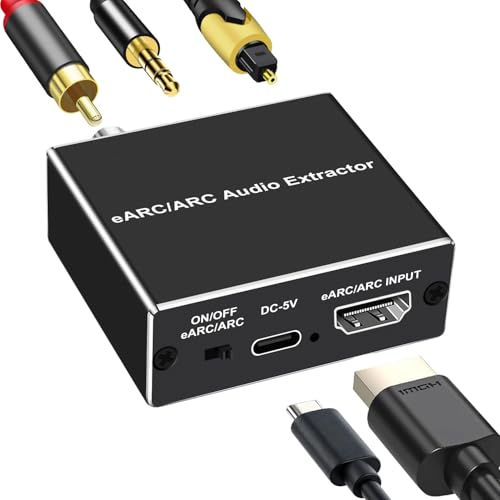
| Most Versatile | Primary Output Types: Optical, Coaxial, 3.5mm | Maximum Audio Sampling Rate: 24bit/192KHz | Supported Audio Formats: PCM 2.0, Dolby 5.1, DTS 5.1 | VIEW LATEST PRICE | Read Our Analysis |
| eSynic 7 FT eARC Audio Extractor to RCA Adapter |

| Budget-Friendly Pick | Primary Output Types: 3.5mm, L/R RCA | Maximum Audio Sampling Rate: 24bit/192KHz | Supported Audio Formats: PCM & PCM 2.0 | VIEW LATEST PRICE | Read Our Analysis |
| OREI eARC 8K Audio Extractor for Monitors |

| Best For Gaming | Primary Output Types: HDMI, Optical | Maximum Audio Sampling Rate: Up to DTS:X and Dolby Atmos | Supported Audio Formats: LPCM 7.1, Dolby TrueHD, Atmos, DTS-HD Master, DTS:X | VIEW LATEST PRICE | Read Our Analysis |
| Tendak 192KHz eARC Audio Extractor Digital to Analog Converter |

| Most Compatible | Primary Output Types: HDMI, Optical, 3.5mm, L/R RCA | Maximum Audio Sampling Rate: 192KHz (24bit SPDIF) | Supported Audio Formats: PCM, AC3, DTS, DD+, DTS-HD Master Audio, Dolby TrueHD | VIEW LATEST PRICE | Read Our Analysis |
| eSynic Professional eARC Audio Extractor Optical Adapter |

| Best Value | Primary Output Types: Optical | Maximum Audio Sampling Rate: 24bit/192KHz | Supported Audio Formats: PCM 2.0, Dolby 5.1, DTS 5.1 | VIEW LATEST PRICE | Read Our Analysis |
| 8K eARC HDMI Audio Extractor Converter |
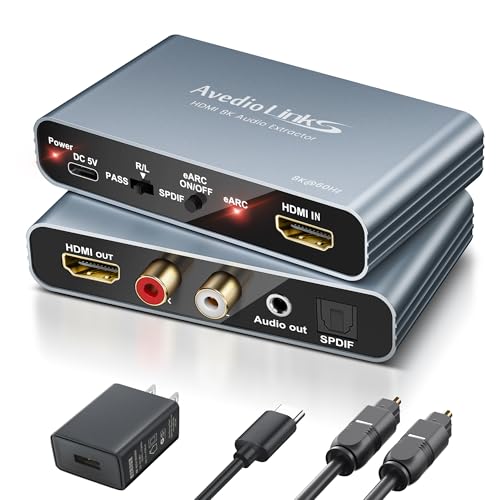
| Best Overall | Primary Output Types: HDMI, Optical, L/R, 3.5mm | Maximum Audio Sampling Rate: PCM formats primary | Supported Audio Formats: PCM (primary); DTS 7.1/5.1, Dolby Vision | VIEW LATEST PRICE | Read Our Analysis |
| 4K@120Hz HDMI 2.1 eARC Audio Extractor |

| High-Performance Pick | Primary Output Types: Optical (SPDIF), HDMI | Maximum Audio Sampling Rate: Up to 7.1ch formats | Supported Audio Formats: SPDIF Optical 5.1ch; HDMI 7.1ch, DTS:X, TrueHD, DTS-HD Master Audio | VIEW LATEST PRICE | Read Our Analysis |
| CAMWAY eARC/ARC Audio Extractor Adapter with Optical RCA |

| Best For Soundbars | Primary Output Types: Optical, L/R RCA, 3.5mm | Maximum Audio Sampling Rate: 24bit/192KHz | Supported Audio Formats: PCM, Dolby Digital 5.1, DTS 5.1 | VIEW LATEST PRICE | Read Our Analysis |
| Cable Matters HDMI 2.1 Audio Extractor with eARC |

| Professional Grade | Primary Output Types: Optical, Analog, HDMI | Maximum Audio Sampling Rate: Up to 48Gbps bandwidth | Supported Audio Formats: LPCM 5.1, Dolby TrueHD, Dolby Atmos, DTS-HD Master Audio, DTS | VIEW LATEST PRICE | Read Our Analysis |
| eARC Audio Extractor to Optical/SPDIF Converter |

| Most Feature-Rich | Primary Output Types: HDMI, Optical, 3.5mm, L/R RCA | Maximum Audio Sampling Rate: 24bit/192KHz (HDMI/Optical) | Supported Audio Formats: PCM, LPCM, Passthrough; up to 7.1 channel via HDMI output | VIEW LATEST PRICE | Read Our Analysis |
More Details on Our Top Picks
HDMI eARC Audio Extractor with Optical & Coaxial Output
If you’re looking to connect your TV’s audio to multiple devices simultaneously, this most versatile HDMI eARC audio extractor delivers the flexibility you need. Simply connect the HDMI cable to your TV’s eARC/ARC port and enable the function through your remote. The device then converts that digital audio signal into three separate outputs: optical, coaxial, and 3.5mm. You can route audio to soundbars, home theaters, or amplifiers depending on your setup. It supports high-quality formats including PCM 2.0, Dolby 5.1, and DTS 5.1 at up to 24bit/192KHz. No software installation is required. Plug it in, connect your devices, and enjoy theater-quality sound immediately.
- Primary Output Types:Optical, Coaxial, 3.5mm
- Maximum Audio Sampling Rate:24bit/192KHz
- Supported Audio Formats:PCM 2.0, Dolby 5.1, DTS 5.1
- Power Requirements:Power adapter (not specified)
- CEC Remote Control Support:Not supported on optical/coaxial outputs
- Setup Type:Plug and play (no software/drivers)
- Additional Feature:Theater-quality immersive sound
- Additional Feature:Multiple simultaneous outputs supported
- Additional Feature:No CEC remote volume control
eSynic 7 FT eARC Audio Extractor to RCA Adapter
The eSynic 7 FT eARC Audio Extractor to RCA Adapter is a budget-friendly pick for TV owners who need straightforward audio extraction without breaking the bank. This plug-and-play device connects directly to your TV’s eARC/ARC port and converts the audio signal to 3.5mm headphone or RCA stereo outputs. It supports PCM audio formats up to 24-bit/192 kHz sampling rates. Setup requires enabling eARC/ARC on your television and setting the output to PCM. The adapter runs on USB power with no drivers needed. Note that it handles PCM formats only—no Dolby support—and lacks an optical output option. Keep the device powered during use for lag-free audio delivery.
- Primary Output Types:3.5mm, L/R RCA
- Maximum Audio Sampling Rate:24bit/192KHz
- Supported Audio Formats:PCM & PCM 2.0
- Power Requirements:USB-powered
- CEC Remote Control Support:Not supported
- Setup Type:Plug and play (no software/drivers)
- Additional Feature:7-foot extended cable length
- Additional Feature:Audio status indicator lights
- Additional Feature:PCM formats only (no Dolby)
OREI eARC 8K Audio Extractor for Monitors
You’re gaming on a 4K monitor without built-in audio extraction—here’s your solution. The OREI eARC 8K Audio Extractor pulls full HDMI audio from your gaming setup and routes it to your soundbar or AV receiver. It supports premium formats like Dolby Atmos, TrueHD, and DTS:X while passing 4K or HDR video to your display. Simply connect your HDMI source to the extractor, run video to your monitor, and audio to your sound system. CEC compatibility lets you control volume with your TV remote. This device eliminates the need for expensive adapters and works with any GPU supporting Atmos output.
- Primary Output Types:HDMI, Optical
- Maximum Audio Sampling Rate:Up to DTS:X and Dolby Atmos
- Supported Audio Formats:LPCM 7.1, Dolby TrueHD, Atmos, DTS-HD Master, DTS:X
- Power Requirements:100-240V power adapter
- CEC Remote Control Support:Compatible with CEC
- Setup Type:Plug and play with 1-year warranty
- Additional Feature:Dolby Atmos extraction capability
- Additional Feature:8K monitor gaming support
- Additional Feature:Lifetime technical support included
Tendak 192KHz eARC Audio Extractor Digital to Analog Converter
Tendak’s 192KHz eARC audio extractor works as the most compatible bridge for upgrading older amplifiers and sound systems that don’t support eARC technology. Connect your eARC TV’s HDMI port to the device, then route audio through optical, RCA, or 3.5mm outputs to your amplifier or speakers. It supports multiple formats—PCM, AC3, DTS, and Dolby TrueHD—at sampling rates up to 192KHz. Setup requires only plugging in the USB power cable; no software installation needed. For optimal 5.1 channel output, ensure your source is configured for 5.1 and set the optical port to Source Output.
- Primary Output Types:HDMI, Optical, 3.5mm, L/R RCA
- Maximum Audio Sampling Rate:192KHz (24bit SPDIF)
- Supported Audio Formats:PCM, AC3, DTS, DD+, DTS-HD Master Audio, Dolby TrueHD
- Power Requirements:Not specified
- CEC Remote Control Support:Not supported on HDMI/optical; supported on RCA/3.5mm
- Setup Type:Plug and play (no software/drivers)
- Additional Feature:7.1/5.1/2.0 channel configurations
- Additional Feature:Multiple simultaneous output support
- Additional Feature:Ideal for conference/classroom use
eSynic Professional eARC Audio Extractor Optical Adapter
eSynic’s eARC audio extractor offers solid value if you’re connecting your HDTV to a soundbar, wireless headphones, or home theater system that requires optical audio input. This USB-powered device needs no software or drivers—just plug it in. Connect your HDMI cable to your TV’s eARC/ARC port, enable eARC/ARC in your TV settings, and attach the optical output to your audio device. It supports 24-bit/192 kHz sampling with PCM 2.0, Dolby 5.1, and DTS 5.1 formats. The setup takes minutes. Note that CEC remote volume control isn’t available through the optical connection, so you’ll adjust volume manually on your audio device.
- Primary Output Types:Optical
- Maximum Audio Sampling Rate:24bit/192KHz
- Supported Audio Formats:PCM 2.0, Dolby 5.1, DTS 5.1
- Power Requirements:USB-powered
- CEC Remote Control Support:Not supported on optical output
- Setup Type:Plug and play (no software/drivers)
- Additional Feature:5.1 and 2.0 channel indicators
- Additional Feature:Lag-free high-quality audio
- Additional Feature:Reduces interference and distortion
8K eARC HDMI Audio Extractor Converter
The K 8K eARC HDMI Audio Extractor Converter stands as the top choice for anyone needing flexible audio extraction across multiple device types. Connect your HDMI source to the IN port, then link your TV’s eARC/ARC port to the HDMI OUT. Select your operating mode: Pass mode outputs only TV sound, L/R mode delivers 2.1CH audio, or OPT mode provides 5.1CH surround sound. Enable your TV’s CEC function and set the DIP switch to “TV” mode for optimal performance. The device supports 8K@60Hz resolution and works with Blu-ray players, gaming consoles, Fire TV, and Apple TV. Power it via Type-C 5V connection. All three output options—optical, L/R, and 3.5mm—function simultaneously with PCM audio formats.
- Primary Output Types:HDMI, Optical, L/R, 3.5mm
- Maximum Audio Sampling Rate:PCM formats primary
- Supported Audio Formats:PCM (primary); DTS 7.1/5.1, Dolby Vision
- Power Requirements:Type-C 5V power
- CEC Remote Control Support:CEC support varies by TV brand
- Setup Type:Plug and play with DIP switch mode selection
- Additional Feature:Triple operating modes available
- Additional Feature:Type-C 5V power option
- Additional Feature:24/7 customer service support
4K@120Hz HDMI 2.1 eARC Audio Extractor
For gamers and home theater enthusiasts who demand high-performance audio extraction, this HDMI 2.1 eARC extractor handles 4K@120Hz video while routing sound to your soundbar or receiver. Connect your PS5, Xbox Series X, or other source device to the input port, then link your display to the output. Plug in the 5V/2A power adapter and configure ARC mode on your TV to enable audio routing. The device converts HDMI audio to optical SPDIF format while supporting advanced features like VRR, HDR, and HDCP2.3. It extracts up to 5.1-channel audio through the optical output and delivers 7.1-channel audio through HDMI. Use a HDMI 2.1 cable under 10 feet for optimal performance.
- Primary Output Types:Optical (SPDIF), HDMI
- Maximum Audio Sampling Rate:Up to 7.1ch formats
- Supported Audio Formats:SPDIF Optical 5.1ch; HDMI 7.1ch, DTS:X, TrueHD, DTS-HD Master Audio
- Power Requirements:5V/2A power
- CEC Remote Control Support:Not specified
- Setup Type:Plug and play with firmware update option
- Additional Feature:VRR, ALLM, Deep Color support
- Additional Feature:1080p@240Hz video compatibility
- Additional Feature:HDMI 2.1 cable recommended
CAMWAY eARC/ARC Audio Extractor Adapter with Optical RCA
CAMWAY’s eARC/ARC Audio Extractor converts your TV’s audio output into multiple formats simultaneously, making it ideal for soundbar users who need flexible connectivity options. Connect the adapter to your TV’s ARC/eARC port, enable CEC in TV settings, and set audio output to HDMI ARC/eARC. You’ll get three output choices: optical for 5.1 surround sound, RCA for stereo systems, or 3.5mm for headphones. The optical output doesn’t support TV remote volume control—adjust volume on your audio equipment instead. RCA and 3.5mm outputs work with TV remote volume when you use PCM/LPCM format. Installation includes all necessary cables: HDMI, optical, and power.
- Primary Output Types:Optical, L/R RCA, 3.5mm
- Maximum Audio Sampling Rate:24bit/192KHz
- Supported Audio Formats:PCM, Dolby Digital 5.1, DTS 5.1
- Power Requirements:Not specified
- CEC Remote Control Support:Not supported on optical; supported on RCA/3.5mm with CEC enabled
- Setup Type:Plug and play (no software/drivers)
- Additional Feature:All cables included in package
- Additional Feature:Simultaneous multi-interface output supported
- Additional Feature:TV remote volume control capable
Cable Matters HDMI 2.1 Audio Extractor with eARC
Cable Matters’ professional-grade HDMI 2.1 audio extractor delivers multi-format audio extraction for TV and soundbar setups. Connect your HDMI source to the input port, then route audio through optical, analog, or HDMI outputs to your soundbar or receiver. The device supports 48Gbps bandwidth, 8K@60Hz video, and advanced audio formats including Dolby Atmos and DTS-HD Master Audio. Enable eARC on your TV and set audio to Bitstream mode for optimal performance. Note that optical output maxes out at 5.1 channels, and older gaming consoles like PS3 won’t work with this extractor.
- Primary Output Types:Optical, Analog, HDMI
- Maximum Audio Sampling Rate:Up to 48Gbps bandwidth
- Supported Audio Formats:LPCM 5.1, Dolby TrueHD, Dolby Atmos, DTS-HD Master Audio, DTS
- Power Requirements:5V stable power
- CEC Remote Control Support:CEC behavior varies by TV brand
- Setup Type:Plug and play (no software/drivers)
- Additional Feature:Advanced EDID management included
- Additional Feature:Cable equalization for reliability
- Additional Feature:48Gbps bandwidth support
eARC Audio Extractor to Optical/SPDIF Converter
Want to connect your TV’s eARC output to multiple audio devices simultaneously? This converter extracts audio from your TV’s HDMI ARC/eARC port and sends it to four destinations: HDMI (7.1 audio), Optical (5.1), 3.5mm stereo, and L/R RCA analog. First, verify your TV has an HDMI ARC/eARC port, then enable CEC and set audio output to HDMI ARC/eARC with PCM or LPCM format. Connect the converter to your TV’s eARC port. Choose your desired output: use Optical for home theater systems, 3.5mm for headphones, or L/R for older amplifiers. The device requires a 5V power connection and needs no software installation.
- Primary Output Types:HDMI, Optical, 3.5mm, L/R RCA
- Maximum Audio Sampling Rate:24bit/192KHz (HDMI/Optical)
- Supported Audio Formats:PCM, LPCM, Passthrough; up to 7.1 channel via HDMI output
- Power Requirements:5V power cord
- CEC Remote Control Support:Not supported on HDMI/optical; supported on 3.5mm and L/R outputs
- Setup Type:Plug and play (no software/drivers)
- Additional Feature:Aluminum construction for durability
- Additional Feature:Up to 7.1 HDMI audio output
- Additional Feature:HDMI audio-only port available
Factors to Consider When Choosing an eARC Audio Extractor
When you’re choosing an eARC audio extractor, you need to verify that it supports the audio formats your devices use, such as Dolby Digital, DTS, or PCM, since not all extractors handle every format. Next, check what output connections the unit offers—optical, coaxial, RCA, or 3.5mm—and match them to your speakers or receiver so you don’t end up with incompatible cables. You should also confirm that the extractor handles your TV’s video resolution without dropping quality, review its power needs to ensure you have adequate outlets, and test the installation process yourself before purchasing to avoid frustration later.
Audio Format Compatibility
One of the most critical factors you’ll encounter when selecting an eARC audio extractor is understanding which audio formats each model supports, since compatibility directly determines what sound quality and surround options you can actually use.
Most extractors handle PCM up to 24-bit/192 kHz, supporting high-resolution 2.0 and multi-channel formats like Dolby 5.1 or DTS 5.1. However, premium models add Dolby TrueHD, Dolby Atmos, DTS-HD Master Audio, and DTS:X capabilities. Budget units may limit you to basic PCM or standard surround formats only.
Check your output type carefully. Optical connections typically cap at 5.1 channels and won’t carry object-based formats like Atmos. HDMI outputs provide wider format support. Before purchasing, review the specific audio format list for your chosen model to ensure it matches your needs.
Output Connection Types
Which output connections you’ll actually use depends on your audio setup, your TV’s capabilities, and the formats you want to extract. eARC extractors typically offer multiple output options—HDMI eARC/ARC passthrough, optical (SPDIF), coaxial, 3.5mm analog, and RCA stereo—though not every model includes all of them. Optical outputs commonly support up to 5.1 channels but may not carry 7.1 or higher formats. Some extractors provide simultaneous multi-interface outputs, allowing you to connect optical, RCA, and 3.5mm at once. Others restrict simultaneous connections to specific combinations. HDMI audio outputs vary between passing high-bandwidth formats like Dolby Atmos and limiting to PCM. Check your receiver’s input requirements before purchasing, ensuring the extractor’s outputs match your equipment’s available inputs.
Video Resolution Support
Since video quality matters just as much as audio extraction, you’ll need to verify that your eARC extractor supports the resolution and refresh rate your TV and source devices deliver. Check the adapter’s specifications for 4K@120Hz, 8K@60Hz, or 4K@240Hz support, depending on your setup. Confirm the device preserves HDR formats like HDR10 and Dolby Vision during passthrough to avoid quality loss. Review compatibility notes for HDMI 2.1 versus 2.0, as this determines maximum bandwidth for high-resolution video. Examine whether the extractor passes video without downscaling or re-encoding when extracting audio via ARC or eARC. If your setup uses dual outputs, verify that video fidelity remains uncompromised while audio routes to optical or other connections simultaneously.
Power Requirements
Once you’ve confirmed your eARC extractor handles the video resolution and refresh rates your devices need, you’ll want to examine how the unit draws power, since this affects both its performance and your setup’s convenience. Most eARC extractors are USB-powered and require no software, offering straightforward plug-and-play installation. Check whether your model uses USB-C or micro-USB connections, as power input typically ranges from 5V at 1A or higher depending on the device. Some units demand active power to maintain stable multi-output performance when driving optical, coaxial, and 3.5mm outputs simultaneously. Verify whether your extractor includes a dedicated 5V power cord or USB cable. Note that power availability can influence features like CEC remote control compatibility, particularly with optical outputs.
Setup Ease And Installation
How straightforward is getting your eARC extractor up and running? Most devices are plug-and-play, requiring no software or drivers, which simplifies your setup process considerably. Start by enabling the eARC or ARC feature on your TV, then connect an HDMI cable from your TV’s marked eARC/ARC port to the extractor. Power the device using its USB connection. Some models require you to select PCM or LPCM as your TV’s audio output format to ensure compatibility across all outputs. Check your device’s manual for this step if needed. Be aware that CEC-based remote volume control won’t function on optical outputs or certain connections depending on your model. This limitation doesn’t affect basic operation but impacts convenience features.
Remote Control Functionality
Beyond the basic setup, you’ll want to contemplate how you’ll control volume and playback once your extractor’s installed. Most optical outputs don’t support remote volume control through CEC, so you’ll need to adjust volume manually on your audio device instead. Some extractors enable TV remote control only on RCA or 3.5mm outputs, not on optical connections. If you’re using ARC/eARC transmission, check your TV’s CEC settings and confirm the audio path supports remote control. Before purchasing, verify whether your specific extractor model allows CEC-enabled control for your chosen output type—whether HDMI/ARC, RCA, or 3.5mm. This step prevents frustration and ensures you can manage audio conveniently after installation.
Device Brand Integration
When you’re selecting an eARC audio extractor, the manufacturer you choose directly impacts how well it’ll work with your TV’s eARC/ARC ports and whether key features like CEC remote control function across your outputs. Different brands handle EDID and CEC protocols differently, which affects whether your TV remote controls volume on optical or analog outputs. Check if the extractor’s brand matches your TV and sound system ecosystem for optimal compatibility. USB-powered models from brands like Cable Matters and eSynic offer plug-and-play installation, though power requirements vary. Consider brands that provide firmware updates and reliable after-sales support. Verify that your chosen extractor supports the HDR and Dolby formats your devices require for seamless integration across your entertainment setup.
Final Thoughts
You’ve reviewed ten eARC audio extractors with different strengths. Choose based on your setup: select optical output if you’re connecting to a soundbar, coaxial for an AV receiver, or analog for older speakers. Verify the model supports your TV’s eARC format and handles your audio needs—PCM, Dolby Atmos, or DTS:X. Check USB power requirements and confirm CEC compatibility before purchasing to ensure seamless integration.

Meet Ry, “TechGuru,” a 36-year-old technology enthusiast with a deep passion for tech innovations. With extensive experience, he specializes in gaming hardware and software, and has expertise in gadgets, custom PCs, and audio.
Besides writing about tech and reviewing new products, he enjoys traveling, hiking, and photography. Committed to keeping up with the latest industry trends, he aims to guide readers in making informed tech decisions.