
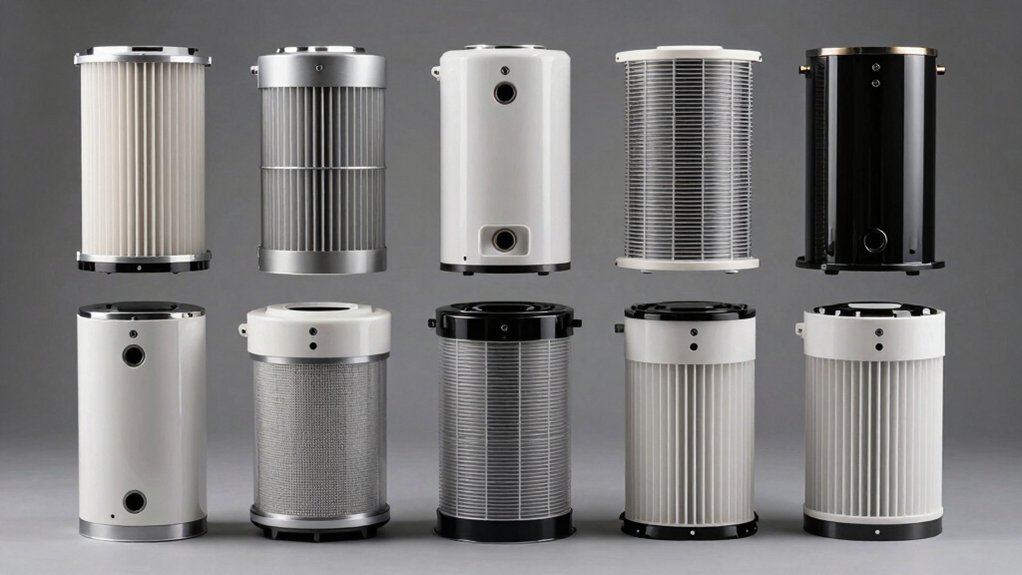

When you operate a 3D printer, you’re releasing ultrafine particles and volatile organic compounds into your workspace. You need a HEPA filter system that captures these emissions effectively. Your choice depends on your printer model, filter efficiency rating, and maintenance schedule. We’ve identified nine proven filters that fit popular printers like Bambu Lab, Creality, and Elegoo units. Here’s what you should know before deciding which one suits your setup best—
| V1 Filter System for 3D Printers with HEPA H13 |

| Best Overall | Filtration Technology: Three-stage (pre-filter, HEPA H13, activated carbon) | Printer Compatibility: Multi-brand (P1S/X1C, Creality, Prusa, Flashforge, Anycubic, Elegoo, Sovol, others) | Supported Filament Types: PLA, PETG, ABS, ASA, nylon (PA) | VIEW LATEST PRICE | Read Our Analysis |
| 3PC HEPA 13 Layer Air Filter for Elegoo Centauri Carbon |

| Best For Elegoo | Filtration Technology: HEPA13 + activated carbon composite | Printer Compatibility: Elegoo Centauri Carbon | Supported Filament Types: ABS, PLA, PETG, PC, PV | VIEW LATEST PRICE | Read Our Analysis |
| ANYCUBIC Mini Purifier 3D Printer Accessories (Pack of 2) |
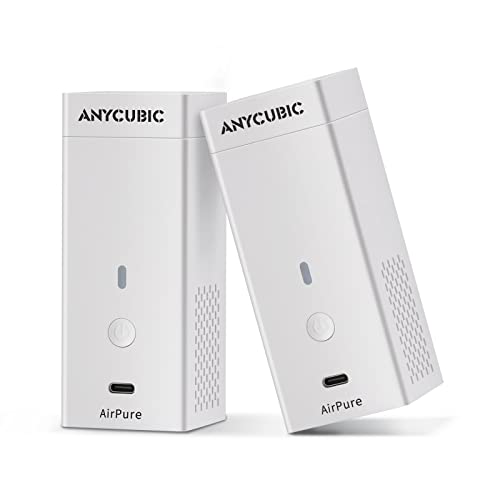
| Most Compact | Filtration Technology: High-density activated carbon only | Printer Compatibility: Anycubic LCD printers | Supported Filament Types: Resin (LCD printers) | VIEW LATEST PRICE | Read Our Analysis |
| HEPA Filter Upgrade for Creality K1/K1C 3D Printers |

| Best For Creality | Filtration Technology: HEPA (99.97% capture at 0.3 microns) | Printer Compatibility: Creality K1/K1C | Supported Filament Types: All enclosed printer filaments | VIEW LATEST PRICE | Read Our Analysis |
| Bulto HEPA Air Filters for Bambu Lab P2S 3D Printer |

| Best For Bambu Lab | Filtration Technology: Dual-layer (HEPA 13 + activated carbon) | Printer Compatibility: Bambu Lab P2S | Supported Filament Types: Not specified | VIEW LATEST PRICE | Read Our Analysis |
| PUREBURG Replacement Filter for 3D Printer Air Purifier |

| Budget-Friendly Pick | Filtration Technology: Activated carbon only | Printer Compatibility: Anycubic & Elegoo mini purifiers | Supported Filament Types: Not specified | VIEW LATEST PRICE | Read Our Analysis |
| ANYCUBIC Activated Carbon Filter for 3D Printer Purifiers (4-Pack) |

| Best Value Pack | Filtration Technology: Activated carbon only | Printer Compatibility: Mini purifiers (Anycubic compatible, Photon Mono M5s Pro) | Supported Filament Types: Not specified | VIEW LATEST PRICE | Read Our Analysis |
| Bambu Lab HEPA 13 Air Filter for X1/P1 Series |

| Premium OEM Filter | Filtration Technology: HEPA 13 + acid-free activated carbon | Printer Compatibility: Bambu Lab X1C, X1, P1S | Supported Filament Types: Low and high VOC filaments | VIEW LATEST PRICE | Read Our Analysis |
| Filter Replacement for Creality Fume Extractor HEPA |

| Professional Grade | Filtration Technology: Three-stage (pre-filter, HEPA, activated carbon) | Printer Compatibility: Creality Smoke Purifier | Supported Filament Types: Not specified | VIEW LATEST PRICE | Read Our Analysis |
More Details on Our Top Picks
V1 Filter System for 3D Printers with HEPA H13
The V1 Filter System stands out for anyone operating 3D printers in shared or residential spaces. This three-stage filtration setup captures ultrafine particles and removes harmful volatile organic compounds like styrene and caprolactam. You’ll benefit from 60 m³/h air purification while printing with PLA, PETG, ABS, ASA, or nylon filaments. The system installs tool-free on enclosed printers from Creality, Prusa, Flashforge, Anycubic, Elegoo, and Sovol models. You access filters easily for quick replacement during maintenance. The compact external design fits homes, studios, and professional settings without taking up excessive space.
- Filtration Technology:Three-stage (pre-filter, HEPA H13, activated carbon)
- Printer Compatibility:Multi-brand (P1S/X1C, Creality, Prusa, Flashforge, Anycubic, Elegoo, Sovol, others)
- Supported Filament Types:PLA, PETG, ABS, ASA, nylon (PA)
- Filter Replacement Lifespan:Not specified
- Installation Type:Tool-free
- Package Quantity:Single unit
- Additional Feature:60 m³/h air purification rate
- Additional Feature:Multi-brand compatibility support
- Additional Feature:Tool-free installation design
3PC HEPA 13 Layer Air Filter for Elegoo Centauri Carbon
Looking for reliable filtration for your Elegoo Centauri Carbon printer? The 3PC HEPA 13 Layer Air Filter delivers effective odor and dust removal through its composite HEPA13 and activated carbon design. This filter removes formaldehyde, VOCs, and odors at 90% efficiency while intercepting 99.95% of nanoplastics and ultrafine particles. Installation takes seconds: locate the button, lift the black lid, insert the filter, and replace the lid. You’ll receive three replacement cartridges per package. The black textured surface matches your printer’s design. This filter works with ABS, PLA, PETG, PC, and PV filaments, making it versatile for most projects.
- Filtration Technology:HEPA13 + activated carbon composite
- Printer Compatibility:Elegoo Centauri Carbon
- Supported Filament Types:ABS, PLA, PETG, PC, PV
- Filter Replacement Lifespan:Not specified
- Installation Type:Plug-and-play
- Package Quantity:Three replacement cartridges
- Additional Feature:Intercepts 99.95% nanoplastics
- Additional Feature:≥90% formaldehyde filtration
- Additional Feature:Three replacement cartridges included
ANYCUBIC Mini Purifier 3D Printer Accessories (Pack of 2)
Want effective odor control without taking up desk space? The ANYCUBIC Mini Purifier offers a compact solution measuring just 4.5 x 1.8 x 1.8 inches. This accessory pack includes two units designed specifically for Anycubic LCD printers. Each purifier contains an 18mm thick activated carbon filter weighing 17 grams that absorbs resin odors during printing. The high-speed fan operates at 5,000 rpm while maintaining noise levels at or below 40 decibels. Replace the filter element every three to six months by removing the top cover. With up to 30,000 hours of operation available, you’ll maintain consistent air quality throughout extended printing sessions.
- Filtration Technology:High-density activated carbon only
- Printer Compatibility:Anycubic LCD printers
- Supported Filament Types:Resin (LCD printers)
- Filter Replacement Lifespan:3–6 months
- Installation Type:Press-button powered; top cover removal
- Package Quantity:Pack of 2
- Additional Feature:5,000 rpm high-speed fan
- Additional Feature:≤40 decibels noise level
- Additional Feature:3–6 month filter lifespan
HEPA Filter Upgrade for Creality K1/K1C 3D Printers
If you’re running a Creality K1 or K1C printer in a home workshop, makerspace, or small room, you’re dealing with fine particle emissions that standard enclosures don’t fully contain. This HEPA filter upgrade captures 99.97% of airborne particles down to 0.3 microns, directly reducing buildup on enclosure walls and nearby surfaces. Installation takes minutes: mount the filter before your exhaust fan using the printer’s original screws—no modifications needed. The compact 75mm x 65mm design fits without blocking components. You’ll notice cleaner surfaces around your printer and improved air quality in poorly ventilated spaces. For enclosed printing environments where particle accumulation concerns you, this upgrade delivers measurable filtration performance.
- Filtration Technology:HEPA (99.97% capture at 0.3 microns)
- Printer Compatibility:Creality K1/K1C
- Supported Filament Types:All enclosed printer filaments
- Filter Replacement Lifespan:Not specified
- Installation Type:Quick installation with original screws; no tools required
- Package Quantity:Single unit
- Additional Feature:99.97% particle capture efficiency
- Additional Feature:75mm x 65mm compact form
- Additional Feature:Reuses original mounting screws
Bulto HEPA Air Filters for Bambu Lab P2S 3D Printer
The Bulto 3-piece filter set delivers dual-layer filtration specifically engineered for your Bambu Lab P2S printer. Each filter combines a true HEPA 13 layer that captures 99.95% of PM2.5 and ultrafine particles with an activated carbon layer that absorbs VOCs and formaldehyde with 90% efficiency. Installation takes minutes: open the rear panel, remove the old filter, and insert the new one without tools. The sponge-sealed frame fits directly into your printer without vibration. You’ll get 2–4 months of service before replacement. This upgrade improves filtration over original carbon filters, protecting your air quality during extended printing sessions.
- Filtration Technology:Dual-layer (HEPA 13 + activated carbon)
- Printer Compatibility:Bambu Lab P2S
- Supported Filament Types:Not specified
- Filter Replacement Lifespan:2–4 months
- Installation Type:Tool-free; rear panel access
- Package Quantity:Three filters (3Pcs)
- Additional Feature:Honeycomb activated carbon design
- Additional Feature:Sponge-sealed vibration-free operation
- Additional Feature:2–4 month service life
PUREBURG Replacement Filter for 3D Printer Air Purifier
PUREBURG’s replacement filters offer a budget-friendly pick for anyone running ANYCUBIC or ELEGOO mini air purifiers. This pack contains eight activated carbon filters measuring 1.5″ x 1.5″ x 0.63″. They reduce chemicals, VOCs, odors, smoke, and PM2.5 particles effectively. Before purchasing, confirm your machine model and filter size match. Replace filters regularly to maintain purifier performance and keep your printing space fresh. Clean each filter monthly with a soft brush for optimal results. PUREBURG guarantees quality through rigorous examinations and QC procedures, ensuring customer satisfaction with every purchase.
- Filtration Technology:Activated carbon only
- Printer Compatibility:Anycubic & Elegoo mini purifiers
- Supported Filament Types:Not specified
- Filter Replacement Lifespan:Not specified
- Installation Type:Replacement cartridge (confirm model before purchase)
- Package Quantity:Pack of 8 filters
- Additional Feature:Pack of 8 filters
- Additional Feature:Monthly soft brush cleaning
- Additional Feature:Compatible with multiple brands
ANYCUBIC Activated Carbon Filter for 3D Printer Purifiers (4-Pack)
Need replacement filters that won’t drain your budget? The ANYCUBIC Activated Carbon Filter 4-Pack offers an affordable solution for maintaining your mini 3D printer purifier. Each pack contains four high-density activated carbon filters compatible with mini purifiers and the Photon Mono M5s Pro. Replace your filter cartridge every three months to keep filtration performance at peak levels. These filters work with mini heater and purifier units from multiple brands of the same type and size. By purchasing a pack of four, you’ll have replacement filters on hand without frequent reordering. This ensures your 3D printer environment stays clean and your purifier continues operating effectively throughout the year.
- Filtration Technology:Activated carbon only
- Printer Compatibility:Mini purifiers (Anycubic compatible, Photon Mono M5s Pro)
- Supported Filament Types:Not specified
- Filter Replacement Lifespan:Every 3 months (recommended)
- Installation Type:Drop-in replacement
- Package Quantity:Pack of 4 filters
- Additional Feature:Pack of 4 filters
- Additional Feature:High-density activated carbon
- Additional Feature:Three-month replacement recommendation
Bambu Lab HEPA 13 Air Filter for X1/P1 Series
Bambu Lab’s premium OEM filter works best if you’re running an X1C, X1, or P1S printer and want integrated air purification. The cartridge combines HEPA 13-grade filtration with acid-free activated carbon to remove both particulates and volatile organic compounds from your printing environment. Installation takes minutes and requires no special tools. Expect the filter to last up to four months with low-emission filaments or two months with high-VOC materials. The compact 3.15 x 1.88 x 1.09-inch design fits seamlessly into your existing setup. Replace the cartridge when performance drops to maintain consistent air quality throughout your workflow.
- Filtration Technology:HEPA 13 + acid-free activated carbon
- Printer Compatibility:Bambu Lab X1C, X1, P1S
- Supported Filament Types:Low and high VOC filaments
- Filter Replacement Lifespan:2–4 months (varies by filament type)
- Installation Type:Quick, hassle-free installation
- Package Quantity:Single unit
- Additional Feature:Acid-free activated carbon construction
- Additional Feature:Up to 4-month cartridge lifespan
- Additional Feature:Quick hassle-free installation
Filter Replacement for Creality Fume Extractor HEPA
If you’re running a Creality Smoke Purifier, you’ll need professional-grade replacement filters that match your equipment’s specifications exactly. This HEPA filter measures 10 x 8.26 x 1.2 inches and captures 99.97% of particles as small as 0.03 micrometers. Replace it every three months or when it stops filtering smoke effectively. You’ll need three components working together: the pre-filter, HEPA filter, and activated carbon filter. All three are essential for peak air purification. Install only Creality’s official replacement filters—other cartridge sizes won’t fit your unit. Check your filter regularly and swap it out promptly to maintain consistent air quality in your workspace.
- Filtration Technology:Three-stage (pre-filter, HEPA, activated carbon)
- Printer Compatibility:Creality Smoke Purifier
- Supported Filament Types:Not specified
- Filter Replacement Lifespan:Every 3 months
- Installation Type:Cartridge replacement (every 3 months)
- Package Quantity:Single replacement filter
- Additional Feature:Honeycomb filter structure
- Additional Feature:99.97% 0.03 µm filtration
- Additional Feature:Three-month replacement interval
Factors to Consider When Choosing a HEPA Filter for 3D Printing

When you’re selecting a HEPA filter for your 3D printer, you’ll need to check your printer model compatibility first, confirm the filtration efficiency rating (typically HEPA H13 or H14 standards), and review how often you’ll need to replace the filter based on your printing frequency. Consider the installation complexity by examining whether the filter requires tools, special adapters, or professional setup, and compare these requirements against your technical comfort level. These four factors—compatibility, efficiency, replacement schedule, and installation difficulty—will determine which filter best suits your specific 3D printing setup and maintenance expectations.
Factors to Consider When Choosing HEPA Filter for 3D Printing
What makes one HEPA filter more effective than another for your 3D printer? You’ll want to evaluate filtration capacity, compatibility, and maintenance requirements. First, confirm the filter matches your printer’s exhaust dimensions and mounting system—many work as drop-in replacements. Second, verify the HEPA rating; HEPA 13 captures 99.95–99.97% of particles down to 0.3 microns, effectively reducing PM2.5 and ultrafine particles. Third, check for integrated activated carbon layers, which absorb volatile organic compounds like formaldehyde and styrene from your filament. Fourth, assess replacement intervals based on your usage and material types; expect 2–4 months for combined carbon-HEPA filters. Finally, prioritize tool-free installation to simplify routine maintenance and keep your workspace clean.
Printer Model Compatibility
Beyond evaluating filtration performance and maintenance schedules, you’ll need to confirm that your chosen HEPA filter actually fits your specific printer model. Check the manufacturer’s compatibility list to verify your printer series—whether it’s a Creality K1/K1C, Bambu Lab P1S/X1, or Elegoo system. Confirm the filter dimensions match your enclosure’s footprint to prevent airflow obstruction or installation gaps. Verify the mounting method: determine whether your filter uses screw-in or clip-in attachment. Review whether replacement cartridges work as direct drop-ins without requiring adapters or modifications. Cross-reference your printer’s model number against the filter’s recommended compatible series. Mismatches cause installation failures, reduced filtration efficiency, and potential equipment damage, so invest time in this verification step before purchasing.
Filtration Efficiency Ratings
How do you know if a HEPA filter will actually capture the harmful particles your 3D printer releases? Check the efficiency rating first. H13 filters capture at least 99.95% of particles between 0.1 and 0.3 microns, making them effective for ultrafine particles and nanoplastics. Higher ratings like H13 outperform lower grades significantly. Next, examine whether the filter combines HEPA with activated carbon. This dual-stage approach addresses both particulate matter and volatile organic compounds. Look for carbon filtration efficiency ratings of 90% or higher for VOCs and formaldehyde. Consider your filament type and particle size distribution, as real-world performance varies. Multi-stage filters target a broader range of contaminants, offering more comprehensive air quality protection for your workspace.
Filter Replacement Frequency
When should you actually replace your HEPA filter? Most 3D printer HEPA filters need replacement every 2 to 4 months during general use. However, you’ll want to replace them more frequently—about every 2 months—if you’re printing with high VOC filaments like ABS. For dual-layer systems combining HEPA and activated carbon, replace the carbon layer every 3 months since it saturates faster from odor absorption. Your replacement schedule depends on three key factors: how many hours you operate your printer weekly, which filament types you use, and whether you use an enclosure. Check your manufacturer’s guidelines first, then monitor performance by noting reduced airflow or persistent odors. These signs indicate it’s time for a new filter.
Installation Complexity Level
What’s your printer model, and does it already have an enclosure? Installation difficulty varies significantly based on your setup. Plug-and-play cartridges offer the simplest approach—you swap a lid or access a rear panel in minutes with no tools required. Direct-fit filters that mount before exhaust fans or into existing OEM enclosures require minimal modification. Custom-fit filters demand more attention: you’ll need to align device-specific mounting holes, use original screws, and verify no interference with moving parts. Before purchasing, confirm compatibility with your exact printer model and enclosure design. Check whether your filter requires tool-free installation or specific hardware alignment. This verification step prevents fitment problems and ensures your filter functions properly without modifications to your printer.
Noise Output Specifications
Why does noise matter for your 3D printing setup? Loud purifiers disrupt your workspace and can interfere with concentration during lengthy print jobs. You’ll want to check the decibel (dB) rating, which measures sound output. Look for units rated at 40 dB or lower for quiet operation. Higher fan speeds increase noise levels, so you’ll need to balance filtration performance against sound. Compare specifications across models to find your acceptable noise threshold. Consider the purifier’s design—compact, enclosed units contain sound better than open-frame models. For desktop setups, smaller form-factor purifiers work well since they’re positioned closer to the source and still maintain effective air cleaning. Always verify the dB rating before purchasing to ensure your workspace remains comfortable during extended printing sessions.
Final Thoughts
You’ll find the right HEPA filter by matching it to your specific printer model—whether that’s Bambu Lab, Creality, Anycubic, or Elegoo. Check the filtration rating (HEPA 13 or better), confirm direct-fit compatibility, and plan for replacement every 2–4 months. Activated carbon layers handle VOCs effectively. Review your budget and maintenance capacity, then select the model that fits your setup. Replace filters regularly for optimal air quality during printing.

Meet Ry, “TechGuru,” a 36-year-old technology enthusiast with a deep passion for tech innovations. With extensive experience, he specializes in gaming hardware and software, and has expertise in gadgets, custom PCs, and audio.
Besides writing about tech and reviewing new products, he enjoys traveling, hiking, and photography. Committed to keeping up with the latest industry trends, he aims to guide readers in making informed tech decisions.