

If you play CS2 competitively, your monitor directly impacts your performance. Pro gamers prioritize refresh rates between 240–400 Hz, fast response times under 1 ms, and minimal motion blur to track enemies during split-second engagements. You’ll find options ranging from compact 1080p TN panels to ultrawide 3440×1440 displays. Each choice offers different advantages—but which one matches your setup and playstyle?
| BenQ Zowie XL2566X+ 400Hz Gaming Monitor |
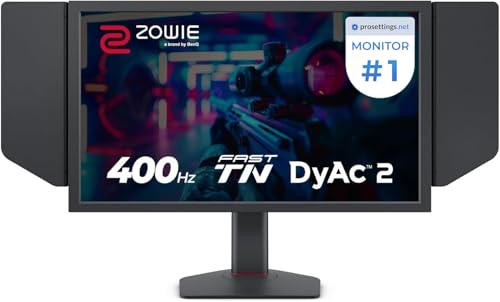
| Fastest Refresh Rate | Refresh Rate: 400 Hz | Response Time: 0.5 ms | Resolution: 1920×1080 (FHD) | VIEW LATEST PRICE | Read Our Analysis |
| BenQ Zowie XL2546X+ 280Hz Gaming Monitor |

| Best Value | Refresh Rate: 280 Hz | Response Time: Fast TN (sub-1ms typical) | Resolution: 1920×1080 (FHD) | VIEW LATEST PRICE | Read Our Analysis |
| ZZA 34 Inch Curved Gaming Monitor 3440×1440 240Hz |

| Immersive Ultrawide | Refresh Rate: 240 Hz | Response Time: 1 ms | Resolution: 3440×1440 (UltraWide) | VIEW LATEST PRICE | Read Our Analysis |
| INNOCN 24.5″ 2K 240Hz Gaming Monitor (25M2S) |

| Best Color Accuracy | Refresh Rate: 240 Hz | Response Time: 1 ms | Resolution: 2560×1440 (QHD) | VIEW LATEST PRICE | Read Our Analysis |
| KTC 24.5 Inch Gaming Monitor 180Hz FHD IPS |

| Budget-Friendly Pick | Refresh Rate: 180 Hz | Response Time: 1 ms | Resolution: 1920×1080 (FHD) | VIEW LATEST PRICE | Read Our Analysis |
| 32 Inch 4K UHD Gaming Monitor with HDR400 |

| Best For Design | Refresh Rate: 60 Hz | Response Time: 1 ms | Resolution: 3840×2160 (4K UHD) | VIEW LATEST PRICE | Read Our Analysis |
| AOC 16T20 Portable Monitor 15.6″ FHD USB-C |
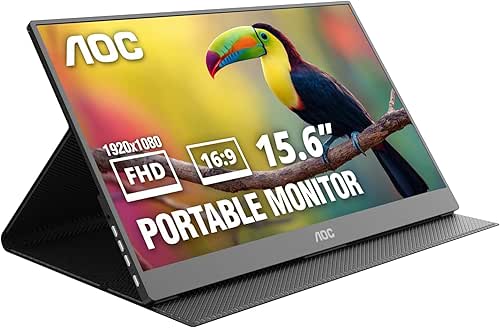
| Most Portable | Refresh Rate: 60 Hz | Response Time: Not specified | Resolution: 1920×1080 (FHD) | VIEW LATEST PRICE | Read Our Analysis |
| ViewSonic VG1656-2K 16 Inch Portable Monitor |

| Professional Portable | Refresh Rate: 60 Hz | Response Time: Not specified | Resolution: 2560×1600 (WQXGA) | VIEW LATEST PRICE | Read Our Analysis |
| Veout 2.5K Portable Gaming Monitor 144Hz 16inch |
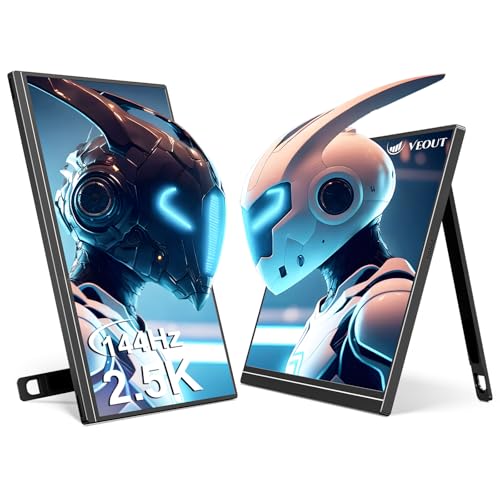
| Best Portable Gaming | Refresh Rate: 144 Hz | Response Time: 1 ms | Resolution: 2560×1600 (2.5K) | VIEW LATEST PRICE | Read Our Analysis |
| MAGICRAVEN 15.6″ Wired Portable Monitor 1080P FHD |

| Most Affordable Portable | Refresh Rate: 60 Hz | Response Time: Not specified | Resolution: 2520×1680 (2K) | VIEW LATEST PRICE | Read Our Analysis |
More Details on Our Top Picks
BenQ Zowie XL2566X+ 400Hz Gaming Monitor
Want the fastest refresh rate available? The BenQ Zowie XL2566X+ delivers 400Hz performance with a 0.5ms response time, eliminating motion blur during intense CS2 matches. Its 24.1-inch TN LCD panel uses DyAc and DyAc 2 technology to reduce eye strain while maintaining clarity. The monitor supports both HDMI and DisplayPort connections, ensuring compatibility with your gaming setup. At 1920×1080 resolution, you’ll experience sharp visuals optimized for competitive play. The included shielding hood minimizes distractions, while height adjustment with industrial-grade ball bearings lets you customize your viewing angle. This monitor earns 4.3 out of 5 stars from 64 reviews.
- Refresh Rate:400 Hz
- Response Time:0.5 ms
- Resolution:1920×1080 (FHD)
- Panel Type:TN LCD
- Screen Size:24.1 inches
- Color Gamut/Accuracy:Enhanced color performance (TN native)
- Additional Feature:DyAc 2 blur reduction technology
- Additional Feature:Industrial-grade height adjustment
- Additional Feature:Included shielding hood
BenQ Zowie XL2546X+ 280Hz Gaming Monitor
Need a monitor that keeps pace with competitive CS2 play? The XL2546X+ delivers a 24.1″ TN panel running 280Hz, giving you crisp motion clarity for fast-paced matches. DyAc 2 technology reduces blur on moving targets, sharpening your ability to track enemies. The redesigned panel cuts overshoot while boosting color vibrancy and eye comfort during long sessions. Connect via DisplayPort or HDMI with FreeSync adaptive sync support. At 9.2kg with height adjustment and a shielding hood included, you’ll position it exactly how you need. This monitor bridges performance and affordability for serious competitive players.
- Refresh Rate:280 Hz
- Response Time:Fast TN (sub-1ms typical)
- Resolution:1920×1080 (FHD)
- Panel Type:TN LCD
- Screen Size:24.1 inches
- Color Gamut/Accuracy:Redesigned color performance (TN native)
- Additional Feature:DyAc 2 dynamic accuracy technology
- Additional Feature:XL Setting to Share feature
- Additional Feature:Industrial-grade height adjustment
ZZA 34 Inch Curved Gaming Monitor 3440×1440 240Hz
The ZZA 34-inch curved gaming monitor delivers an immersive ultrawide experience designed for competitive CS2 players who demand expansive field awareness. Its 3440×1440 resolution and 21:9 aspect ratio give you a 30% wider horizontal view than standard 16:9 monitors, letting you spot enemies earlier. The 240Hz refresh rate paired with 1ms response time ensures smooth, responsive gameplay. The 1500R curved VA panel produces deep blacks and clear highlights, while FreeSync support reduces screen tearing. Connect via DisplayPort 1.2 or HDMI 1.4, then mount on your desk or VESA arm. The matte finish minimizes glare, and 99% sRGB accuracy supports streaming and content creation alongside competitive play.
- Refresh Rate:240 Hz
- Response Time:1 ms
- Resolution:3440×1440 (UltraWide)
- Panel Type:VA
- Screen Size:34 inches
- Color Gamut/Accuracy:99% sRGB
- Additional Feature:1500R curved immersive display
- Additional Feature:99% sRGB color accuracy
- Additional Feature:Bezel-free modular design
INNOCN 24.5″ 2K 240Hz Gaming Monitor (25M2S)
Competitive CS2 players need superior color accuracy paired with extreme refresh rates, and INNOCN’s 25M2S delivers both through its 2560×1440 resolution and 240Hz panel. The Mini-LED backlight with local dimming produces vivid images essential for spotting enemies in dark corners. Connect via DisplayPort 1.4 or HDMI 2.1 to your gaming PC or laptop. The 1ms response time eliminates motion blur during fast-paced gunfights. G-Sync compatibility ensures smooth gameplay without stuttering. Use the height-adjustable stand to position the monitor at eye level, reducing neck strain during long competitive sessions. The matte finish minimizes glare from surrounding light sources.
- Refresh Rate:240 Hz
- Response Time:1 ms
- Resolution:2560×1440 (QHD)
- Panel Type:IPS
- Screen Size:24.5 inches
- Color Gamut/Accuracy:100% sRGB
- Additional Feature:Mini-LED local dimming backlight
- Additional Feature:1000 nits peak brightness
- Additional Feature:Built-in RGB ambient lighting
KTC 24.5 Inch Gaming Monitor 180Hz FHD IPS
Looking for a budget-friendly pick that doesn’t sacrifice performance? The KTC 24.5-inch monitor delivers 180Hz refresh rates with a 1ms response time, giving you the speed you need for competitive CS2 play. Its FHD resolution keeps frame rates high on mid-range systems. The IPS panel offers 128% sRGB color accuracy, so you’ll catch enemies clearly across different lighting conditions. Connect via HDMI or DisplayPort to your PC or console. The adjustable tilt lets you position the screen for extended gaming sessions without strain. KTC backs this monitor with a 12-month replacement guarantee, making it a reliable option when budget matters.
- Refresh Rate:180 Hz
- Response Time:1 ms
- Resolution:1920×1080 (FHD)
- Panel Type:IPS
- Screen Size:24.5 inches
- Color Gamut/Accuracy:128% sRGB, DCI-P3 105%
- Additional Feature:HDR10 support included
- Additional Feature:350 cd/m² brightness rating
- Additional Feature:128% sRGB color gamut
32 Inch 4K UHD Gaming Monitor with HDR400
Why settle for a standard display when you can get a 32-inch 4K monitor that serves designers, programmers, and competitive gamers equally well? This Kroteaup model delivers 4K resolution at 3840 x 2160 pixels with HDR400 support, giving you vivid colors and deep blacks for immersive visuals. The VA panel offers 3500:1 contrast ratio and 1 ms MPRT response time. You’ll connect via two HDMI 2.0 or DisplayPort 1.4 ports. FreeSync and G-Sync compatibility ensure smooth gameplay in CS2 and other FPS titles. The 60 Hz refresh rate suits design work better than competitive play. Built-in speakers provide audio without extra equipment. A two-year warranty covers your purchase.
- Refresh Rate:60 Hz
- Response Time:1 ms
- Resolution:3840×2160 (4K UHD)
- Panel Type:VA
- Screen Size:32 inches
- Color Gamut/Accuracy:DCI-P3 86%, 100% sRGB
- Additional Feature:HDR400 high dynamic range
- Additional Feature:Built-in speaker audio output
- Additional Feature:3500:1 contrast ratio
AOC 16T20 Portable Monitor 15.6″ FHD USB-C
The AOC 16T20’s most portable design makes it ideal for esports players who travel to tournaments or practice at multiple locations. You’ll connect it to your laptop or gaming console using USB-C or Mini HDMI—no drivers required. The 15.6-inch FHD display delivers crisp visuals for competitive gameplay, though its 60Hz refresh rate limits fast-action performance compared to higher-refresh monitors. Weighing just 1.54 pounds, it fits easily into your bag. Use the included smart cover for protection during transport. The built-in speakers handle audio, and USB-C power delivery eliminates extra cables. This monitor excels for practicing away from your main setup or attending smaller tournaments with minimal equipment.
- Refresh Rate:60 Hz
- Response Time:Not specified
- Resolution:1920×1080 (FHD)
- Panel Type:IPS
- Screen Size:15.6 inches (Portable)
- Color Gamut/Accuracy:Not specified
- Additional Feature:USB-C powered plug-and-play
- Additional Feature:Premium smart cover included
- Additional Feature:Ultra-portable lightweight design
ViewSonic VG1656-2K 16 Inch Portable Monitor
ViewSonic’s professional portable 16-inch monitor serves esports players who need a second display without sacrificing mobility. The 2560×1600 WQXGA resolution delivers crisp details across the 16:10 aspect ratio, providing extra vertical space for game overlays and communication windows. You’ll connect it via USB-C with passthrough charging, eliminating cable clutter during tournaments or practice sessions. The 400-nit brightness and matte finish reduce glare in various lighting conditions. At 2.3 pounds with a 0.38-inch profile, you’ll transport it easily between venues. The included magnetic cover protects the display during travel, while the built-in stand enables quick setup anywhere.
- Refresh Rate:60 Hz
- Response Time:Not specified
- Resolution:2560×1600 (WQXGA)
- Panel Type:IPS
- Screen Size:16 inches (Portable)
- Color Gamut/Accuracy:Not specified
- Additional Feature:65W USB-C power passthrough
- Additional Feature:16:10 aspect ratio
- Additional Feature:Detachable magnetic screen cover
Veout 2.5K Portable Gaming Monitor 144Hz 16inch
Veout’s portable gaming monitor shines for competitive gamers who travel frequently or need multi-monitor setups without desk space constraints. You’ll get 2560×1600 resolution at 144Hz via USB-C, delivering sharp visuals and smooth gameplay essential for CS2. The 1ms response time minimizes input lag during fast-paced matches. Connect it to your laptop or gaming console using the included cables—no drivers required. The adjustable stand tilts from 0° to 75°, letting you position the screen for optimal viewing. Its lightweight aluminum design weighs just 1.58 lbs, making transport simple. Built-in speakers provide basic audio, though competitive players typically use headsets instead.
- Refresh Rate:144 Hz
- Response Time:1 ms
- Resolution:2560×1600 (2.5K)
- Panel Type:IPS
- Screen Size:16 inches (Portable)
- Color Gamut/Accuracy:100% sRGB
- Additional Feature:Portrait mode support capability
- Additional Feature:Ultra-slim aluminum body construction
- Additional Feature:24/7 lifetime quality warranty
MAGICRAVEN 15.6″ Wired Portable Monitor 1080P FHD
MAGICRAVEN’s most affordable portable option delivers a 2520×1680 resolution display in a lightweight 1.1 lb package, making it ideal for CS2 players who need a secondary monitor without breaking their budget. You’ll connect via USB-C 3.1 Gen2 or HDMI 2.0, and the plug-and-play setup requires no driver installation. The 178° viewing angle and IPS A-grade screen with 300 nits brightness provide clear visibility during gameplay. You get dual USB-C ports for connectivity and power delivery, plus a 3.5 mm audio jack. The 3:2 aspect ratio suits productivity alongside gaming. MAGICRAVEN backs this with a 2-year warranty, 90-day replacement guarantee, and 24/7 customer support responding within 8 hours.
- Refresh Rate:60 Hz
- Response Time:Not specified
- Resolution:2520×1680 (2K)
- Panel Type:IPS
- Screen Size:15.6 inches (Portable)
- Color Gamut/Accuracy:100% sRGB
- Additional Feature:2520×1680 high resolution display
- Additional Feature:Dual USB-C 3.2 ports
- Additional Feature:24/7 customer service support
Factors to Consider When Choosing to Monitor for CS2
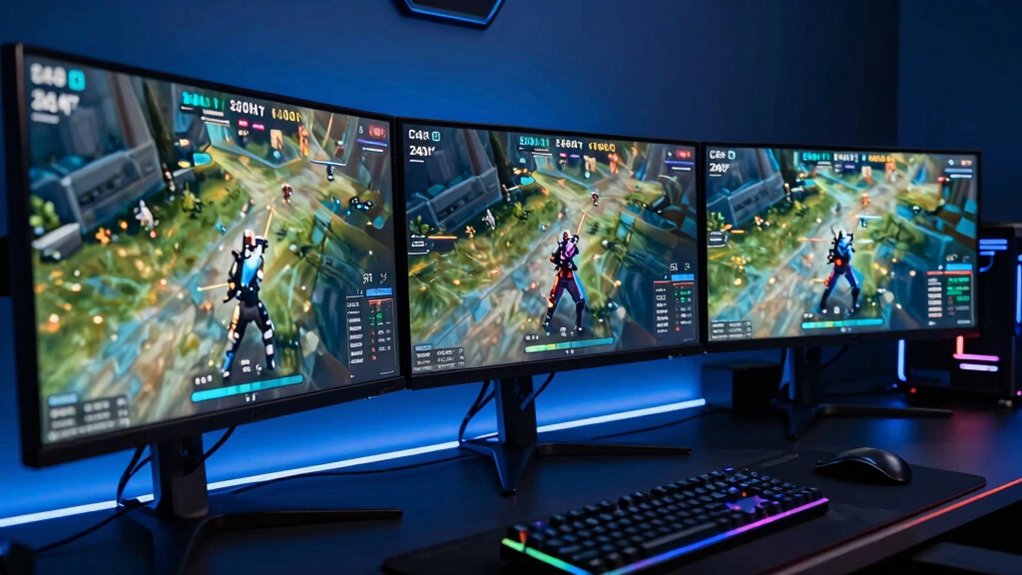
When selecting a monitor for CS2, you’ll want to evaluate five core specifications that directly impact your competitive performance: refresh rate (measured in hertz), response time (measured in milliseconds), panel type (such as IPS, TN, or VA), display resolution (such as 1080p or 1440p), and color accuracy (measured in delta E or color gamut percentage). Start by checking your graphics card’s capabilities to determine what refresh rate you can actually achieve, then match that with a monitor that supports that speed—for example, if your GPU handles 144 frames per second, purchase a 144Hz or higher monitor. Finally, confirm the monitor’s response time stays under 5 milliseconds, verify the panel type suits your needs (TN panels offer speed, IPS panels offer color, VA panels offer contrast), and decide whether resolution or smoothness matters more for your playstyle.
Refresh Rate Performance
Why does refresh rate matter so much in CS2? Higher refresh rates reduce input lag and motion blur, giving you clearer tracking of fast actions. Most esports monitors offer 240 Hz, 280 Hz, or 400 Hz, with 240 Hz and above providing the most noticeable benefit in competitive play.
Pair your monitor with a 1 ms to 0.5 ms response time to minimize ghosting during rapid crosshair movements and recoil control. This combination ensures smoother, more precise aiming and faster reaction times.
However, ultra-high refresh rates work best when your system consistently renders near the monitor’s maximum Hz. If your GPU can’t keep up, inconsistencies between frame output and monitor refresh negate some benefits. Match your monitor’s refresh rate to your system’s actual performance capability.
Response Time Matters
How fast does your monitor respond to color changes? That’s your response time, measured in milliseconds. You’ll want 0.5 ms to 1 ms for CS2, which reduces motion blur and ghosting during fast gameplay. At these speeds, weapon recoil and sprinting appear crisp and clear.
Sub-1 ms response panels outperform slower monitors when tracking enemy movements and bullet impacts. You should pair low response time with high refresh rate—both work together for smoother gameplay. Consider panel types: TN panels typically deliver the fastest response times, though IPS and VA panels exist as alternatives. TN panels may sacrifice color accuracy and viewing angles, so evaluate your priorities. Balance response time against other monitor features based on your competitive needs.
Panel Type Selection
You’ll encounter three main panel types when shopping for a CS2 monitor, and each offers distinct trade-offs you need to weigh against your priorities.
TN panels deliver the fastest response times, critical for reaction-heavy gameplay, but sacrifice color accuracy and viewing angles. IPS panels provide superior color reproduction—typically 99% sRGB or higher—and wider viewing angles, ensuring consistent visibility from different positions. VA panels offer exceptional contrast ratios up to 4000:1, which sharpens enemy silhouettes on dark maps, though response times lag behind TN.
Match your panel choice to your playstyle. Prioritize TN if reaction speed dominates your strategy. Choose IPS for consistent color work or team play requiring angle flexibility. Select VA if contrast and visibility in low-light areas drive your performance advantage.
Display Resolution Clarity
When selecting a monitor for CS2, resolution directly impacts how clearly you see enemies and map details, but it also affects the frame rates your GPU can deliver. Start by evaluating your GPU’s power. If you own a high-end card, 1440p at 240 Hz or 2560×1440 delivers sharper textures and clearer enemy silhouettes than 1080p without sacrificing speed. For ultrawide 3440×1440 panels, you gain wider situational awareness but accept slightly smaller target sizes. If your GPU is mid-range, 1080p at 240 Hz maintains fast refresh rates. Consider 4K only if you prioritize detail over competitive frame rates. Match your resolution choice to your hardware’s capabilities and your priority—sharpness or speed.
Color Accuracy Standards
Color accuracy directly affects how you perceive CS2’s environments, enemy skins, and UI elements during competitive play. You’ll want a monitor with at least 99% sRGB coverage and delta E below 2 to ensure faithful color reproduction. Check the monitor’s specifications for color gamut percentages—this determines how broadly it reproduces colors accurately. Look for 8-bit color depth or higher to eliminate banding in shaded areas. IPS panels provide more consistent color accuracy across viewing angles compared to TN or VA panels. Verify factory calibration standards when reviewing monitor specs. These factors combined give you precise color representation, reducing the risk of misidentifying enemy positions or environmental details during fast-paced matches.
Motion Blur Reduction
While color accuracy helps you spot enemies in CS2’s varied environments, motion blur reduction directly sharpens how you see those enemies when they’re moving. You’ll want a monitor with DyAc or DyAc 2 technology, which clarifies moving images by reducing blur during fast gameplay. Pair this with a high refresh rate—280 Hz or higher delivers noticeably crisper motion than 144 Hz displays. Check the panel response time: aim for 0.5–1 ms MPRT for sharp motion trails during rapid actions. TN panels typically excel here, offering faster motion clarity than IPS panels, though with reduced color accuracy. Combine high refresh rate, low persistence backlighting, and updated panel design to minimize ghosting and overshoot, enabling precise enemy identification during intense skirmishes.
Connectivity Options Available
How do you connect your gaming PC or laptop to your monitor? You’ll use HDMI or DisplayPort as your primary video inputs, both delivering high-refresh connections essential for CS2’s fast-paced gameplay. DisplayPort typically supports higher refresh rates, making it ideal for competitive play. Some monitors include USB-C ports that combine data and power delivery, eliminating cable clutter with a single connection to laptops or docks. USB-A ports let you connect peripherals directly to your monitor, while 3.5mm audio outputs work with headsets without requiring extra hubs. Check your monitor’s VESA mounting compatibility to plan cable routing around wall mounts. Verify FreeSync or Adaptive Sync support to reduce screen tearing during matches. Match your monitor’s ports to your PC’s outputs before purchasing.
Budget Versus Features
What’s the best balance between spending less and getting the performance you need for CS2? Start by setting a budget limit, then prioritize refresh rate and response time over resolution. Aim for 180–280 Hz with 1 ms response times, which delivers solid motion clarity at reasonable prices. Choose 1080p TN panels instead of higher-resolution IPS or VA options to reduce costs while maintaining speed. If budget allows, add blur-reducing technology like DyAc for clearer enemy identification during fast gameplay. Include FreeSync or G-Sync compatibility to smooth performance without major expense. Finally, verify ergonomic features—height adjustment and VESA mounting—exist before purchasing. These choices ensure you spend efficiently while meeting CS2’s performance demands.
Final Thoughts
You’ll want to prioritize refresh rate and response time above all else for CS2. Choose between high-refresh 1080p monitors like the BenQ Zowie XL2566X+ (400 Hz) for maximum speed, or 2K options if you prefer sharper visuals. Consider your GPU’s output capacity and desk space before selecting ultrawide or portable models. Match your monitor’s sync technology to your graphics card, then adjust settings to match your competitive playstyle.

Meet Ry, “TechGuru,” a 36-year-old technology enthusiast with a deep passion for tech innovations. With extensive experience, he specializes in gaming hardware and software, and has expertise in gadgets, custom PCs, and audio.
Besides writing about tech and reviewing new products, he enjoys traveling, hiking, and photography. Committed to keeping up with the latest industry trends, he aims to guide readers in making informed tech decisions.