


You need to keep your computer functioning properly, and regular cleaning is essential. Dust buildup clogs fans, traps heat, and slows performance. A quality PC cleaning kit combines the right tools—compressed air dusters, microfiber cloths, brushes, and anti-static protection—to safely remove debris from keyboards, screens, and internal components. Choosing the right kit prevents damage while maintaining your system’s efficiency. But which kit actually delivers the results you need?
| WOLFBOX MF60 Compressed Air Duster with 5 Nozzles |
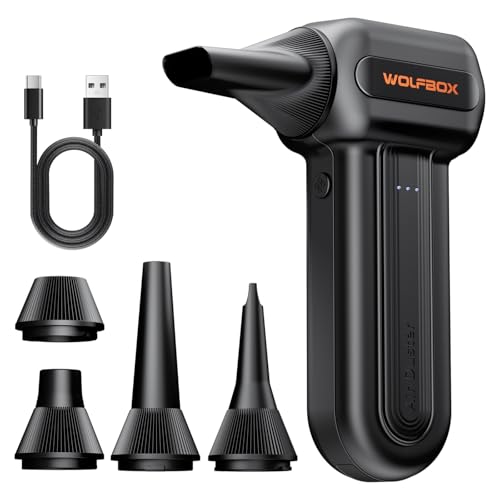
| Best Overall | Primary Cleaning Method: Compressed air duster (motorized) | Motor/Power Type: Brushless motor (110,000 RPM max) | Included Accessories: 5 nozzles | VIEW LATEST PRICE | Read Our Analysis |
| Compressed Air Duster Rechargeable Electric Cordless Blower |

| Most Powerful Motor | Primary Cleaning Method: Compressed air duster (motorized) | Motor/Power Type: 100,000 RPM motor | Included Accessories: 5 nozzles + 3 brushes | VIEW LATEST PRICE | Read Our Analysis |
| Keyboard Cleaning Kit All-in-1 Computer Cleaner Brush |
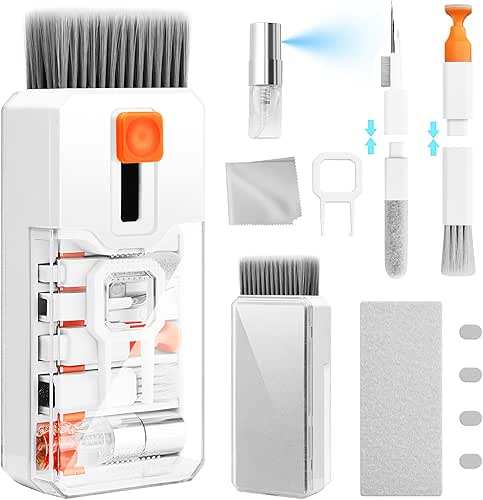
| Best Comprehensive Kit | Primary Cleaning Method: Manual brush and cloth kit | Motor/Power Type: N/A (manual tool) | Included Accessories: 5 nozzles equivalent, 2 cloths, keycap puller, brushes, lens pen | VIEW LATEST PRICE | Read Our Analysis |
| Small Portable Anti Static Cleaning Brush Kit (8-Pack) |
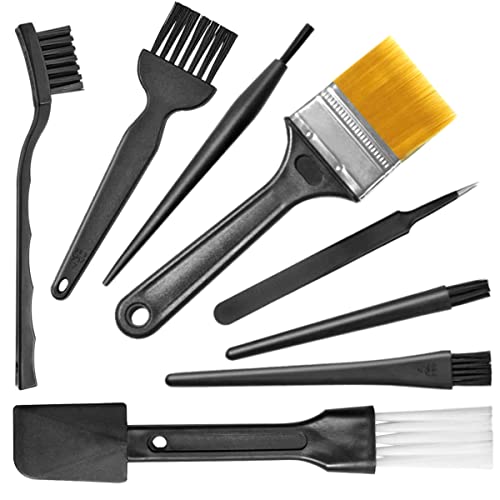
| Best Budget Option | Primary Cleaning Method: Manual anti-static brushes | Motor/Power Type: N/A (manual tool) | Included Accessories: 8-piece brush set + tweezers, key puller | VIEW LATEST PRICE | Read Our Analysis |
| Air Duster Electric Blower High Power Cleaning PC |

| Professional Grade Power | Primary Cleaning Method: Electric air blower (motorized) | Motor/Power Type: 500W motor (200,000 RPM max) | Included Accessories: 4 brushes + 2 sponge filters | VIEW LATEST PRICE | Read Our Analysis |
| EVEO Screen Cleaner Spray for Electronics (1 Pack) |

| Best Screen Cleaner | Primary Cleaning Method: Liquid spray cleaner | Motor/Power Type: N/A (spray liquid) | Included Accessories: Microfiber cloth + spray bottle | VIEW LATEST PRICE | Read Our Analysis |
| Screen Cleaner Spray for Electronics & Touchscreens (16oz) |

| Best Premium Formula | Primary Cleaning Method: Liquid spray cleaner | Motor/Power Type: N/A (spray liquid) | Included Accessories: Microfiber cloth + 2 nozzle sprayers | VIEW LATEST PRICE | Read Our Analysis |
More Details on Our Top Picks
WOLFBOX MF60 Compressed Air Duster with 5 Nozzles
How’d you like a cleaning tool that works for both your PC and your car? The WOLFBOX MF60 replaces disposable canned air with a rechargeable alternative. Its brushless motor reaches 110,000 RPM on the highest setting for tough debris removal. You’ll choose between three speed options: Gear 1 at 25K RPM for delicate electronics, Gear 2 at 60K RPM for routine cleaning, and Gear 3 at 110K RPM for stubborn dust. The device includes five interchangeable nozzles—flat, long, round, and specialty nozzles for various tasks. Two 2500mAh batteries deliver up to 240 minutes of runtime on lower speeds. You’ll recharge fully in 3.5 hours. Weighing just 0.5 lbs, you’ll carry it easily in backpacks or vehicles. A 24-month warranty and round-the-clock support provide assurance.
- Primary Cleaning Method:Compressed air duster (motorized)
- Motor/Power Type:Brushless motor (110,000 RPM max)
- Included Accessories:5 nozzles
- Portability/Weight:Lightweight (0.5 lbs)
- Runtime/Recharge Time:240 minutes max (3.5-hour recharge)
- Target Compatibility/Use Cases:Electronics, keyboards, desks, car vents, outdoor inflation
- Additional Feature:240-minute runtime on Gear 1
- Additional Feature:Five interchangeable specialized nozzles
- Additional Feature:24-month warranty included
Compressed Air Duster Rechargeable Electric Cordless Blower
If you’re looking for a reusable cleaning solution that eliminates the need for disposable compressed air cans, the Compressed Air Duster Rechargeable Electric Cordless Blower delivers powerful performance without ongoing expenses. The 100,000 RPM motor generates three adjustable airflow settings—Low, Medium, and High—so you can match cleaning power to your task. The included 5 nozzles and 3 brushes let you tackle keyboards, car vents, and electronic components with precision. You’ll charge the 7500 mAh battery via Type-C in four hours and enjoy 20–40 minutes of continuous runtime, equivalent to 30+ compressed air cans. Built-in temperature control and circuit protection keep the unit safe during extended use, while LED work lights illuminate dust in tight spaces. You’ll save $500+ annually compared to disposable cans and eliminate chemical exposure.
- Primary Cleaning Method:Compressed air duster (motorized)
- Motor/Power Type:100,000 RPM motor
- Included Accessories:5 nozzles + 3 brushes
- Portability/Weight:Lightweight (portable)
- Runtime/Recharge Time:20–40 minutes continuous (4-hour charge)
- Target Compatibility/Use Cases:Electronics, keyboards, desks, vehicle interiors
- Additional Feature:LED work lights for visibility
- Additional Feature:7500 mAh lithium battery
- Additional Feature:$500+ annual savings potential
Keyboard Cleaning Kit All-in-1 Computer Cleaner Brush
Need a single toolkit that handles keyboards, screens, and delicate electronics without switching between multiple products? The Ordilend Keyboard Cleaning Kit combines multiple tools in one compact unit. Use the keycap puller to remove keys from mechanical keyboards, then apply the high-density brush to clean between keys thoroughly. For screens, use the included microfiber cloths at right angles to corners for streak-free results. The metal pen tip removes stubborn stains, while the soft lens pen cleans delicate surfaces like camera lenses and earbuds. Store everything in the portable design suitable for your desk, car, or bag.
- Primary Cleaning Method:Manual brush and cloth kit
- Motor/Power Type:N/A (manual tool)
- Included Accessories:5 nozzles equivalent, 2 cloths, keycap puller, brushes, lens pen
- Portability/Weight:Compact, portable
- Runtime/Recharge Time:N/A (manual tool)
- Target Compatibility/Use Cases:Keyboards, screens, MacBook, iPhone, iPad, earbuds, camera
- Additional Feature:Keycap puller for mechanical keyboards
- Additional Feature:Retractable large brush design
- Additional Feature:Metal pen tip for stains
Small Portable Anti Static Cleaning Brush Kit (8-Pack)
Looking for a versatile cleaning solution that won’t damage your computer’s delicate electronics? This 8-pack kit gives you multiple brush types for different cleaning tasks. Round-handle brushes reach tight spaces like CPU fans and camera lenses. Use the flat-handle brush on circuit boards and electronic components. The crank brush handles heavy scrubbing on grout or tough stains. The kit includes anti-static tweezers and a key puller for keyboard maintenance. Weighing just 68 grams, you’ll easily transport it between devices. Combine these brushes with compressed air to remove dust and debris from keyboards, vents, and internal components effectively.
- Primary Cleaning Method:Manual anti-static brushes
- Motor/Power Type:N/A (manual tool)
- Included Accessories:8-piece brush set + tweezers, key puller
- Portability/Weight:Lightweight (68 grams)
- Runtime/Recharge Time:N/A (manual tool)
- Target Compatibility/Use Cases:Keyboards, CPUs, circuit boards, camera, car vents
- Additional Feature:Anti-static tweezers included
- Additional Feature:Multiple bristle hardness varieties
- Additional Feature:Round/flat/crank handle options
Air Duster Electric Blower High Power Cleaning PC
The Air Duster Electric Blower High Power Cleaning PC stands out as the best choice for anyone who needs a reliable, reusable alternative to disposable canned air. This 500W electric blower delivers air speeds up to 50 m/s with two-speed settings: low at 100,000 RPM or high at 200,000 RPM for intensive cleaning. The 8.2-foot cord eliminates recharging, and the included four brushes and two sponge filters handle keyboards, laptops, copiers, and cameras effectively. Its design prevents liquid formation during use while reducing noise through an advanced air duct system. At 1.4 pounds, you’ll manage it easily during extended cleaning sessions.
- Primary Cleaning Method:Electric air blower (motorized)
- Motor/Power Type:500W motor (200,000 RPM max)
- Included Accessories:4 brushes + 2 sponge filters
- Portability/Weight:1.4 lbs, corded (8.2-foot cord)
- Runtime/Recharge Time:Corded (no recharge needed)
- Target Compatibility/Use Cases:Computer, keyboard, laptop, camera, medical equipment, blinds
- Additional Feature:200,000 RPM high-speed setting
- Additional Feature:8.2-foot extra-long power cord
- Additional Feature:50 m/s air delivery speed
EVEO Screen Cleaner Spray for Electronics (1 Pack)
If you’re maintaining multiple devices across your workspace, you’ll want a versatile cleaning solution that works safely on all your screens. The EVEO Screen Cleaner Spray delivers a 200-milliliter bottle with an included microfiber cloth, compatible with LCD, LED, OLED, and CRT screens. Setup requires screwing the sprayer gun onto the bottle. Spray the cleaning liquid directly onto the microfiber cloth—not the screen itself. Wipe your monitor, laptop, tablet, or phone until you achieve desired cleanliness. The plush microfiber cloth absorbs stains without shedding fibers or leaving streaks. This kit handles dust, fingerprints, and smudges efficiently across multiple device types including iPhones, iPads, and PC monitors.
- Primary Cleaning Method:Liquid spray cleaner
- Motor/Power Type:N/A (spray liquid)
- Included Accessories:Microfiber cloth + spray bottle
- Portability/Weight:Portable spray bottle (200ml)
- Runtime/Recharge Time:N/A (spray liquid)
- Target Compatibility/Use Cases:TV, computer screen, laptop, phone, iPad, monitor
- Additional Feature:Premium plush microfiber cloth
- Additional Feature:200 milliliter bottle size
- Additional Feature:Zero fiber shedding formula
Screen Cleaner Spray for Electronics & Touchscreens (16oz)
Want a single cleaning solution that works across all your devices without damaging delicate screens? This 16oz spray cleaner handles LCD, LED, and OLED TVs, laptops, smartphones, and tablets. The kit includes a microfiber cloth and two nozzles—a push-button sprayer for small devices and a trigger sprayer for larger screens. The biodegradable formula removes dust, fingerprints, and grime while creating a protective layer that repels dirt and reduces static electricity. It works with brands like Apple, Samsung, Dell, and LG. You’ll achieve streak-free results without harsh chemicals, ammonia, or alcohol, making it safe around family and pets.
- Primary Cleaning Method:Liquid spray cleaner
- Motor/Power Type:N/A (spray liquid)
- Included Accessories:Microfiber cloth + 2 nozzle sprayers
- Portability/Weight:Portable spray bottle (473ml)
- Runtime/Recharge Time:N/A (spray liquid)
- Target Compatibility/Use Cases:TV, laptop, smartphone, iPad, MacBook, monitor, keyboard, Tesla screens
- Additional Feature:Dual sprayer nozzles included
- Additional Feature:Anti-static protective layer formation
- Additional Feature:100% biodegradable formula
Factors to Consider When Choosing a PC Cleaning Kit
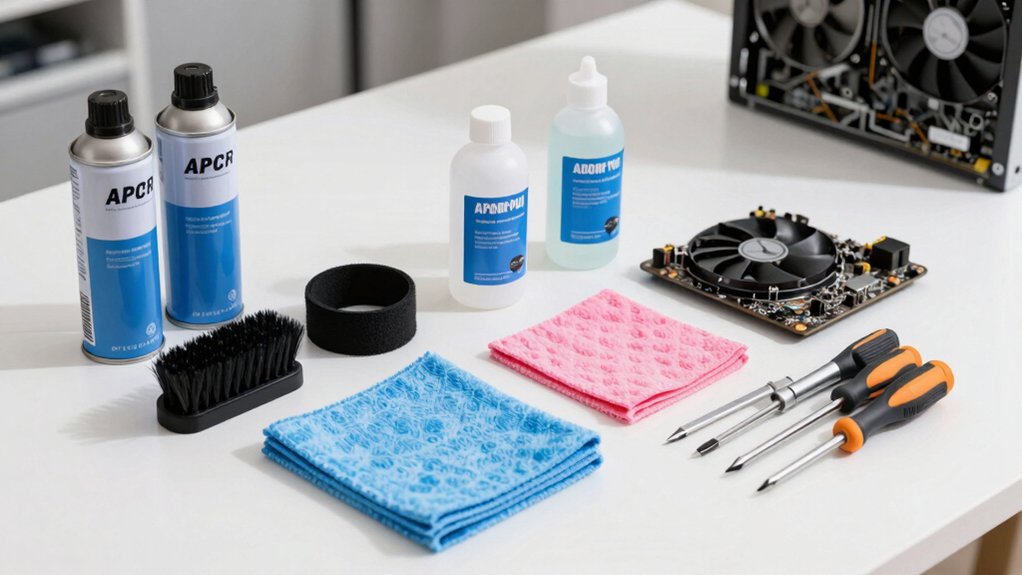
When you’re selecting a PC cleaning kit, you’ll want to evaluate the power and performance specifications along with battery life and runtime duration to ensure the tool can handle your cleaning tasks without frequent recharging. Next, examine the included accessories and versatility of the kit, as well as its portability and design comfort, since you’ll be maneuvering it around tight spaces inside your computer case and on delicate components. Finally, check the warranty coverage and support options provided by the manufacturer so you’re protected if the cleaning kit malfunctions during use.
Power and Performance Specifications
Start by examining the RPM (revolutions per minute) rating of any PC cleaning kit you’re considering, as this directly impacts how effectively the device removes dust and debris from your computer’s components. Look for higher ratings, up to 110,000 RPM, which deliver stronger air pressure and faster debris removal. Next, check for multiple speed settings—such as Gear 1, Gear 2, and Gear 3, or Low, Medium, and High options—allowing you to adjust performance for delicate versus tough cleaning tasks. Review the motor type; brushless motors provide better longevity and consistent power output. Finally, compare continuous runtime specifications on each gear setting, typically ranging up to 240 minutes on lower gears, to determine how long your cleaning sessions can last between charges.
Battery Life and Runtime Duration
How much runtime do you actually need from a PC cleaning kit? Battery life varies significantly by model, ranging from 20–40 minutes of continuous use to up to 240 minutes on lower settings. Consider your cleaning tasks first. For quick keyboard and monitor work, 20–40 minutes suffices. For extended deep cleaning, choose models with larger capacity batteries like 7500 mAh units that deliver longer runtimes. Keep in mind that higher RPM settings and multi-speed configurations drain batteries faster due to increased power draw. If you’re cleaning multiple computers, select a kit with fast charging capabilities—Type-C chargers reach full capacity in 3.5–4 hours, minimizing downtime. Compare runtime equivalency to disposable cans to gauge efficiency for your specific workload.
Included Accessories and Versatility
A quality PC cleaning kit should include multiple nozzles and brushes designed specifically for different cleaning tasks—narrow nozzles for keyboard gaps, soft brushes for screen edges, and angled attachments for hard-to-reach areas between components. You’ll want anti-static options to prevent damage during cleaning. Look for kits offering microfiber cloths, replacement cloths, and retractable brushes for convenient reuse. Diverse accessories like anti-static tweezers, key pullers, and lens pens expand your kit’s application across various devices and surfaces. Verify that all components work safely with electronics, screens, and non-electronic surfaces. This compatibility ensures you can address cleaning needs throughout your entire computer setup without switching between multiple products or risking equipment damage.
Portability and Design Comfort
When you’re selecting a PC cleaning kit, consider whether you’ll be carrying it between rooms, storing it in a closet, or transporting it to different locations. Lightweight designs reduce fatigue during extended cleaning sessions, making them ideal if you’ll handle the kit frequently. Compact form factors fit easily into camera bags, backpacks, or glove compartments for convenient transport. Evaluate grip ergonomics and handle comfort to maintain precision when directing airflow or positioning brushes around delicate components. Battery-powered models with large capacities support longer cleaning periods without frequent recharging, though they add weight. Corded options with extended cords—such as 8.2-foot lengths—eliminate battery concerns but require proximity to electrical outlets. Match your chosen model to your typical cleaning environment and storage space.
Warranty Coverage and Support
Because electronics like PC cleaning kits can experience motor failure, battery degradation, or component wear over time, you’ll want to examine the warranty terms before making your purchase. Review what’s covered: defects, workmanship, and specific parts. Identify exclusions to avoid surprise costs later. Most kits offer 1 to 24 months of coverage; extended warranties provide additional protection for frequent users. Verify the brand offers accessible support channels—24/7 chat, responsive phone lines, or straightforward return processes. Check if replacements or repairs are included without extra fees. Reliable manufacturers clearly state these terms upfront. Compare warranty lengths across similar kits; longer coverage generally indicates manufacturer confidence. Prioritize brands with established support reputations to ensure you can quickly resolve installation or usage issues when they arise.
Final Thoughts
You’ll want to select a PC cleaning kit that matches your specific needs. Choose compressed air dusters for fans and hard-to-reach spaces, keyboard brushes for detailed debris removal, and screen cleaners for displays. Verify the kit includes anti-static protection to safeguard components. Check the warranty and available replacements. Start with fans, move to keyboards, then finish with screens. This systematic approach prevents damage while maintaining peak performance.

Meet Ry, “TechGuru,” a 36-year-old technology enthusiast with a deep passion for tech innovations. With extensive experience, he specializes in gaming hardware and software, and has expertise in gadgets, custom PCs, and audio.
Besides writing about tech and reviewing new products, he enjoys traveling, hiking, and photography. Committed to keeping up with the latest industry trends, he aims to guide readers in making informed tech decisions.