


When you’re building a Raspberry Pi 5 system, you’ll need a case that protects your hardware while supporting your specific workload. You can choose from aluminum enclosures with active cooling, compact NVMe-ready designs, or models with integrated displays. Each option offers different advantages for cooling, expansion, and port accessibility. The right case depends on whether you’re running AI tasks, managing storage-intensive projects, or prioritizing portability. Here’s what you need to know.
| Pironman 5 NVMe SSD Mini PC Case for Raspberry Pi 5 |

| Best All-In-One | Cooling System: Tower cooler with dual RGB fans | Storage Expansion: Single NVMe M.2 slot (2230-2280) | Display Features: 0.96″ OLED module showing system stats | VIEW LATEST PRICE | Read Our Analysis |
| Argon NEO 5 Aluminum Case for Raspberry Pi 5 |

| Best Passive Cooling | Cooling System: 30mm PWM fan with passive cooling fins | Storage Expansion: No storage expansion | Display Features: No display | VIEW LATEST PRICE | Read Our Analysis |
| Pironman 5-MAX Raspberry Pi 5 Case with NVMe SSD |
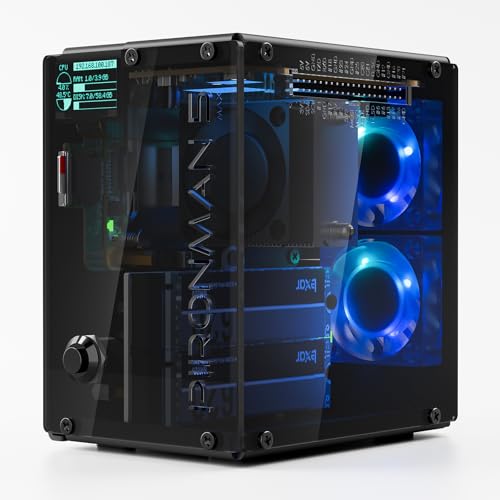
| Best For Power Users | Cooling System: PWM tower cooler with dual RGB fans | Storage Expansion: Dual NVMe M.2 slots with RAID 0/1 support | Display Features: 0.96″ OLED module with customizable display | VIEW LATEST PRICE | Read Our Analysis |
| FREENOVE Raspberry Pi 5 Case with Touchscreen |

| Best With Display | Cooling System: Active cooler with dual fans, auto start/stop | Storage Expansion: Single M.2 NVMe slot with 128GB SSD included | Display Features: 4.3″ touchscreen plus 0.96″ OLED screen | VIEW LATEST PRICE | Read Our Analysis |
| GeeekPi Metal Case for Raspberry Pi 5 with Cooler |

| Best Budget-Friendly | Cooling System: Active cooler with aluminum heatsink and PWM fan | Storage Expansion: No storage expansion | Display Features: No display | VIEW LATEST PRICE | Read Our Analysis |
| Argon NEO 5 M.2 NVMe Case for Raspberry Pi 5 |

| Best For Storage | Cooling System: Integrated cooling fan with built-in heatsink | Storage Expansion: Single M.2 NVMe slot (up to 2280) | Display Features: No display | VIEW LATEST PRICE | Read Our Analysis |
| ElectroCookie Raspberry Pi 5 Aluminum Case with Cooling Fan |
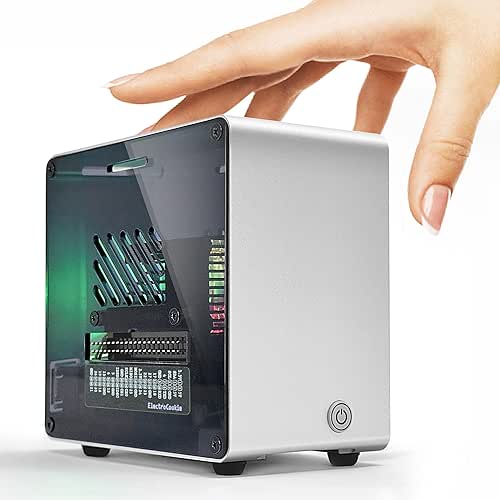
| Best Sleek Design | Cooling System: Large active cooler with RGB-lit PWM fan | Storage Expansion: Compatible with M.2 HAT NVMe SSD Shield (sold separately) | Display Features: No display | VIEW LATEST PRICE | Read Our Analysis |
More Details on Our Top Picks
Pironman 5 NVMe SSD Mini PC Case for Raspberry Pi 5
Are you building a Raspberry Pi 5 system that needs storage, cooling, and display capabilities all in one compact package? The Pironman 5 NVMe SSD Mini PC Case delivers exactly that. You’ll get an aluminum chassis with a tower cooler and dual RGB fans for efficient heat management. The case supports NVMe M.2 SSDs in 2230, 2242, 2260, and 2280 sizes, giving you flexible storage options. A built-in 0.96″ OLED display shows CPU usage, RAM, temperature, and IP address in real time. You also receive an external GPIO extender, safe shutdown feature, and Hailo-8L AI accelerator compatibility. Assembly takes minutes with the included step-by-step guide. Dimensions are 6.1″ D x 5.3″ W x 3.7″ H, making it genuinely compact for desktop setups.
- Cooling System:Tower cooler with dual RGB fans
- Storage Expansion:Single NVMe M.2 slot (2230-2280)
- Display Features:0.96″ OLED module showing system stats
- AI Accelerator Support:Hailo-8L AI accelerator compatible
- Material/Build:Aluminum chassis
- Additional Ports/Connectivity:External GPIO extender, HDMI ports, USB 2.0 port
- Additional Feature:Safe shutdown power control
- Additional Feature:0.96″ OLED system monitoring
- Additional Feature:IR receiver included
Argon NEO 5 Aluminum Case for Raspberry Pi 5
Looking to run intensive AI applications on your Raspberry Pi 5 without thermal throttling? The Argon NEO 5 delivers dual cooling through a built-in 30mm PWM fan and passive aluminum fins, keeping your board at optimal temperatures during demanding tasks like Hailo AI and OpenClaw processing. The aluminum construction protects your Raspberry Pi 5 while maintaining full port accessibility. Installation is straightforward: secure the case using the bottom plate mounting points compatible with all Pi 5 models (2GB through 16GB). This setup ensures reliable performance during sustained computational workloads without overheating complications.
- Cooling System:30mm PWM fan with passive cooling fins
- Storage Expansion:No storage expansion
- Display Features:No display
- AI Accelerator Support:Hailo AI accelerator compatible
- Material/Build:Aluminum case
- Additional Ports/Connectivity:All ports accessible, no expansion
- Additional Feature:Dual passive/active cooling
- Additional Feature:Bottom-mounted installation points
- Additional Feature:All ports fully accessible
Pironman 5-MAX Raspberry Pi 5 Case with NVMe SSD
The Pironman 5-MAX delivers dual NVMe SSD slots with RAID support, making it ideal for power users who need expandable storage and serious computing capability. You’ll install M.2 drives (2230–2280 sizes) into the two slots and configure RAID 0 for speed or RAID 1 for data protection. The case includes a PWM tower cooler and dual RGB fans to handle sustained workloads. An integrated 0.96″ OLED display shows CPU usage, memory, temperature, and IP address in real time. The safe power button enables controlled shutdowns. You mount your Raspberry Pi 5 (sold separately) on the bottom, then secure the tempered glass enclosure panels. This setup works well for NAS systems, AI edge devices, and Home Assistant hubs.
- Cooling System:PWM tower cooler with dual RGB fans
- Storage Expansion:Dual NVMe M.2 slots with RAID 0/1 support
- Display Features:0.96″ OLED module with customizable display
- AI Accelerator Support:Hailo-8L AI accelerator compatible
- Material/Build:Tempered glass enclosure with aluminum components
- Additional Ports/Connectivity:External GPIO extender, dual HDMI ports
- Additional Feature:Dual NVMe RAID support
- Additional Feature:Dual transparent glass panels
- Additional Feature:RTC battery timekeeping
FREENOVE Raspberry Pi 5 Case with Touchscreen
Want a Raspberry Pi 5 setup that handles displays, storage, and cooling in one unit? The FREENOVE case integrates a 4.3-inch touchscreen, 0.96-inch OLED display, and M.2 NVMe SSD slot for expanded storage. You’ll get dual-fan active cooling with temperature-based auto-control, stereo speakers, and 3.5mm and optical audio outputs. The case exposes GPIO pins for accessibility and includes 128GB SSD with PCIe speeds up to 804 MB/s read and 404 MB/s write. Download setup tutorials from the product box link to configure your SSD as your system disk and customize RGB lighting. This kit delivers multi-display options with reliable thermal management.
- Cooling System:Active cooler with dual fans, auto start/stop
- Storage Expansion:Single M.2 NVMe slot with 128GB SSD included
- Display Features:4.3″ touchscreen plus 0.96″ OLED screen
- AI Accelerator Support:No AI accelerator support mentioned
- Material/Build:Plastic/composite case kit
- Additional Ports/Connectivity:Exposed GPIO, stereo speakers, 3.5mm and S/PDIF audio
- Additional Feature:4.3″ color touchscreen display
- Additional Feature:Built-in stereo speakers
- Additional Feature:128GB SSD pre-included
GeeekPi Metal Case for Raspberry Pi 5 with Cooler
Need reliable protection without breaking your budget? The GeeekPi Metal Case combines durable aluminum construction with an active cooling system. You’ll get full port access to USB-C power, micro HDMI, USB, Ethernet, and SD card slots. The included PWM fan and aluminum heatsink work together to maintain optimal operating temperatures during extended use. The package includes a screwdriver and screw pack for straightforward installation. You can use this case with Raspberry Pi 5 4GB or 8GB boards and compatible PCIe peripherals like the X1000 and X1001. Note that the Raspberry Pi 5 board isn’t included separately.
- Cooling System:Active cooler with aluminum heatsink and PWM fan
- Storage Expansion:No storage expansion
- Display Features:No display
- AI Accelerator Support:No AI accelerator support mentioned
- Material/Build:Metal case
- Additional Ports/Connectivity:Access to all ports, supports PCIe peripheral boards
- Additional Feature:Included screwdriver/screw pack
- Additional Feature:PCIe peripheral board support
- Additional Feature:MIPI DSI/CSI connector access
Argon NEO 5 M.2 NVMe Case for Raspberry Pi 5
If you’re running storage-heavy AI workloads on your Raspberry Pi 5, the Argon NEO 5 M.2 NVMe case delivers the enclosure you need to keep your drive protected while maintaining peak performance. This aluminum case houses any M.2 NVMe drive up to 2280 size, connecting directly to your Raspberry Pi 5’s PCIe slot via an included FPC impedance-controlled cable. The integrated cooling fan and heatsink work together to manage heat during intensive operations, extending your device’s lifespan. You’ll boot faster and access storage more reliably than standard setups. The case supports AI applications like Hailo, AI Agents, and OpenClaw, making it ideal for machine learning projects demanding consistent, high-speed data transfer and thermal stability.
- Cooling System:Integrated cooling fan with built-in heatsink
- Storage Expansion:Single M.2 NVMe slot (up to 2280)
- Display Features:No display
- AI Accelerator Support:Hailo AI accelerator compatible
- Material/Build:Aluminum enclosure
- Additional Ports/Connectivity:FPC impedance-controlled cable included
- Additional Feature:Direct M.2 NVMe boot
- Additional Feature:Impedance-controlled FPC cable
- Additional Feature:Up to 2280 drive support
ElectroCookie Raspberry Pi 5 Aluminum Case with Cooling Fan
The ElectroCookie aluminum case delivers a sleek, modern design for users wanting professional aesthetics alongside reliable thermal management. You’ll access GPIO pins, SD card slots, USB ports, and Micro HDMI connections without removing the case. The active RGB-lit PWM fan automatically adjusts speed based on CPU temperature, cooling your Raspberry Pi 5 efficiently. You can expand storage by installing a compatible M.2 NVMe SSD shield separately. The soft-touch power button responds smoothly. Weighing 0.28 kilograms with dimensions of 4.1″D x 2.4″W x 3.8″H, this aluminum tower fits desktop and workshop setups. Note that this case isn’t compatible with Raspberry Pi 4 models due to port differences.
- Cooling System:Large active cooler with RGB-lit PWM fan
- Storage Expansion:Compatible with M.2 HAT NVMe SSD Shield (sold separately)
- Display Features:No display
- AI Accelerator Support:No AI accelerator support mentioned
- Material/Build:Aluminum mini tower case
- Additional Ports/Connectivity:All ports accessible, GPIO pins exposed
- Additional Feature:RGB PWM fan lighting
- Additional Feature:Mini PC-style tower design
- Additional Feature:Soft-touch power button
Factors to Consider When Choosing Raspberry Pi 5 Cases
When you’re selecting a Raspberry Pi 5 case, you’ll need to evaluate several key factors: cooling system performance to prevent overheating during intensive tasks, storage expansion capabilities for additional drives or modules, and display and monitoring options if you’re running headless or need real-time performance data. You should also assess the build quality and materials of the case itself, checking whether it uses durable aluminum, plastic, or hybrid construction that can withstand your environment. Finally, confirm that your chosen case supports AI accelerator compatibility if you plan to use machine learning tools or accelerator modules with your Raspberry Pi 5.
Cooling System Performance
How much heat your Raspberry Pi 5 generates depends directly on your workload, and choosing a case with proper cooling becomes essential when you run demanding applications or overclock your device. Active cooling with PWM fans provides stronger heat dissipation than passive cooling alone. Look for cases featuring dual fans and dust-filtered configurations, which improve airflow and reduce dust accumulation that degrades performance. Cases with integrated heatsinks and aluminum enclosures enhance thermal conductivity, moving heat away from your board efficiently. Select designs with auto-adjusting fan speed based on temperature to maintain stable performance without manual adjustment. Avoid cases with RGB lighting or designs that obstruct port access, as these features can disrupt airflow patterns and compromise cooling efficiency.
Storage Expansion Capabilities
Want faster boot times and higher storage capacity? Check your case’s NVMe M.2 slot configuration first. Most Pi 5 cases support single slots accommodating drives from 2230 to 2280 sizes. Some premium cases offer dual NVMe slots with RAID 0 for combined performance or RAID 1 for data redundancy. Verify that your case supports M-Key NVMe drives specifically. Install your chosen drive into the available slot to use it as your system drive, which greatly boosts OS boot speed and overall storage throughput. If you need expanded PCIe-based storage beyond the Pi’s onboard slots, select cases with PCIe Gen2 or Gen3 switches. Review compatibility requirements carefully, as certain configurations may require external adapters or thermal shields for proper operation and heat management.
Display And Monitoring Options
Most Raspberry Pi 5 cases offer built-in display solutions that let you monitor your system’s performance directly without connecting external tools or devices. You’ll find two primary options: a compact 0.96-inch OLED display showing CPU usage, RAM consumption, temperature, and IP address for quick status checks, or a full-color 4.3-inch touchscreen (800 x 480) for interactive control and comprehensive system overview. Some cases include dual full-size HDMI ports, enabling multi-display setups for enhanced visual monitoring. Built-in PWM cooling and RGB lighting maintain stable temperatures, preventing thermal throttling that would skew performance readings. Select cases also provide external GPIO extenders and integration guidance for home automation platforms, streamlining your monitoring setup.
Build Quality And Materials
The durability of your Raspberry Pi 5 case depends on the materials used in its construction. Choose aluminum chassis designs over plastic enclosures to gain superior heat dissipation and long-term durability. Aluminum effectively pulls heat away from your components, protecting them from thermal damage. Plastic housings lack this capability and degrade faster under sustained use. Evaluate cases featuring dual RGB fans or active cooling towers, which maintain safe operating temperatures during intensive tasks. Transparent or smoked panels let you monitor your setup visually while housing cooling components. Some premium cases include integrated OLED or LCD displays for real-time system monitoring. Verify that your case supports integrated PCIe and NVMe expansion, along with external GPIO extenders. These features ensure robust, expandable construction designed for serious projects.
AI Accelerator Compatibility
If you’re planning to run AI inference tasks on your Raspberry Pi 5, you’ll need to verify that your case supports AI accelerators like Hailo-8L before making a purchase. Check whether the case exposes PCIe slots or M.2/NVMe routes without obstruction, since accelerators require unblocked pathways to function. Review the manufacturer’s specifications for mentions of RAID capacity, NVMe support, or PCIe Gen2/Gen3 compatibility. Examine cooling design features—tower coolers and active fans are essential for sustaining AI workloads’ thermal demands. Confirm that power delivery can handle accelerator requirements. Not all cases support these components, so verification prevents incompatibility issues and ensures your AI hardware integrates properly into your setup.
Port Accessibility And Design
How accessible are your ports when a case is installed? You’ll want to verify that USB-C, micro HDMI, USB, Ethernet, and SD card slots remain fully reachable. Check whether the case design includes cutouts for all ports your setup requires. If you’re using an M.2 NVMe drive, confirm the case allows straightforward drive installation without blocking other connections. Some cases feature external GPIO extenders or front-facing headers to expand connectivity without compromising existing port access. Open-access designs let you plug and unplug peripherals easily while keeping cables organized. Review each case’s layout carefully, especially if you need dual HDMI or multi-display support, since these options reduce available video port access. Prioritize cases that balance protection with unobstructed port reach for your specific needs.
Budget And Value Proposition
What’s your actual spending limit, and which features’ll you genuinely use? Start by listing your project requirements. If you’re running basic tasks, a simple plastic case costs $15–$25 and meets your needs. For sustained workloads, active cooling cases run $40–$60 but prevent thermal throttling. Add NVMe storage support if you need faster data access; expect $50–$80. Consider warranty coverage and return policies—a 1-year warranty reduces purchasing risk on higher-priced models. Next, identify unnecessary add-ons like RGB lighting or OLED displays that inflate costs without serving your function. Finally, calculate total value by dividing monthly usage hours into the case price. Higher-cost cases justify their expense through longevity and performance reliability.
Final Thoughts
When selecting your Raspberry Pi 5 case, prioritize cooling capacity, port accessibility, and your specific use case. Aluminum cases with active cooling suit intensive workloads like AI projects. If you need storage expansion, choose models with NVMe support. For basic protection, standard plastic cases work fine. Verify the case fits your Pi 5 exactly and accommodates any additional hardware you’re installing before purchasing.

Meet Ry, “TechGuru,” a 36-year-old technology enthusiast with a deep passion for tech innovations. With extensive experience, he specializes in gaming hardware and software, and has expertise in gadgets, custom PCs, and audio.
Besides writing about tech and reviewing new products, he enjoys traveling, hiking, and photography. Committed to keeping up with the latest industry trends, he aims to guide readers in making informed tech decisions.