

When you’re setting up a retro-gaming setup, you’ll need to match your monitor to your specific hardware and space constraints. You’ve got options ranging from tiny 3.5-inch screens for Raspberry Pi builds to larger 22-inch displays for serious gaming sessions. Each monitor type offers different benefits—some prioritize portability, others prioritize resolution or refresh rates. The right choice depends on what you’re actually playing and where you’ll be playing it. Here’s how to find the perfect fit.
| 7 Inch Portable HDMI Monitor with Built-in Speakers |

| Versatile Multi-Input Option | Screen Size: 7 inches | Native Resolution: 1024×600 | Input Connectivity: HDMI, VGA, AV, BNC | VIEW LATEST PRICE | Read Our Analysis |
| Raspberry Pi 3.5 Inch Touch Screen TFT LCD Display |

| Raspberry Pi Native Display | Screen Size: 3.5 inches | Native Resolution: 320×480 | Input Connectivity: SPI direct connection | VIEW LATEST PRICE | Read Our Analysis |
| SKitphrati 17″ Square Monitor 1280×1024 with VESA Mount |

| Desktop Workstation Pick | Screen Size: 17 inches | Native Resolution: 1280×1024 | Input Connectivity: HDMI, VGA, Component | VIEW LATEST PRICE | Read Our Analysis |
| AOC 16T20 Portable Monitor 15.6″ FHD USB-C |
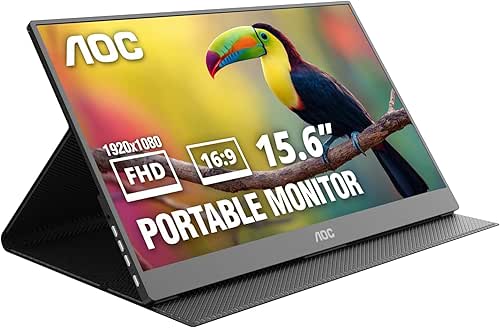
| Best Portable Solution | Screen Size: 15.6 inches | Native Resolution: 1920×1080 | Input Connectivity: USB-C x2, Mini HDMI | VIEW LATEST PRICE | Read Our Analysis |
| Sceptre 22-Inch Gaming Monitor 144Hz FHD (E225W-FW144) |

| High-Performance Gaming Monitor | Screen Size: 22 inches | Native Resolution: 1920×1080 | Input Connectivity: HDMI, DisplayPort | VIEW LATEST PRICE | Read Our Analysis |
| Small Security Monitor with HDMI & VGA Port |

| Security Monitoring Specialist | Screen Size: 10 inches | Native Resolution: 1920×1280 | Input Connectivity: HDMI, VGA | VIEW LATEST PRICE | Read Our Analysis |
| Eyoyo 8 Inch IPS Monitor with HDMI/VGA/AV Input |

| Compact All-Purpose Display | Screen Size: 8 inches | Native Resolution: 1024×768 | Input Connectivity: HDMI, VGA, AV, BNC, USB | VIEW LATEST PRICE | Read Our Analysis |
More Details on Our Top Picks
7 Inch Portable HDMI Monitor with Built-in Speakers
The 7-inch portable monitor is a versatile multi-input option that works well for retro gaming setups. You can connect it using HDMI, VGA, AV, or BNC inputs depending on your gaming device. The 1024×600 native resolution supports up to 1920×1080, giving you flexibility with older and newer systems. Power it through DC 12V or Micro USB, making it compatible with standard power banks for portability. The IPS display offers a 178-degree viewing angle and 2ms response time, suitable for gaming. Built-in speakers eliminate the need for external audio equipment. The aluminum shell provides durability while keeping the monitor lightweight and easy to transport between gaming setups.
- Screen Size:7 inches
- Native Resolution:1024×600
- Input Connectivity:HDMI, VGA, AV, BNC
- Refresh Rate:60 Hz
- Built-in Audio:Built-in speakers
- Portability/Form Factor:Portable with aluminum shell
- Additional Feature:Multi-input connectivity (HDMI/VGA/AV/BNC)
- Additional Feature:Aluminum shell, scratch-resistant
- Additional Feature:Power bank compatible
Raspberry Pi 3.5 Inch Touch Screen TFT LCD Display
Want a native display that connects directly to your Raspberry Pi 3 B+ without extra power or complicated setup? This 3.5-inch TFT LCD screen offers 320×480 resolution with resistive touch control. It uses SPI connection technology and includes a protective PC case with split design for straightforward installation. The display delivers stable, flicker-free output at approximately 50 Hz refresh rate. You’ll receive tweezers and mounting accessories for assembly. The package includes a pre-installed driver system image, eliminating software configuration steps. The included white nylon column provides balance. This monitor suits RetroP, Raspbian, and Ubuntu systems, making it practical for retro gaming setups without requiring additional power sources.
- Screen Size:3.5 inches
- Native Resolution:320×480
- Input Connectivity:SPI direct connection
- Refresh Rate:~50 Hz
- Built-in Audio:No speakers
- Portability/Form Factor:Compact (3.3″D x 2″W x 1.57″H) with case
- Additional Feature:Resistive touch control included
- Additional Feature:Direct SPI connection
- Additional Feature:Pre-installed driver system image
SKitphrati 17″ Square Monitor 1280×1024 with VESA Mount
Looking for a desktop workstation pick that handles both retro gaming and productivity? The SKitphrati 17″ monitor delivers a 1280×1024 resolution with a 5:4 aspect ratio, giving you extra vertical space for coding and document editing. Its TN panel offers 75Hz refresh rates and 250 nits brightness, suitable for gaming on PS3, PS4, Xbox 360, and Switch. The monitor includes one HDMI port and VGA connectivity, so you’ll connect your gaming console or PC directly. Its VESA mount compatibility lets you attach it to wall brackets or monitor arms, freeing up desk space. The 45% sRGB color accuracy supports photo editing workflows. Two-year warranty coverage protects your investment for extended use.
- Screen Size:17 inches
- Native Resolution:1280×1024
- Input Connectivity:HDMI, VGA, Component
- Refresh Rate:75 Hz
- Built-in Audio:Not specified
- Portability/Form Factor:Fixed desktop/wall-mount monitor
- Additional Feature:5:4 aspect ratio (extra vertical space)
- Additional Feature:VESA 100mm wall mount compatible
- Additional Feature:45% sRGB color correction
AOC 16T20 Portable Monitor 15.6″ FHD USB-C
Need a portable gaming display you’ll actually take with you? The AOC 16T20 gives you a 15.6-inch FHD 1920×1080 IPS panel with 170-degree viewing angles and 60Hz refresh rate. Connect it via USB-C to your laptop, MacBook, PC, or gaming console—PS5, Xbox, or Switch work seamlessly. The monitor weighs 1.54 pounds and includes a smart cover for protection during travel. Power delivery happens through USB-C, eliminating extra cables. Setup requires no drivers; plug in and start gaming immediately. Built-in speakers handle audio without external equipment. This monitor supports spreadsheets, video calls, and streaming alongside gaming. The glossy screen delivers vibrant colors and 1000:1 contrast for crisp visuals.
- Screen Size:15.6 inches
- Native Resolution:1920×1080
- Input Connectivity:USB-C x2, Mini HDMI
- Refresh Rate:60 Hz
- Built-in Audio:Built-in speakers
- Portability/Form Factor:Ultra-portable (1.54 lb) with smart cover
- Additional Feature:USB-C power delivery included
- Additional Feature:Premium smart cover included
- Additional Feature:No drivers required setup
Sceptre 22-Inch Gaming Monitor 144Hz FHD (E225W-FW144)
The Sceptre E225W-FW144G delivers high-performance gaming at a compact 22-inch size. You’ll get a 1920×1080 resolution with a 144Hz refresh rate, making fast-paced action smooth and responsive. The 1ms response time reduces motion blur during gameplay. Connect your system using either HDMI or DisplayPort. FreeSync adaptive sync technology minimizes screen tearing when gaming. The matte screen finish reduces glare, and Blue Light Shift technology lessens eye strain during extended sessions. Built-in speakers eliminate the need for external audio equipment. The nearly bezel-free design works well if you’re setting up multiple monitors side-by-side.
- Screen Size:22 inches
- Native Resolution:1920×1080
- Input Connectivity:HDMI, DisplayPort
- Refresh Rate:144 Hz
- Built-in Audio:Built-in speakers
- Portability/Form Factor:Standard desktop gaming monitor
- Additional Feature:Blue Light Shift technology
- Additional Feature:FreeSync adaptive sync supported
- Additional Feature:1ms response time
Small Security Monitor with HDMI & VGA Port
Security monitoring specialists’ll find this 10-inch portable display cuts through the complexity of multi-camera setups. The 1920×1280 FHD resolution delivers crisp detail across multiple security feeds simultaneously. Dual HDMI and VGA ports connect directly to cameras, DVRs, or mini PCs without adapters. The high-brightness IPS panel remains visible in various lighting conditions. Mount it using the included stand for desktop placement or attach it to a wall with VESA compatibility. Built-in speakers provide audio alerts. This monitor handles real-time surveillance for shops, offices, and remote locations efficiently.
- Screen Size:10 inches
- Native Resolution:1920×1280
- Input Connectivity:HDMI, VGA
- Refresh Rate:Not specified
- Built-in Audio:Built-in dual speakers
- Portability/Form Factor:Portable 10-inch with moon stand
- Additional Feature:Moon-shaped stand included
- Additional Feature:16:10 FHD resolution (1920×1280)
- Additional Feature:VESA mount compatible
Eyoyo 8 Inch IPS Monitor with HDMI/VGA/AV Input
For retro gaming enthusiasts who need a compact all-purpose display, Eyoyo’s 8-inch IPS monitor delivers native 1024×768 resolution paired with multiple input options. Connect your classic consoles, Raspberry Pi, or DVR systems using HDMI, VGA, AV, or BNC ports. The 4:3 aspect ratio matches legacy devices perfectly. Its IPS panel produces accurate colors and 170° viewing angles. At 0.9 pounds with a desktop stand included, you’ll position it easily in tight spaces. Flip the image horizontally or vertically for unconventional mounting. Built-in speakers handle audio directly. The monitor runs 24/7 reliably on 12V at 7.2W consumption, making it ideal for continuous retro gaming setups.
- Screen Size:8 inches
- Native Resolution:1024×768
- Input Connectivity:HDMI, VGA, AV, BNC, USB
- Refresh Rate:60 Hz
- Built-in Audio:Built-in speakers with remote
- Portability/Form Factor:Compact 8-inch with desktop stand
- Additional Feature:Flexible image orientation (flip)
- Additional Feature:Remote control included
- Additional Feature:VESA 75×75 compatibility
Factors to Consider When Choosing a Small Monitor for Retro Gaming
When you’re shopping for a small retro gaming monitor, you’ll need to evaluate several key specifications: resolution and aspect ratio determine how sharp your image appears and whether it matches your console’s original output, input connectivity options like HDMI, VGA, and AV let you connect different gaming systems, and response time performance affects how quickly pixels change during fast-action games. You should also examine the display panel technology (IPS, TN, or VA panels each offer different color accuracy and viewing angles) and check the brightness and contrast levels to ensure the screen displays dark scenes clearly without washing out bright areas. Comparing these factors across your options helps you find a monitor that balances compatibility with your gaming collection and delivers the visual quality you’re after.
Resolution and Aspect Ratio
Why does aspect ratio matter so much for retro gaming? Classic games were designed for specific screen shapes—typically 4:3 or square formats. When you use a widescreen monitor, these games stretch unnaturally and distort the original pixel art.
Choose a monitor with a 4:3 or 5:4 aspect ratio to display games as developers intended. If you select a 16:10 panel instead, you’ll gain extra vertical space for menus and UI elements during emulation.
For resolution, pick native options like 320×480 or 1024×768. These preserve pixel art clarity without requiring heavy letterboxing or pillarboxing. Some small monitors upscale to 1920×1080 while maintaining low input lag, giving you flexibility. Match your monitor’s resolution to your games’ native output for authentic visuals.
Input Connectivity Options
What inputs does your monitor actually need to handle your retro gaming setup?
Start by identifying your devices. If you’re connecting modern consoles or PCs, prioritize HDMI and VGA inputs for reliable digital and analog video transmission. For classic systems from the AV era—like older Nintendo or Sega units—look for monitors offering AV or composite inputs. Some specialized models include BNC connectors, which work well for CCTV-style outputs and professional retro setups.
Next, consider audio connectivity. Monitors with built-in HDMI audio eliminate the need for separate speaker cables, reducing clutter significantly. Finally, check for USB-C or USB power options. These simplify cable management when using compact gaming rigs or laptops, consolidating power and data into fewer connections.
Response Time Performance
How quickly your monitor’s pixels respond directly affects your retro gaming experience, especially for titles demanding fast reflexes or featuring rapid motion sequences. Target response times of 5 milliseconds or lower to minimize motion blur and ghosting during pixel transitions. For fast-paced games, 1–2 ms proves ideal. Verify advertised specs against independent reviews, since manufacturers often overstate actual performance. Prioritize gray-to-gray response measurements over peak refresh rate claims. TN panels typically deliver faster response times than IPS options, though IPS provides superior color accuracy. Weigh your priorities: choose TN for speed-critical retro titles, or IPS if color fidelity matters equally. Check real-world gaming scenario tests rather than laboratory conditions to ensure the monitor performs as claimed during actual gameplay.
Display Panel Technology
Display panel technology determines not only how fast your monitor responds, but also how accurately it displays colors and maintains image quality from different viewing angles—both factors that matter when you’re sitting close to a small screen during extended retro gaming sessions.
Choose IPS panels for wide viewing angles (around 170°) and consistent color accuracy. They’re ideal if you’re gaming from various positions. Avoid TN panels, which offer narrower viewing angles and less reliable colors despite faster response times.
Select matte finishes over glossy or touchscreen options to reduce reflections and improve gameplay clarity. Match your monitor’s native resolution to your retro game’s input resolution—use 1280×1024 or 320×480 examples—to minimize scaling artifacts and keep titles sharp.
Brightness and Contrast Levels
Why does a monitor’s brightness matter so much for retro gaming? You need adequate brightness to see HUD elements and dithering details clearly, especially in dark scenes. Aim for monitors with at least 250–300 nits brightness, which prevents graphics from looking washed out in well-lit rooms. Pair this with a contrast ratio of 1000:1 or higher to sharpen the distinction between dark and bright areas in classic games. IPS panels deliver consistent brightness and color accuracy across viewing angles, ensuring your retro visuals appear evenly lit from different positions. Watch for glossy screens, which reflect ambient light and reduce perceived contrast during daytime gaming. Matte screens handle reflections better, protecting your image quality throughout the day.
Portability and Form Factor
When you’re building a retro gaming setup that travels with you, the monitor’s physical design matters just as much as its display quality. Prioritize a compact 8–10 inch display to maximize portability without sacrificing usability. Select a lightweight chassis weighing around 0.9–1.5 lb to reduce carry burden during travel. Verify the monitor includes multiple input options—HDMI, VGA, and AV—so you can connect various classic consoles and adapters without additional equipment. Check for a built-in stand or VESA mounting capability to adapt the monitor to different gaming environments. Finally, confirm the power draw stays around 5–10 W to extend battery life when using portable power sources during extended gaming sessions away from outlets.
Mounting Flexibility Solutions
Once you’ve confirmed your monitor’s portability and input options, you’ll need to evaluate how it’ll attach to your gaming space. Check whether your monitor supports VESA mounting, typically 75×75 mm, which allows wall or arm mounting for flexible setups. Verify that the monitor includes a built-in stand for desktop placement or has a compact footprint for space-constrained areas. Confirm the manufacturer provides mounting hardware or compatible brackets—some models specify VESA compatibility but don’t include actual mounts. Review cable routing options to ensure organized, accessible connections for your consoles and devices. Finally, examine the monitor’s housing material and weight to determine if it suits portable or rack-mounted configurations. These mounting considerations directly impact how effectively you’ll integrate your retro-gaming display into your available space.
Audio Capability Features
How you’ll handle sound during retro gaming depends on what audio features your small monitor actually provides. First, check whether your monitor has built-in speakers by reviewing the specifications. If it does, examine the wattage and driver details to understand audio quality. Next, verify if your monitor includes a 3.5mm headphone jack or audio output port, since not all models offer these. For retro gaming specifically, confirm that audio latency stays minimal and syncs properly with the video to prevent lip-sync problems. Additionally, determine how your monitor receives audio—some rely on HDMI audio embedded in the signal, so you’ll need to verify your console or computer supports this method. Test audio before committing to ensure it meets your gaming needs.
Final Thoughts
You’ll pick the right retro-gaming monitor by matching your setup’s needs. Choose a 7-inch portable model if you need mobility and built-in audio. Select the Raspberry Pi 3.5-inch display for dedicated single-board computers. Go with the 17-inch square monitor for desk setups requiring VESA mounting. Pick the AOC 16T20 for USB-C power convenience. Consider the 8–10-inch options if you prioritize low power draw and multiple input types.

Meet Ry, “TechGuru,” a 36-year-old technology enthusiast with a deep passion for tech innovations. With extensive experience, he specializes in gaming hardware and software, and has expertise in gadgets, custom PCs, and audio.
Besides writing about tech and reviewing new products, he enjoys traveling, hiking, and photography. Committed to keeping up with the latest industry trends, he aims to guide readers in making informed tech decisions.