

You need a reliable VGA to DVI adapter when your display and video source don’t match. Some adapters work passively, while others require power for active conversion. Your choice depends on your specific setup—whether you’re connecting a digital DVI source to an older VGA monitor or vice versa. The seven adapters reviewed here handle these scenarios differently, and selecting the wrong type wastes time and money.
| DTECH DVI to VGA Adapter 1080P Video Connector |

| Budget-Friendly Pick | Connector Type: DVI-D (24+1) Male to VGA Female | Maximum Resolution: 1080p (1920 x 1080) | Installation Type: Plug-and-play, driver-free | VIEW LATEST PRICE | Read Our Analysis |
| BENFEI Active DVI-D to VGA Adapter |

| Best Overall | Connector Type: DVI-D (24+1) Male to VGA Female | Maximum Resolution: 1920 x 1200 @60Hz | Installation Type: Plug-and-play, no driver required | VIEW LATEST PRICE | Read Our Analysis |
| DTech DVI Male to VGA Female Adapter Converter |
| Best For Gaming | Connector Type: DVI-I (24+5) Male to VGA Female | Maximum Resolution: 1080p Full HD | Installation Type: Plug-and-play, driver-free | VIEW LATEST PRICE | Read Our Analysis |
| Cables Direct Online DVI-A to VGA Adapter (2-Pack) |

| Best Value | Connector Type: DVI-A Female to VGA Male | Maximum Resolution: 1920 x 1080 | Installation Type: Plug-and-play, no drivers required | VIEW LATEST PRICE | Read Our Analysis |
| Thsucords DVI to VGA Cable 6.6FT Gold-Plated |

| Best For Long Distances | Connector Type: DVI-D (24+1) Male to VGA Male | Maximum Resolution: 1080p @60Hz / 1920 x 1200 @60Hz | Installation Type: Plug-and-play, no external devices needed | VIEW LATEST PRICE | Read Our Analysis |
| StarTech DVI to VGA Cable Adapter (DVIVGAMF8IN) |

| Premium Quality | Connector Type: DVI-I (29 pin) Male to VGA Female | Maximum Resolution: Not specified | Installation Type: Easy-to-install | VIEW LATEST PRICE | Read Our Analysis |
| gofanco Active DVI-D to VGA Adapter Converter |

| Professional Grade | Connector Type: DVI-D Male to VGA Female | Maximum Resolution: 1080p @60Hz / 1920 x 1200 @60Hz | Installation Type: Plug-and-play, no driver required | VIEW LATEST PRICE | Read Our Analysis |
More Details on Our Top Picks
DTECH DVI to VGA Adapter 1080P Video Connector
If you’re connecting a computer or device with a DVI output to an older monitor or projector that only accepts VGA input, the DTECH DVI to VGA Adapter is your straightforward solution. This passive adapter converts digital DVI signals to analog VGA output at 1080p resolution. Simply plug the DVI-D male connector into your source device and attach a VGA cable (sold separately) to the 15-pin female port connecting to your display. The gold-plated connectors resist corrosion, and secure screws prevent accidental disconnection. Installation requires no drivers—it’s plug-and-play. Note this adapter works one-way only: DVI input to VGA output. It doesn’t support reverse connections from VGA computers to DVI monitors.
- Connector Type:DVI-D (24+1) Male to VGA Female
- Maximum Resolution:1080p (1920 x 1080)
- Installation Type:Plug-and-play, driver-free
- Connector Finish:Gold-plated
- Warranty Period:180 days
- Form Factor:Passive adapter coupler
- Additional Feature:Gold-plated corrosion-resistant connectors
- Additional Feature:Grip treads and screw fastening
- Additional Feature:Compatible with gaming consoles/Raspberry Pi
BENFEI Active DVI-D to VGA Adapter
Looking to connect an older VGA display to a newer DVI-D equipped computer? The BENFEI Active DVI-D to VGA Adapter solves this compatibility problem directly. This male-to-female adapter features 40 pins and handles video signals up to 1920 x 1200 at 60Hz, supporting full HD content. The quad-shielded cable reduces signal interference during transmission. Installation requires no drivers—simply plug the DVI connector into your computer’s port and attach your VGA monitor to the adapter’s female end. The adapter works with major brands including Dell, HP, Lenovo, and ASUS systems. BENFEI backs this product with an 18-month unconditional warranty, ensuring reliable performance for office setups, home entertainment, and presentation rooms.
- Connector Type:DVI-D (24+1) Male to VGA Female
- Maximum Resolution:1920 x 1200 @60Hz
- Installation Type:Plug-and-play, no driver required
- Connector Finish:Quad-shielded, PVC jacket
- Warranty Period:18 months
- Form Factor:Active adapter cable
- Additional Feature:Quad-shielded cable signal protection
- Additional Feature:PC graphics up to 1920×1200
- Additional Feature:18-month unconditional warranty coverage
DTech DVI Male to VGA Female Adapter Converter
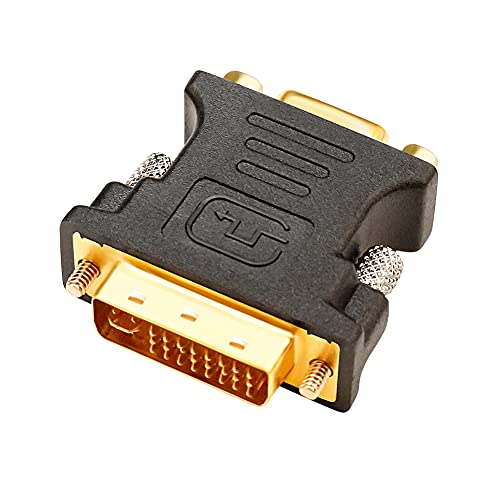
The DTech adapter works best when you’re connecting a DVI-equipped device—such as a PS4, video card, or PC—to a VGA monitor, TV, or projector. This adapter accepts DVI-I 24+5 male connectors only; verify your device uses this specific interface before purchasing. The adapter supports up to 1080p resolution and requires a separate VGA cable for connection. Gold-plated connectors resist corrosion and secure attachment screws prevent accidental disconnection. Installation is plug-and-play with no drivers needed. Note that audio won’t transmit through VGA, so you’ll need to route audio separately. The 180-day warranty covers manufacturer defects.
- Connector Type:DVI-I (24+5) Male to VGA Female
- Maximum Resolution:1080p Full HD
- Installation Type:Plug-and-play, driver-free
- Connector Finish:Gold-plated connectors
- Warranty Period:180 days
- Form Factor:Passive adapter coupler
- Additional Feature:DVI-I 24+5 pin compatibility
- Additional Feature:Gold-plated connector corrosion resistance
- Additional Feature:Supports HDTV/Plasma/DVD/Projector use
Cables Direct Online DVI-A to VGA Adapter (2-Pack)
Need a reliable adapter that converts DVI-A outputs to VGA inputs without hassle? The Cables Direct Online 2-Pack offers exactly what you need. Each adapter features a DVI-A female connector paired with a VGA male plug, enabling seamless connectivity between your devices. The gold-plated connectors ensure stable signal transmission and prevent corrosion. Simply connect the DVI-A end to your source device and plug the VGA end into your display. These adapters support resolutions up to 1920×1080, making them suitable for monitors, projectors, and laptops. No drivers or software installation is required. The compact design makes them portable for travel. You receive two adapters per package, providing backup options and convenience for multiple setups. Amazon’s 30-day return guarantee protects your purchase.
- Connector Type:DVI-A Female to VGA Male
- Maximum Resolution:1920 x 1080
- Installation Type:Plug-and-play, no drivers required
- Connector Finish:Gold-plated connectors
- Warranty Period:30-day return guarantee
- Form Factor:Passive adapter (2-pack)
- Additional Feature:Two-pack quantity per purchase
- Additional Feature:Gold-plated premium connector construction
- Additional Feature:Compact and portable design
Thsucords DVI to VGA Cable 6.6FT Gold-Plated
If you’re connecting a DVI-D graphics card or source device to an older VGA monitor or projector, the Thsucords DVI to VGA Cable 6.6FT Gold-Plated offers a straightforward solution that supports resolutions up to 1080P@60Hz. The cable features high-purity oxygen-free copper and gold-plated connectors to maintain signal stability. Its nylon braided sleeve provides durability and interference resistance. Simply plug the DVI end into your graphics card or source device and the VGA end into your display—no external adapters needed. The unidirectional design works only from DVI to VGA, so verify your connection direction. Note that this cable transmits video only; it doesn’t support audio signals.
- Connector Type:DVI-D (24+1) Male to VGA Male
- Maximum Resolution:1080p @60Hz / 1920 x 1200 @60Hz
- Installation Type:Plug-and-play, no external devices needed
- Connector Finish:Metal-plated interfaces, nylon braided
- Warranty Period:1 year
- Form Factor:6.6 ft cable
- Additional Feature:Nylon braided outer sleeve
- Additional Feature:High-purity oxygen-free copper cable
- Additional Feature:1 year manufacturer warranty included
StarTech DVI to VGA Cable Adapter (DVIVGAMF8IN)
StarTech.com’s 8-inch DVI to VGA cable adapter works best for you if you’re connecting a computer with a DVI-I output port to an older VGA monitor. The adapter features a DVI-I male connector on one end and a VGA female connector on the other, making the connection straightforward. Its 28 AWG conductor and dual shielding reduce electromagnetic interference for reliable signal transmission. The compact 8-inch dongle format minimizes port strain and blockage. Nickel-plated connectors resist oxidation and corrosion. You’ll appreciate the lifetime warranty backing this adapter’s durability and performance.
- Connector Type:DVI-I (29 pin) Male to VGA Female
- Maximum Resolution:Not specified
- Installation Type:Easy-to-install
- Connector Finish:Nickel-plated connectors
- Warranty Period:Lifetime warranty
- Form Factor:8 inch cable dongle
- Additional Feature:8-inch integrated dongle format
- Additional Feature:Aluminum-mylar foil braid shielding
- Additional Feature:Lifetime warranty coverage included
gofanco Active DVI-D to VGA Adapter Converter
The gofanco Active DVI-D to VGA Adapter Converter (Model DVIDVGA2) works best for you if your desktop or laptop has a DVI-D port but you’re connecting to a monitor or projector with only a VGA input. This active adapter converts digital DVI signals to analog VGA, supporting resolutions up to 1920 x 1200 at 60Hz and HDTV up to 1080p. Simply plug the DVI connector into your device’s DVI-D port and connect your VGA cable to the adapter’s female VGA output. No driver installation is required. The quad-shielded cable minimizes signal loss during transmission. It draws minimal power (0.5 amps) and includes a Type A power plug for North America. The adapter carries FCC, CE, and RoHS compliance certifications, backed by a one-year limited warranty with Silicon Valley-based technical support.
- Connector Type:DVI-D Male to VGA Female
- Maximum Resolution:1080p @60Hz / 1920 x 1200 @60Hz
- Installation Type:Plug-and-play, no driver required
- Connector Finish:Not specified
- Warranty Period:1 year limited warranty
- Form Factor:Active adapter converter
- Additional Feature:Quad-shielded cable signal optimization
- Additional Feature:Silicon Valley technical support access
- Additional Feature:FCC/CE/RoHS compliance certified
Factors to Consider When Choosing VGA to DVI Adapters
When you’re selecting a VGA to DVI adapter, you’ll need to evaluate four key factors: connector type compatibility with your devices, the resolution and performance capacity the adapter supports, whether you need an active or passive design, and the quality of the cable construction. First, check that the adapter’s connectors match your equipment—DVI-D, DVI-I, or DVI-A—since using the wrong type won’t work. Second, verify the adapter handles your required resolution (1080p, 1440p, or higher) and compare its specifications against your monitor and graphics card capabilities.
Factors to Consider When Choosing VGA to DVI Adapters
How do you know which VGA to DVI adapter will actually work with your setup? First, identify your adapter type: passive adapters work only with DVI-I outputs, while active adapters convert digital signals to analog for DVI-D outputs. Next, check connector compatibility by matching pin configurations—DVI-I uses 24+5 pins, and DVI-D uses 24+1 pins. Verify directionality in the product description to confirm it supports your input and output requirements. Then, check maximum resolution support; most adapters handle 1080p or 1920×1200 at 60Hz, so ensure your display’s needs align. Finally, determine if you need external power—active converters may require additional power sources, affecting compatibility with your device. These steps prevent purchasing incompatible adapters.
Connector Type Compatibility
Since DVI connectors come in three distinct types—DVI-I, DVI-D, and DVI-A—you’ll need to identify which one’s on your source device before selecting an adapter. DVI-I connectors have 24 pins plus 5 additional pins and support both digital and analog signals. DVI-D connectors feature 24 pins plus 1 pin for digital-only transmission. DVI-A connectors carry analog signals exclusively. Match your source’s DVI type to the adapter’s input specification. DVI-I and DVI-A sources work with passive adapters since they output analog signals compatible with VGA. DVI-D sources require active adapters because they output digital signals only, necessitating conversion circuitry to produce analog VGA output. Verify your source device’s connector type first to ensure proper compatibility.
Resolution and Performance Capacity
After you’ve confirmed your connector types match, you’ll need to evaluate what resolution your adapter can actually deliver. Check whether your adapter supports 1080p at 60Hz or higher resolutions like 1920×1200, since VGA’s bandwidth naturally limits maximum performance. Active adapters typically handle 1080p or 1920×1200 effectively, while passive adapters often max out around 1080p depending on your source and display. Verify the adapter’s specifications match your target resolution before purchasing. If you need 1080p performance, confirm the adapter explicitly states this capability. For higher resolutions, choose an active adapter. Mismatching your adapter’s capacity to your needs results in blurry images, signal loss, or complete incompatibility, so specification verification is essential.
Active Versus Passive Design
What’s the real difference between active and passive adapters, and why does it matter for your setup? Active adapters contain built-in processors that convert analog VGA signals to digital DVI, making them necessary when you’re connecting an analog VGA source to a digital DVI-D monitor. Passive adapters work only with DVI-I or DVI-A ports and rely on existing analog signals, requiring no external power. Choose an active adapter if your source is VGA and your display uses DVI-D exclusively. Select a passive adapter when both your source and display support analog signals, since they’re cheaper and simpler. Verify your specific DVI type before purchasing to ensure compatibility and avoid equipment conflicts.
Cable Construction Quality
How do you know if an adapter’s physical build will hold up in your setup? Check the connector plating first—gold-plated connectors resist corrosion and maintain signal quality longer than unplated alternatives. Next, examine the cable jacket material. Quad-shielded, PVC-jacketed constructions minimize electromagnetic interference and signal loss, especially important for longer cable runs. Look for nylon braiding around the cable, which protects against physical damage and extends durability. Verify the conductor gauge—28 AWG conductors support stable signal transmission without degradation. Finally, inspect the connector design for grip treads or screws that secure connections firmly to your ports. These features prevent accidental disconnection and reduce wear over time. Combining these construction elements ensures your adapter performs reliably in demanding environments.
Directionality and Signal Flow
While cable construction guarantees your adapter survives physical wear, directionality determines whether your adapter actually works with your specific devices. VGA to DVI adapters work only one way: converting analog VGA signals to DVI-I or DVI-A inputs. You can’t reverse this process with a passive adapter. If you’re connecting a VGA source to a DVI-D display, you’ll need an active converter instead. Before purchasing, identify your source connector type—whether it’s DVI-A, DVI-I, or DVI-D—and your target display’s input. DVI-I adapters may output VGA through analog pins, but this depends on both your source’s capabilities and your display’s VGA input compatibility. Verify these details to avoid purchasing an incompatible adapter.
Warranty and Support Coverage
When you’re investing in a VGA to DVI adapter, the warranty and support coverage you receive can considerably impact your long-term satisfaction and protection against defects. Before purchasing, verify the exact warranty period—some adapters offer 180 days while others provide 18-month coverage. Check the manufacturer’s website for specific claim processes and required documentation. Understand that return policies often align with Amazon’s 30-day voluntary return window, which affects post-purchase warranty support. Review whether the adapter includes tech support and what that entails. Examine any conditions or exceptions in the warranty terms. Confirm the seller’s reputation for honoring claims. Document your purchase receipt and product details immediately upon arrival to streamline potential warranty claims later.
Final Thoughts
You’ll find the right adapter by matching your source type to your display. If you’re converting from a digital DVI-D source to VGA, you’ll need an active adapter like BENFEI or gofanco. For analog-compatible sources, passive adapters work fine and cost less. Check your cable length requirements and resolution needs before purchasing. Verify connector types on both your devices to ensure compatibility.

Meet Ry, “TechGuru,” a 36-year-old technology enthusiast with a deep passion for tech innovations. With extensive experience, he specializes in gaming hardware and software, and has expertise in gadgets, custom PCs, and audio.
Besides writing about tech and reviewing new products, he enjoys traveling, hiking, and photography. Committed to keeping up with the latest industry trends, he aims to guide readers in making informed tech decisions.