
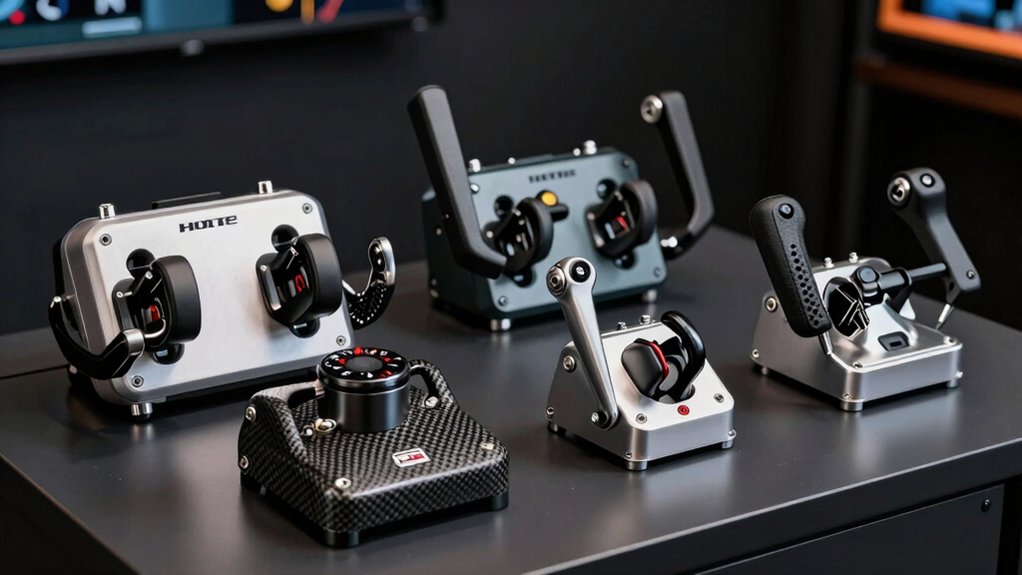

If you’re serious about flight simulation, you need equipment that matches your commitment. You’ve got options—from the Logitech G PRO Flight Yoke System with its stainless-steel precision to budget-friendly alternatives like the PXN-2113. Each setup offers different features, durability levels, and price points. The question isn’t which one exists, but which one fits your specific needs and setup constraints.
| Logitech G PRO Flight Yoke System Professional Simulation |

| Best Overall | Control Type: Yoke and throttle quadrant | Platform Compatibility: Windows PC only | Programmable Buttons/Controls: 54+ programmable controls | VIEW LATEST PRICE | Read Our Analysis |
| Turtle Beach VelocityOne Flight Universal Control System |

| Most Comprehensive | Control Type: Yoke with integrated rudder and throttle quadrant | Platform Compatibility: PC and Xbox Series X/S/One | Programmable Buttons/Controls: 18 assignable buttons plus 12 analog axes | VIEW LATEST PRICE | Read Our Analysis |
| PC Joystick USB Gaming Flight Simulator Controller with Vibration |

| Budget-Friendly Pick | Control Type: Joystick with throttle control | Platform Compatibility: Windows PC only | Programmable Buttons/Controls: 12 programmable buttons | VIEW LATEST PRICE | Read Our Analysis |
| Thrustmaster Sol-R6 Throttle for flight simulation (Compatible with PC) |

| Best Throttle Solo | Control Type: Throttle quadrant only | Platform Compatibility: Windows PC only | Programmable Buttons/Controls: 14 assignable actions | VIEW LATEST PRICE | Read Our Analysis |
| EIMSOAH Simulation Joystick Aircraft Yoke and Throttle Control |
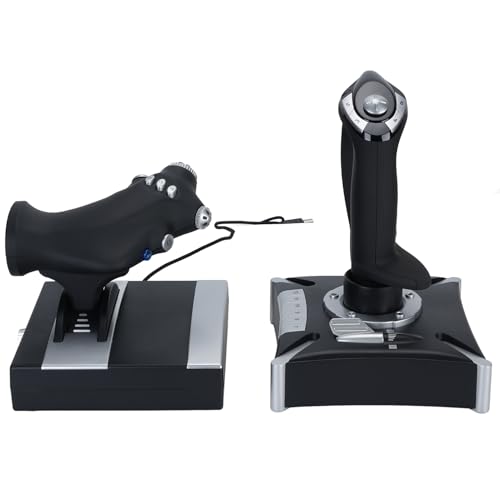
| Best Console Compatible | Control Type: Joystick with yoke and throttle | Platform Compatibility: Windows PC and Xbox Series X/S | Programmable Buttons/Controls: 16 programmable keys | VIEW LATEST PRICE | Read Our Analysis |
| FAUOSWUK Simulation Joystick with Vibration for Xbox |
| Best Xbox Integration | Control Type: Joystick with yoke and throttle | Platform Compatibility: Windows PC and Xbox Series X/S | Programmable Buttons/Controls: 16 programmable keys | VIEW LATEST PRICE | Read Our Analysis |
| VELATEMOR Aircraft Yoke Throttle Controller with Programmable Keys |
| Best Plug-and-Play | Control Type: Joystick with yoke and throttle | Platform Compatibility: Windows PC and Xbox Series X/S | Programmable Buttons/Controls: 16 programmable keys | VIEW LATEST PRICE | Read Our Analysis |
| SimFab Mounting Bracket Kit for Thrustmaster TCA Yoke |

| Best Mounting Solution | Control Type: Mounting bracket kit (no controls) | Platform Compatibility: Windows PC | Programmable Buttons/Controls: N/A (mounting bracket only) | VIEW LATEST PRICE | Read Our Analysis |
| Honeycomb Alpha Yoke with Bravo Throttle Bundle |

| Professional Grade Bundle | Control Type: Yoke and throttle quadrant bundle | Platform Compatibility: Windows PC | Programmable Buttons/Controls: Configurable (specific count not listed) | VIEW LATEST PRICE | Read Our Analysis |
| Meza-Flight Simulator Cockpit for Honeycomb and Logitech |

| Best Cockpit Integration | Control Type: Mounting cockpit panel (no controls) | Platform Compatibility: Windows PC | Programmable Buttons/Controls: N/A (panel only) | VIEW LATEST PRICE | Read Our Analysis |
| Meza Mount – Desk Mount for Flight Controls |

| Best Desk Mount | Control Type: Desk mount (no controls) | Platform Compatibility: PC/Mac/Linux/Unix | Programmable Buttons/Controls: N/A (mount only) | VIEW LATEST PRICE | Read Our Analysis |
| Logitech G PRO Flight Yoke System (Renewed) |

| Best Renewed Option | Control Type: Yoke and throttle quadrant (renewed) | Platform Compatibility: Windows PC | Programmable Buttons/Controls: 54+ programmable controls | VIEW LATEST PRICE | Read Our Analysis |
| Wheel Stand Pro TB Flight Stand Compatible with Rudders |

| Best Flight Stand | Control Type: Flight stand mount (no controls) | Platform Compatibility: Universal (no platform restrictions) | Programmable Buttons/Controls: N/A (stand mount only) | VIEW LATEST PRICE | Read Our Analysis |
| Trak Racer TR One Flight Sim Mount Kit |
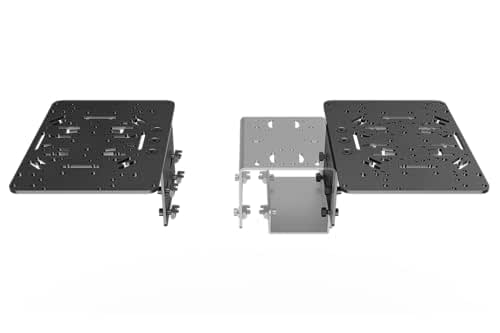
| Best Modular System | Control Type: Mount kit for flight controls | Platform Compatibility: Universal (no platform restrictions) | Programmable Buttons/Controls: N/A (mount kit only) | VIEW LATEST PRICE | Read Our Analysis |
More Details on Our Top Picks
Logitech G PRO Flight Yoke System Professional Simulation
If you’re building muscle memory as a new pilot or sharpening your skills as an experienced flight simmer, the Logitech G PRO Flight Yoke System delivers realistic yoke controls with 75 programmable options across its yoke and throttle quadrant. The stainless steel shaft provides smooth, accurate aircraft control in flight simulators. You’ll access 14 button controls and a 3-position mode switch to customize your setup. Mount the system using two desk clamps for secure positioning on most desks. The package includes the flight yoke with a 5.9-foot USB cable and the throttle quadrant with a 4.92-foot connector cable. Install the optional software for compatibility with Microsoft Flight Simulator, FSX, X-Plane 10, and Prepar3D. This setup works on Windows 11, 10, 8.1, and 7.
- Control Type:Yoke and throttle quadrant
- Platform Compatibility:Windows PC only
- Programmable Buttons/Controls:54+ programmable controls
- Weight:Not specified
- Connection Type:USB (wired)
- Mounting Solution:2-position desk clamp
- Additional Feature:Stainless steel yoke shaft
- Additional Feature:Three-position mode switch
- Additional Feature:54+ programmable controls
Turtle Beach VelocityOne Flight Universal Control System
Looking for a flight control system that works seamlessly across both Xbox and PC platforms? The VelocityOne Flight delivers a complete setup with a 180° yoke, modular throttle quadrant, and integrated rudder controls. You’ll access 12 analog axes and 26 assignable controls through the full-color flight management display. The system connects via USB to Xbox Series X|S, Xbox One, or Windows PCs running Microsoft Flight Simulator, X-Plane, or War Thunder. Configure controls on-the-fly using the display, swap throttle tops for different aircraft types, and secure the clamping system to your desk. Weighing 10 pounds, this all-in-one solution suits serious simmers seeking comprehensive platform compatibility.
- Control Type:Yoke with integrated rudder and throttle quadrant
- Platform Compatibility:PC and Xbox Series X/S/One
- Programmable Buttons/Controls:18 assignable buttons plus 12 analog axes
- Weight:10 pounds
- Connection Type:USB (wired)
- Mounting Solution:Secure clamping system
- Additional Feature:180° true yoke rotation
- Additional Feature:Full-color flight management display
- Additional Feature:Integrated rudder/toe brakes
PC Joystick USB Gaming Flight Simulator Controller with Vibration
The PXN-2113 Pro delivers essential flight simulation controls for PC gamers who need straightforward, budget-conscious equipment without compatibility complications. This wired USB joystick features four axes, eight-way hat switch, twelve programmable buttons, and throttle control for single-hand operation. Vibration feedback activates when you set intensity above fifty percent. Four suction cups stabilize the controller on smooth surfaces. Install the optional driver from the PXN website, then plug in and calibrate through your flight sim’s settings. In Microsoft Flight Simulator, select Generic USB Joystick and map inputs accordingly. Note that Force Feedback isn’t supported, and compatibility excludes Minecraft, Asphalt 8, and Ace Combat 7.
- Control Type:Joystick with throttle control
- Platform Compatibility:Windows PC only
- Programmable Buttons/Controls:12 programmable buttons
- Weight:0.5 kilograms
- Connection Type:USB (wired)
- Mounting Solution:Four suction cups
- Additional Feature:Vibration function available
- Additional Feature:Four suction cup stability
- Additional Feature:Single-hand operation capable
Thrustmaster Sol-R6 Throttle for flight simulation (Compatible with PC)
Want precise engine control that adapts to different aircraft types? The Thrustmaster Sol-R6 Throttle delivers this through its adjustable detent system with four positions: none, 50%, 80% afterburner, and dual-detent. You’ll configure the detent based on your aircraft for accurate power management. The S.M.A.R.T. technology features advanced slide rails with 3.1 inches of travel, ensuring smooth, responsive movement. The built-in 15° rudder with automatic re-centering handles yaw control without additional equipment. You get 14 assignable buttons for essential flight functions. USB connectivity links directly to your PC, and the white design fits standard setups. This throttle handles space, military, and civil flight simulations effectively.
- Control Type:Throttle quadrant only
- Platform Compatibility:Windows PC only
- Programmable Buttons/Controls:14 assignable actions
- Weight:1.29 kilograms
- Connection Type:USB (wired)
- Mounting Solution:Not specified
- Additional Feature:S.M.A.T. advanced slide rails
- Additional Feature:Adjustable detent (4 positions)
- Additional Feature:Built-in 15° rudder
EIMSOAH Simulation Joystick Aircraft Yoke and Throttle Control
For flight simmers who want realistic aircraft controls without breaking their budget, EIMSOAH’s simulation joystick delivers essential features that mirror actual cockpit equipment. The device offers four precision axes, an 8-way POV hat, and 16 programmable buttons you can customize to your flying style. Its yoke-like design includes damping feedback and throttle control that simulate real aircraft responses. Heavy-duty suction cups anchor the unit firmly to your setup, preventing drift during intense flights. You’ll enjoy plug-and-play compatibility with Windows PCs and Xbox consoles without requiring drivers for basic operation. Optional software lets you map controls precisely to your preferences, making this an affordable option for serious flight simulation enthusiasts.
- Control Type:Joystick with yoke and throttle
- Platform Compatibility:Windows PC and Xbox Series X/S
- Programmable Buttons/Controls:16 programmable keys
- Weight:Not specified
- Connection Type:USB (wired)
- Mounting Solution:Heavy-duty suction cups
- Additional Feature:Heavy-duty suction cup base
- Additional Feature:Damping feedback technology
- Additional Feature:No driver installation required
FAUOSWUK Simulation Joystick with Vibration for Xbox
If you’re looking for a yoke and throttle setup that works straight out of the box without driver hassles, the FAUOSWUK Simulation Joystick delivers plug-and-play convenience on PC and Xbox Series X/S. Simply power up your computer, plug in the controller, and you’re ready to fly—no driver installation required, though drivers are available if needed. The setup features robust suction cups that keep the unit stable during intense gameplay. You’ll find four axes, an 8-way POV, and 16 programmable keys, allowing you to customize controls to match your flying style. The joystick and throttle mimic aircraft controls with damping feedback for authenticity. Hardware features are adjustable, supporting flexible configurations for different game preferences.
- Control Type:Joystick with yoke and throttle
- Platform Compatibility:Windows PC and Xbox Series X/S
- Programmable Buttons/Controls:16 programmable keys
- Weight:Not specified
- Connection Type:USB (wired)
- Mounting Solution:Robust suction cups
- Additional Feature:Robust suction cup stability
- Additional Feature:Damping feedback mimics aircraft
- Additional Feature:Plug-and-play setup
VELATEMOR Aircraft Yoke Throttle Controller with Programmable Keys
The VELATEMOR Simulation Joystick delivers a dual-control setup that separates joystick and throttle functions, making it ideal if you’re serious about flight simulation without committing to a full-size yoke system. You’ll get four axes and 8-way POV functionality with damping feedback for realistic control. The 16 programmable keys let you customize controls to match your preferred flight sim. Setup requires no driver installation—just plug it in and connect after powering up. You can optionally download drivers from the manufacturer’s site for enhanced configuration. The suction cup base keeps everything stable during intense gameplay sessions. It’s compatible with Windows 7 through 11 and Xbox Series X and S, so you’ll work with most modern platforms and popular flight simulation titles.
- Control Type:Joystick with yoke and throttle
- Platform Compatibility:Windows PC and Xbox Series X/S
- Programmable Buttons/Controls:16 programmable keys
- Weight:Not specified
- Connection Type:USB (wired)
- Mounting Solution:Suction cup base
- Additional Feature:Double stick joystick control
- Additional Feature:Suction cup secure mounting
- Additional Feature:No driver installation required
SimFab Mounting Bracket Kit for Thrustmaster TCA Yoke
Upgrading your flight sim setup without replacing controls you’ve already bought? The SimFab Mounting Bracket Kit solves that problem. This kit mounts your Thrustmaster TCA yoke, throttle quadrant, and rudder pedals to OpenWheeler Gen3 or SimFab cockpit frames. You get three separate brackets: one designed specifically for the TCA yoke, one universal throttle bracket compatible with Logitech, CH Products, Honeycomb, and Turtle Beach units, and one rudder pedal plate that fits Thrustmaster, Logitech, VirPil, and MFG Crosswind pedals. All mounting hardware comes included. Metal parts carry a lifetime factory warranty. This USA-manufactured kit keeps your existing controls functional while integrating them into a complete cockpit setup.
- Control Type:Mounting bracket kit (no controls)
- Platform Compatibility:Windows PC
- Programmable Buttons/Controls:N/A (mounting bracket only)
- Weight:Not specified
- Connection Type:N/A (mounting bracket only)
- Mounting Solution:Compatible with OpenWheeler/SimFab cockpits
- Additional Feature:Universal throttle bracket compatibility
- Additional Feature:Lifetime factory warranty (metal)
- Additional Feature:USA designed/manufactured
Honeycomb Alpha Yoke with Bravo Throttle Bundle
Looking for a complete cockpit setup that’ll handle everything from a Cessna to a Boeing 747? The Honeycomb Alpha Yoke with Bravo Throttle Bundle delivers both components you need. The Alpha Yoke features ergonomic design with USB connectivity for your PC. The Bravo Throttle Quadrant includes six commercial levers, autopilot controls, gear and flap levers, and a trim wheel. You’ll get fourteen warning lights and an annunciator panel with seven programmable switches. The gear lever includes LED landing gear indicator lights. Set adjustable lever tension to your preference. This bundle weighs 12.13 kilograms and measures 23.8 x 17.8 x 19 inches. Users rate it 4.3 out of 5 stars.
- Control Type:Yoke and throttle quadrant bundle
- Platform Compatibility:Windows PC
- Programmable Buttons/Controls:Configurable (specific count not listed)
- Weight:12.13 kilograms
- Connection Type:USB (wired)
- Mounting Solution:Not specified
- Additional Feature:Four-engine aircraft support
- Additional Feature:14 backlit warning lights
- Additional Feature:Adjustable lever tension
Meza-Flight Simulator Cockpit for Honeycomb and Logitech
Want a pre-built panel that integrates your existing Honeycomb or Logitech equipment without custom fabrication? The Meza-Flight Simulator Cockpit solves this problem. Its aluminum alloy construction resists bending while desk clamps secure it safely on surfaces from 0.5″ to 2.2″ thick. The panel arrives pre-cut for all instrument positions, letting you hand-press components into place and configure your setup immediately. It accommodates your iPad, yoke, throttle, and instruments with a built-in light bar for enhanced visibility. USB connectivity ensures seamless PC integration. At 4 kg, it’s substantial yet manageable, giving you a professional cockpit experience without extensive assembly work.
- Control Type:Mounting cockpit panel (no controls)
- Platform Compatibility:Windows PC
- Programmable Buttons/Controls:N/A (panel only)
- Weight:4 kilograms
- Connection Type:USB (wired)
- Mounting Solution:Aluminum clamp (0.5-2.2 inch desk thickness)
- Additional Feature:Pre-cut instrument panel design
- Additional Feature:Aluminum alloy construction
- Additional Feature:Adjustable desk clamp (0.5″-2.2″)
Meza Mount – Desk Mount for Flight Controls
If you’ve invested in premium flight control equipment like the Honeycomb Alpha yoke or Bravo throttle quadrant, you’ll need a reliable mounting solution to keep them stable during intense flight sessions. The Meza Mount RM offers two installation methods. First, you can mount it permanently under your desk using the included self-tapping screws and allen wrench. Second, you can clamp it to your table’s edge using the YOKE-provided clip for a non-permanent setup. The metal construction weighs just 0.4 kilograms and measures 16 by 2 inches, fitting most desk configurations. Large end pieces accommodate default clamps on Honeycomb and Logitech equipment. This mount earns 4.7 out of 5 stars from users and works across PC, Mac, Linux, and Unix systems via USB connectivity.
- Control Type:Desk mount (no controls)
- Platform Compatibility:PC/Mac/Linux/Unix
- Programmable Buttons/Controls:N/A (mount only)
- Weight:0.4 kilograms
- Connection Type:USB (wired)
- Mounting Solution:Under-desk mount or table clamp
- Additional Feature:Under-desk or clamp installation
- Additional Feature:Compatible with multiple brands
- Additional Feature:Includes allen wrench
Logitech G PRO Flight Yoke System (Renewed)
The Logitech G PRO Flight Yoke System offers you a professional-grade setup at a reduced price through Amazon’s Renewed program, making it an excellent choice if you’re building your first serious flight simulation cockpit without spending full retail cost. You get a stainless steel yoke shaft that delivers smooth, accurate control across beginner to advanced training levels. The system includes 75 programmable controls spread across a POV hat, 14 buttons, and three operation modes, letting you configure throttle knobs and other functions to match your aircraft. You mount the yoke securely using the two-position desk clamp, which accommodates various desk widths. The USB connection integrates directly with your PC, and Amazon’s 90-day limited warranty protects your purchase, with guaranteed replacement or refund if issues arise.
- Control Type:Yoke and throttle quadrant (renewed)
- Platform Compatibility:Windows PC
- Programmable Buttons/Controls:54+ programmable controls
- Weight:Not specified
- Connection Type:USB (wired)
- Mounting Solution:2-position desk clamp
- Additional Feature:90-day limited warranty
- Additional Feature:Amazon Renewed inspection process
- Additional Feature:Professionally tested condition
Wheel Stand Pro TB Flight Stand Compatible with Rudders
Looking for a flight stand that’ll work with your Turtle Beach VelocityOne setup without eating up your entire gaming space? The Wheel Stand Pro TB Flight Stand delivers compatibility with your yoke, throttle, and rudders while offering adjustability for any player size or seating arrangement. Its quick-release mechanism lets you swap components rapidly. The 360-degree tilt steering wheel column provides stepless adjustability, meaning you position it exactly how you need it. At 17 pounds, the stand remains stable during intense flight sessions. The manufacturer ships it in eco-friendly cardboard packaging. With 4.5 stars from customer reviews and ranking highly in PC flight controls, this stand provides reliable support for serious flight simulation without requiring additional purchases.
- Control Type:Flight stand mount (no controls)
- Platform Compatibility:Universal (no platform restrictions)
- Programmable Buttons/Controls:N/A (stand mount only)
- Weight:17 pounds
- Connection Type:N/A (stand mount only)
- Mounting Solution:Adjustable flight stand with 360-degree tilt
- Additional Feature:360-degree tilt column adjustment
- Additional Feature:Quick release mechanism
- Additional Feature:Fits any chair/sofa
Trak Racer TR One Flight Sim Mount Kit
Serious flight simmers who’ve invested in high-end throttles, yokes, and HOTAS systems need a mounting solution that matches their equipment’s quality—and that’s where the Trak Racer TR One Flight Sim Mount Kit delivers. This dual-sided mount fits 8mm T-slot aluminum profiles on TR80, TR120, and TR160 rigs. You’ll mount throttles, yokes, and HOTAS controls on both left and right sides with full adjustability for angle and distance. The solid steel construction with matte black powder coating ensures durability. You can position your gear exactly as you need it, and you’re not locked into one configuration—swap components without replacing the entire mount.
- Control Type:Mount kit for flight controls
- Platform Compatibility:Universal (no platform restrictions)
- Programmable Buttons/Controls:N/A (mount kit only)
- Weight:2.2 pounds
- Connection Type:N/A (mount kit only)
- Mounting Solution:8mm T-slot aluminum profile compatible
- Additional Feature:Modular ecosystem design
- Additional Feature:Universal 8mm T-slot compatibility
- Additional Feature:Matte black powder-coated finish
Factors to Consider When Choosing a Yoke and Throttle for PC
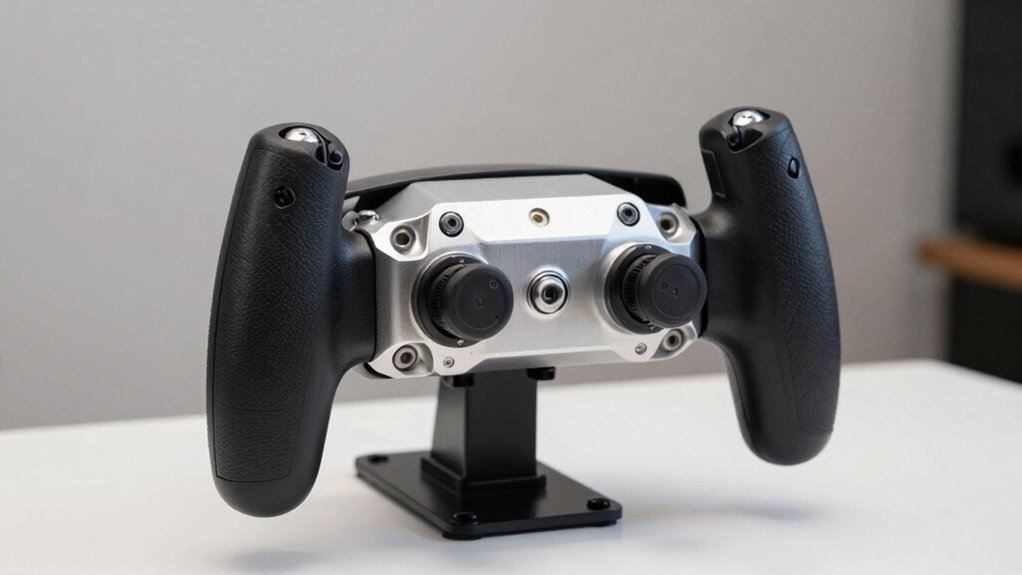
You’ll want to evaluate compatibility with your flight simulator software first, since not all yokes work with every platform like Microsoft Flight Simulator, X-Plane, or Prepar3D. Next, examine the build quality and materials—look for sturdy construction with metal components and durable switches, as these systems endure repeated use during long flights. Finally, check what programmable controls and customization options you get, because you’ll need enough assignable buttons and switches to map all your necessary functions without purchasing additional peripherals.
Best Yoke and Throttle for PC
What should you prioritize when selecting a yoke and throttle setup for your flight simulator? First, verify Windows compatibility across versions 7–11 to ensure your system works. Next, confirm the setup integrates with your preferred simulator: MS Flight Simulator, X-Plane, or Prepar3D. Then, evaluate control options—look for 14–54 programmable inputs that match your needs. Check the yoke’s rotation range; 180° rotation provides authentic handling. Assess build quality by examining shaft materials like steel or stainless steel and mounting clamp durability. Finally, consider configurability features such as vernier throttles and trim wheels for precision adjustments during flight. Stable desk attachment mechanisms prevent movement during use, so inspect clamping systems carefully.
Factors to Consider When Choosing Yoke and Throttle for PC
How do you know which yoke and throttle setup will work best for your flight simulator setup? Start by checking your yoke’s rotation range—many systems offer 180°—and count the throttle quadrant’s programmable buttons and levers. Next, verify Windows compatibility and whether your chosen flight sim (Microsoft Flight Simulator, X-Plane, or Prepar3D) requires optional software. Then assess your desk space and mounting options: look for stable clamps, secure pedal integration, and non-slip bases. Evaluate sensor quality by examining hall effect sensors, stainless steel shafts, and the total number of programmable controls available. Finally, review warranty coverage and check if the system supports modular upgrades like additional throttle tops or rudder integration for future expansion.
Compatibility With Flight Simulators
Once you’ve assessed your physical space and mounting options, confirming simulator compatibility becomes your next priority. Check the device’s support for your chosen simulator—Microsoft Flight Simulator, FSX, X-Plane, or Prepar3D—since not all hardware works equally across titles. Verify cross-platform compatibility, noting whether the yoke functions on PC only or also supports Xbox Series X|S. Review simulator-specific documentation, as some devices require manual input mapping or may lack certain features like force feedback in particular games. Look for hardware offering realistic rotation ranges and multiple programmable axes to ensure accurate control mapping. Finally, confirm the product includes onboard configuration software or displays that let you adjust settings directly without external tools.
Build Quality And Materials
Why does build quality matter more than you’d think? Your equipment endures repeated stress during extended flight sessions, so durability directly impacts performance and cost-effectiveness.
Examine the shaft material first. Stainless steel yokes deliver smoother, more precise control than plastic alternatives, reducing input lag during critical maneuvers. Next, evaluate the base construction. Heavy-duty bases with suction cups minimize wobble and vibration, stabilizing your setup during intense flights.
Check the mounting hardware. Aluminum or steel components resist wear better than plastic fasteners, extending equipment lifespan significantly. Inspect throttle mechanisms for built-in detents and tactile feedback, which improve thrust adjustment repeatability and reliability.
Finally, assess surface finishes. Powder-coated or anodized surfaces resist corrosion and wear in desktop environments, maintaining functionality over years of use. These material choices collectively determine whether your investment survives demanding flight simulation demands.
Programmable Controls And Customization
Most quality yokes and throttles for PC flight simulation offer programmable controls that let you assign inputs across 14 to 75 buttons, multiple axes, and hat switches—giving you the flexibility to match your specific aircraft and flying style. You’ll find many systems include dedicated configuration software or on-device displays for mapping inputs without leaving your setup. Throttle quadrants expand your options further by adding multiple programmable levers and vernier controls beyond the yoke alone. This customization lets you assign cockpit functions like flaps, gear, trim, and autopilot to physical controls, reducing menu navigation during flight. Check compatibility requirements before purchasing, as advanced customization may need vendor software or specific driver support. Platform differences between PC and Xbox also affect where and how you apply mappings.
Mounting And Stability Options
You’ll need to secure your yoke and throttle system properly to prevent unwanted movement during flight sessions. Start by selecting a mounting method that fits your desk setup. Desk clamps offer adjustable positioning for various desk types, while under-desk mounting options minimize visible clutter. Next, choose mounting brackets compatible with your specific yoke and throttle models to ensure stability. Check that your system’s weight and materials—such as solid steel components—reduce wobble during operation. Universal mounting bases work with multiple brands and generations, allowing you to upgrade individual components without replacing everything. Finally, verify that your chosen setup maintains rigidity throughout extended flight sessions, enabling precise control inputs consistently.
Ergonomic Design Features
Once you’ve secured your yoke and throttle system to your desk, focus on how the controls themselves fit your hands and body. Look for yokes with cushioned grips that reduce hand fatigue during long flights. Check that throttle knobs and levers position naturally within your reach without requiring arm extension. Adjustable controls let you customize knob height, lever angle, and button placement to match your hand size and preferred positioning. Test the resistance and travel distance of moving parts—they should feel smooth yet responsive, mimicking actual aircraft controls. Examine button layouts to ensure you can locate and press keys without looking down. Programmable buttons let you assign functions based on your workflow, reducing the mental effort needed during complex maneuvers.
Throttle Control Mechanisms
Because throttle precision directly affects your ability to manage engine power during takeoffs, climbs, and landings, you’ll want to evaluate the specific control mechanism that suits your flying style and aircraft preferences. Consider dedicated quadrant systems with multiple levers and vernier adjustments, which let you fine-tune thrust accurately. Look for built-in detent mechanisms offering 4 positions—none, 50%, 80%, and afterburner—matching real aircraft power settings. Check travel distance specifications; around 80 mm provides smooth, linear thrust changes. Some throttles integrate rudder controls or additional switches, enabling coordinated engine management from one unit. Verify USB connectivity and platform compatibility with your PC or Xbox setup. Confirm driver software availability for customization features you’ll need.
Final Thoughts
You’ll want to evaluate your budget, space, and required features before purchasing. Start by determining whether you need a basic joystick or a complete yoke-and-throttle setup. Check compatibility with your PC and flight simulator software. Review durability ratings and warranty coverage. Compare mounting options for your desk or stand. Finally, read user reviews focusing on build quality and long-term reliability to ensure you’re investing in equipment that’ll perform consistently.

Meet Ry, “TechGuru,” a 36-year-old technology enthusiast with a deep passion for tech innovations. With extensive experience, he specializes in gaming hardware and software, and has expertise in gadgets, custom PCs, and audio.
Besides writing about tech and reviewing new products, he enjoys traveling, hiking, and photography. Committed to keeping up with the latest industry trends, he aims to guide readers in making informed tech decisions.