
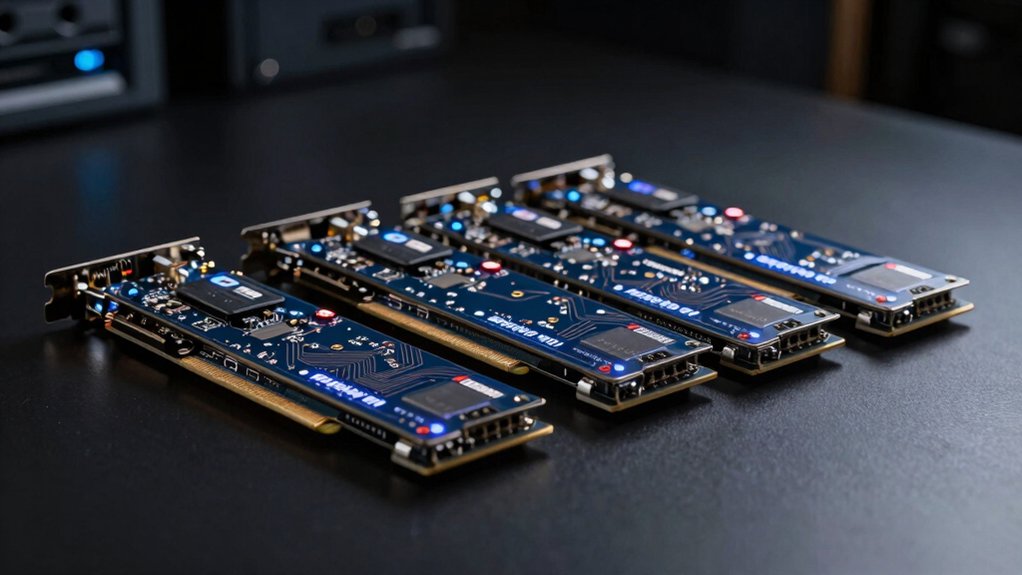

You’re looking to upgrade your system’s capabilities without replacing your motherboard. PCIe cards offer straightforward solutions for adding WiFi 6 connectivity, expanding USB ports, or boosting graphics performance. Your choice depends on your case dimensions, available slots, and specific needs. Understanding what each card type delivers—and what compatibility factors matter—determines whether you’ll actually see the performance gains you’re after. Let’s examine your best options.
| TP-Link WiFi 6 AX3000 PCIe Card (Archer TX3000E) |

| Best for Gaming | PCIe Interface Type: PCIe x1 (dual-band WiFi 6) | Form Factor: Low-profile bracket included | Wireless/Connectivity Standard: WiFi 6 (802.11ax) with Bluetooth 5.3 | VIEW LATEST PRICE | Read Our Analysis |
| GeForce GT 210 1024MB Low Profile Graphics Card |

| Budget-Friendly Pick | PCIe Interface Type: PCI Express 1.0 x16 (graphics card) | Form Factor: Original half-height bracket; low-profile compatible | Wireless/Connectivity Standard: Wired dual-screen output (HDMI/VGA) | VIEW LATEST PRICE | Read Our Analysis |
| Wireless N Dual Band 600Mbps PCIE WiFi Adapter (FS-N600) |
| Best Value | PCIe Interface Type: PCIe x1 (dual-band WiFi N) | Form Factor: Low-profile and full-height brackets included | Wireless/Connectivity Standard: WiFi N (802.11n) dual-band | VIEW LATEST PRICE | Read Our Analysis |
| PCIE USB 3.0 Expansion Card 4-Port (FS-U4L-Pro) |

| Best Overall | PCIe Interface Type: PCIe x1 (USB 3.0 expansion) | Form Factor: Full-height and low-profile brackets included | Wireless/Connectivity Standard: USB 3.0 (5Gbps shared bandwidth) | VIEW LATEST PRICE | Read Our Analysis |
More Details on Our Top Picks
TP-Link WiFi 6 AX3000 PCIe Card (Archer TX3000E)
If you’re building or upgrading a desktop PC and need faster wireless speeds without sacrificing stability, the TP-Link Archer TX3000E delivers the performance you’re looking for. This PCIe WiFi 6 card supports dual-band speeds up to 2.4 Gbps, featuring OFDMA technology that reduces latency for gaming and real-time applications. Installation requires connecting the Bluetooth USB cable to your motherboard’s F_USB header to enable Bluetooth 5.3 functionality. The included low-profile bracket fits compact cases, while magnetized antennas offer flexible placement. WPA3 encryption secures your connection. Gold-plated connectors and a heatsink ensure durability. Compatible with Windows 10 and 11 (64-bit), it includes a 2-year warranty and driver updates available through TP-Link’s support page.
- PCIe Interface Type:PCIe x1 (dual-band WiFi 6)
- Form Factor:Low-profile bracket included
- Wireless/Connectivity Standard:WiFi 6 (802.11ax) with Bluetooth 5.3
- Windows Compatibility:Windows 10, 11 (64-bit)
- External Components Included:2 high-gain antennas with magnetized base
- Warranty Coverage:2-year built-in warranty
- Additional Feature:WiFi 6 with 2.4 Gbps speeds
- Additional Feature:Bluetooth 5.3 connectivity included
- Additional Feature:WPA3 encryption security standard
GeForce GT 210 1024MB Low Profile Graphics Card
You’re building a compact PC, HTPC, or small form factor system and need a graphics card that actually fits—that’s where the Glorto GeForce GT 210 1024MB Low Profile Graphics Card becomes essential. This card features a half-height bracket that installs in tight spaces where standard cards won’t fit. You’ll get 1024MB of DDR3 memory, dual HDMI and VGA outputs for multi-monitor setups, and support for resolutions up to 2560×1600. The 589MHz core runs cool and efficient for basic display output. At just 8.1 ounces and 6.15 x 4.73 inches, it slots into SFF and HTPC builds without modification. DirectX 10.1 and OpenGL 3.3 compatibility cover entry-level graphics needs. You’ll appreciate the straightforward installation and reliable performance for office work, media playback, and light applications where dedicated graphics matter.
- PCIe Interface Type:PCI Express 1.0 x16 (graphics card)
- Form Factor:Original half-height bracket; low-profile compatible
- Wireless/Connectivity Standard:Wired dual-screen output (HDMI/VGA)
- Windows Compatibility:Windows (no specific version listed in specs)
- External Components Included:None (GPU only)
- Warranty Coverage:Product warranty available online (duration unspecified)
- Additional Feature:Dual display output support
- Additional Feature:DirectX 10.1 and OpenGL 3.3
- Additional Feature:1024MB DDR3 memory
Wireless N Dual Band 600Mbps PCIE WiFi Adapter (FS-N600)
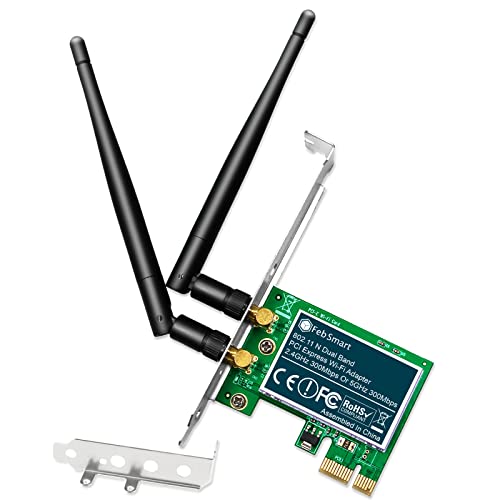
Desktop PC users looking to upgrade their network connectivity without replacing their entire system should consider the FebSmart FS-N600, a PCIe WiFi adapter that delivers 600Mbps total throughput across dual bands. The card works with Windows 11, 10, 8.x, 7, XP, Windows Server versions, and Linux systems, making it compatible with most setups. Installation requires one empty PCIe slot and takes minutes—the adapter includes both low-profile and full-height brackets for different case types. Two detachable 3dBi antennas support 2.4GHz and 5GHz bands simultaneously. Security features include WEP, WPA, WPA2, WPA3, and AES encryption standards. You’ll get a one-year limited warranty covering parts and defects.
- PCIe Interface Type:PCIe x1 (dual-band WiFi N)
- Form Factor:Low-profile and full-height brackets included
- Wireless/Connectivity Standard:WiFi N (802.11n) dual-band
- Windows Compatibility:Windows XP, 7, 8.x, 10, 11; Windows Server 2003–2022
- External Components Included:2 detachable 3dBi dual-band antennas
- Warranty Coverage:1-year limited parts warranty
- Additional Feature:600Mbps dual-band performance
- Additional Feature:Detachable external antennas included
- Additional Feature:WPA3 encryption support
PCIE USB 3.0 Expansion Card 4-Port (FS-U4L-Pro)
Need more USB 3.0 ports without cluttering your desk with external hubs? The FS-U4L-Pro adds four USB 3.0 ports directly to your desktop or workstation via a single PCIe X1 slot. This card uses the RENESAS UPD720201 controller, delivering 5Gbps bandwidth shared across all ports. Each port supplies 5V/2A for powering industrial cameras, NVMe enclosures, and docking stations. The card includes built-in self-powered technology, eliminating extra PSU cables. You’ll get both full-height and low-profile brackets for standard or slim PCs. Installation requires an available PCIe slot and driver installation on Windows XP through 7. Mac OS X isn’t supported. Simply insert the card, install drivers if needed, and connect your USB 3.0 devices for immediate functionality.
- PCIe Interface Type:PCIe x1 (USB 3.0 expansion)
- Form Factor:Full-height and low-profile brackets included
- Wireless/Connectivity Standard:USB 3.0 (5Gbps shared bandwidth)
- Windows Compatibility:Windows XP, Vista, 7, 8.x, 10, 11; Windows Server 2003–2022
- External Components Included:Full-height and low-profile brackets
- Warranty Coverage:Warranty information available (duration unspecified in summary)
- Additional Feature:5Gbps USB 3.0 bandwidth
- Additional Feature:Self-powered with no cables
- Additional Feature:Electronic fuses protect devices
Factors to Consider When Choosing SFI PCIe Cards
You’ll need to verify that any SFI PCIe card you’re considering matches your system’s slot type and motherboard specifications before making a purchase. Check the card’s power requirements against your power supply’s wattage and available connectors, then review its performance specs—such as data transfer speeds and port count—to confirm it’ll handle your intended workload. These three factors directly determine whether the card will function properly, operate safely, and deliver the performance you need.
Best SFi PCIE Cards
What compatibility issues might derail your expansion card purchase? You’ll want to verify your motherboard’s PCIe generation (Gen 1–4) and available slot types (x1, x4, x8, or x16) before buying. Check your power supply’s wattage and available connectors, since some cards demand dedicated power delivery or per-port limits for USB devices and GPUs. Next, evaluate the card’s physical form factor—full-height or low-profile brackets—to confirm it fits your case. Consider whether you need multi-function features like integrated Bluetooth or dual-band wireless, which can affect system latency. Finally, confirm driver support for your operating system: Windows, Linux, or macOS. Download drivers beforehand from the manufacturer’s website to avoid installation delays and ensure long-term stability.
Factors to Consider When Choosing SFi PCIE Cards
When selecting an SFI PCIe card, start by confirming three hardware specifications on your motherboard: the PCIe slot type (x1, x4, x8, or x16), the PCIe generation it supports (Gen 1 through Gen 4), and the number of available slots. Next, identify what ports you need—USB 3.0, HDMI, VGA, or others—and verify bracket compatibility with your case space. Check power requirements carefully: determine if your power supply provides sufficient watts and whether the card needs additional cables. Review driver support for your operating system, whether Windows, Linux, or macOS. Finally, confirm installation constraints: some cards require self-powered adapters, specific cable configurations, or bracket swaps. Matching these factors ensures reliable performance and proper fit.
Compatibility With Your System
After you’ve identified your hardware specs and power requirements, the next step is confirming that your chosen card will actually work within your specific system. Check your motherboard’s PCIe slot type and version—whether it’s x1, x16, PCIe 2.0, or 3.0—and verify the card matches. Confirm your operating system supports the card; Windows, Linux, and macOS have different driver availability. Look for required connections like Bluetooth headers or additional power cables. Measure your case’s physical space to ensure the card fits without blocking other components. Verify there are no conflicts with existing devices occupying adjacent slots. Finally, review manufacturer compatibility lists specific to your motherboard model to avoid installation problems.
Power Requirements And Safety
How much power does your SFI PCIe card actually need? Check your card’s specifications for per-port current limits (commonly 5V/2A per port) and total power draw across all ports. Most cards cap combined current to prevent motherboard overload. Next, verify your system PSU can supply the required wattage. Self-powered designs draw from auxiliary supplies, reducing strain on your motherboard. Review the card’s built-in safety features: fuses protect against short circuits, capacitors smooth voltage delivery, and inductors prevent current spikes. Confirm your motherboard PCIe slot supports the card’s power demands. Underestimating power needs causes instability, device throttling, or failure. Match your card’s specifications exactly to your system capabilities before installation.
Performance Specifications Matter
What separates a mediocre SFI PCIe card from one that’ll actually boost your setup? You need to examine the performance specifications directly. First, check the throughput rating—look for cards specifying speeds like AX3000 with 2402 Mbps on 5 GHz. Second, verify bandwidth features such as 160 MHz support and 1024-QAM modulation, which determine real-world performance. Third, confirm the card supports advanced radio technologies like MU-MIMO and OFDMA, which reduce latency when multiple devices connect simultaneously. Fourth, match the wireless standards (802.11ax/WiFi 6) against your network environment. Fifth, evaluate power requirements and any necessary USB or Bluetooth headers for compatibility with your motherboard. These specifications directly impact whether you’ll see meaningful improvements in your system’s wireless performance.
Physical Form Factor Constraints
Three critical physical dimensions‘ll determine whether an SFI PCIe card actually fits your system: the bracket type, the PCIe slot size, and the overall card dimensions. First, identify your case size. Standard desktops require full-height brackets, while slim or compact cases demand low-profile (half-height) brackets. Second, verify your motherboard’s available PCIe slots. Cards specify compatibility—some work only in x1 slots, others in x16 slots. Third, measure clearance around your target slot. Check for obstructions from power supplies, coolers, or adjacent components that block card installation. Many cards include both bracket types, so you can adapt them to your build. Always confirm slot availability before purchasing to avoid compatibility issues.
Final Thoughts
You’ve reviewed four PCIe cards that upgrade your system’s connectivity and performance. Before purchasing, you’ll need to verify your motherboard’s available slots, check case space for card dimensions, confirm power requirements, and install drivers. Match the card type to your specific needs—WiFi for connectivity, USB expansion for peripherals, or graphics for display output. This ensures you’ll get the performance gains you’re looking for without compatibility issues.

Meet Ry, “TechGuru,” a 36-year-old technology enthusiast with a deep passion for tech innovations. With extensive experience, he specializes in gaming hardware and software, and has expertise in gadgets, custom PCs, and audio.
Besides writing about tech and reviewing new products, he enjoys traveling, hiking, and photography. Committed to keeping up with the latest industry trends, he aims to guide readers in making informed tech decisions.