

When you’re setting up a VR system, your HDMI connection directly affects performance and image quality. You’ll encounter several extender options, each with different distance capabilities, power requirements, and resolution support. Cable Matters, COWEEN, Silkland, VCE, and UGREEN all offer proven solutions—but which one matches your specific setup? Understanding the key differences between these extenders will help you make the right choice.
| Cable Matters Active HDMI Repeater Signal Booster |

| Best Long-Distance | Maximum Video Resolution: 4K@60Hz (up to 135 feet for 1080p) | Connector Type: Female to Female HDMI coupler | Cable Length Options: Not specified (signal booster, not cable) | VIEW LATEST PRICE | Read Our Analysis |
| 4K UHD HDMI Extender Female to Female Repeater |

| Budget-Friendly Pick | Maximum Video Resolution: 4K@30Hz (not 4K@60Hz) | Connector Type: Female to Female HDMI coupler | Cable Length Options: Not specified (signal booster, not cable) | VIEW LATEST PRICE | Read Our Analysis |
| Silkland 8K HDMI Extension Cable 3.3FT Extender |
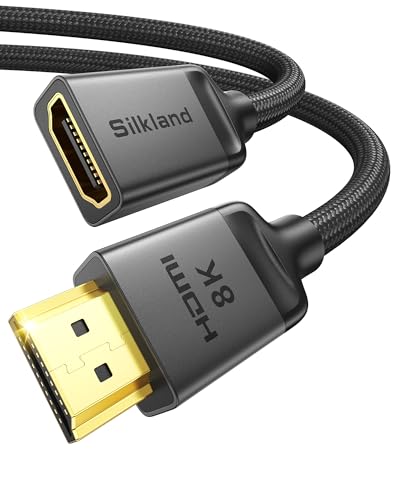
| Best for 8K | Maximum Video Resolution: 8K@60Hz and 4K@120Hz | Connector Type: HDMI Male to Female extension cable | Cable Length Options: 1.6FT, 3.3FT, 5FT, 6.6FT, 10FT | VIEW LATEST PRICE | Read Our Analysis |
| VCE HDMI Extension Cable Male to Female Adapter |

| Best Compact | Maximum Video Resolution: 4K@60Hz | Connector Type: HDMI Male to Female extension cable | Cable Length Options: 5.5 inches (fixed) | VIEW LATEST PRICE | Read Our Analysis |
| UGREEN HDMI Extension Cable 2.0 High Speed 4K |

| Best Value | Maximum Video Resolution: 4K@60Hz (within 3m total length) | Connector Type: HDMI Male to Female extension cable | Cable Length Options: 1.5FT (fixed) | VIEW LATEST PRICE | Read Our Analysis |
| Silkland 8K HDMI Extension Cable 1.6FT |

| Premium Performance | Maximum Video Resolution: 8K@60Hz and 4K@120Hz | Connector Type: HDMI Male to Female extension cable | Cable Length Options: 1.6FT, 3.3FT, 5FT, 6.6FT, 10FT | VIEW LATEST PRICE | Read Our Analysis |
More Details on Our Top Picks
Cable Matters Active HDMI Repeater Signal Booster
If you’re running longer HDMI cables between your gaming PC or console and your VR headset display without losing signal quality, the Cable Matters Active HDMI Repeater Signal Booster works as a female-to-female coupler that boosts and extends your connection. It extends 4K 60Hz signals up to 60 feet, 4K 30Hz up to 100 feet, and 1080p up to 135 feet. The repeater supports 3D pass-through, HDR, and HDCP 2.2 compatibility. You can optionally connect a micro-USB power cable to a wall charger for enhanced performance in setups with weaker signal sources. Input and output port labels guide proper connections, making installation straightforward without technical expertise.
- Maximum Video Resolution:4K@60Hz (up to 135 feet for 1080p)
- Connector Type:Female to Female HDMI coupler
- Cable Length Options:Not specified (signal booster, not cable)
- Audio Support:Dolby Digital, DTS, TrueHD (no ARC)
- Connector Quality:Labeled input/output ports
- Power Requirements:Optional Micro-USB power (sold separately)
- Additional Feature:Signal regeneration/amplification technology
- Additional Feature:Extended 4K 60Hz up to 60 feet
- Additional Feature:Optional micro USB power support
4K UHD HDMI Extender Female to Female Repeater
The COWEEN 4K UHD HDMI Extender regenerates your signal by decoding and re-encoding it, which means you’ll extend your transmission distance without losing picture quality—a critical feature whether you’re setting up a VR system in your home theater or running cables across a conference room. At 4K 30Hz, you can run 5 meters input and 10 meters output; at 1080P, you’ll get 15 meters input and 25 meters output. Use HDMI 1.4 copper cable for 4K and HDMI 1.3 for 1080P to achieve optimal performance. The female-to-female connector requires no external power or software installation. Note that this repeater doesn’t support 4K 60Hz.
- Maximum Video Resolution:4K@30Hz (not 4K@60Hz)
- Connector Type:Female to Female HDMI coupler
- Cable Length Options:Not specified (signal booster, not cable)
- Audio Support:Standard audio pass-through
- Connector Quality:Standard female-to-female connectors
- Power Requirements:No external power required
- Additional Feature:Decodes and re-encodes signal
- Additional Feature:No external power required
- Additional Feature:HDCP 1.4/1.1 and DVI 1.0 compliant
Silkland 8K HDMI Extension Cable 3.3FT Extender
Looking to extend your HDMI connection without sacrificing signal quality? The Silkland 8K HDMI Extension Cable delivers 48Gbps bandwidth supporting 8K@60Hz and 4K@120Hz performance. You’ll get a male-to-female connector that extends your current cable while protecting device ports from wear. The construction includes nylon braiding, triple shielding, and 24K gold-plated connectors that resist corrosion and interference. Available in five lengths—from 1.6FT to 10FT—you can choose the right extension for wall-mounted TVs, tight spaces, or gaming setups. A 2-year replacement warranty covers all costs, ensuring reliability for PS5, Xbox, and streaming devices.
- Maximum Video Resolution:8K@60Hz and 4K@120Hz
- Connector Type:HDMI Male to Female extension cable
- Cable Length Options:1.6FT, 3.3FT, 5FT, 6.6FT, 10FT
- Audio Support:eARC with Dolby Atmos
- Connector Quality:24K gold-plated connectors with triple shielding
- Power Requirements:Passive (no external power)
- Additional Feature:48Gbps ultra high speed bandwidth
- Additional Feature:2-year replacement service coverage
- Additional Feature:24K gold-plated corrosion-resistant connectors
VCE HDMI Extension Cable Male to Female Adapter
Want to extend your HDMI port without putting stress on your TV or gaming device? The VCE Male to Female adapter solves this problem with its compact 5.5-inch design. It supports 4K@60Hz and 18 Gbps bandwidth, making it suitable for VR headsets and gaming consoles. The cable features 24K gold-plated connectors and aluminum-magnesium braided shielding that blocks EMI/RFI interference. You’ll get an 18-month warranty plus lifetime customer support. Simply connect the male end to your device and the female end to your HDMI cable. This adapter works with PS4 Pro, Xbox, Nintendo Switch, and PC setups, reducing port strain while maintaining signal quality.
- Maximum Video Resolution:4K@60Hz
- Connector Type:HDMI Male to Female extension cable
- Cable Length Options:5.5 inches (fixed)
- Audio Support:ARC and Dolby Atmos
- Connector Quality:24K gold-plated connectors with aluminum-magnesium braided shielding
- Power Requirements:Passive (no external power)
- Additional Feature:5.5 inches compact short length
- Additional Feature:18-month warranty with lifetime support
- Additional Feature:Aluminum-magnesium alloy braided shielding
UGREEN HDMI Extension Cable 2.0 High Speed 4K
If you’re running a VR setup where your headset or display sits more than a few feet from your source device, you’ll need an extension cable that handles high-bandwidth signals without degradation. The UGREEN 1.5FT HDMI 2.0 extension delivers 4K@60Hz video with 18Gbps transfer rates and triple shielding against interference. Gold-plated connectors and tinned copper conductors ensure reliable signal transmission. It supports ARC and surround sound for complete audio compatibility. The cable works with PS5, Xbox, PC, and VR headsets. Keep total extension length under 3 meters to maintain 4K performance. Install it between your source device and display using the male-to-female adapter connection.
- Maximum Video Resolution:4K@60Hz (within 3m total length)
- Connector Type:HDMI Male to Female extension cable
- Cable Length Options:1.5FT (fixed)
- Audio Support:ARC with Dolby 5.1/7.1 surround
- Connector Quality:Gold-plated connectors with triple shielding
- Power Requirements:Passive (no external power)
- Additional Feature:2K@240Hz refresh rate support
- Additional Feature:30AWG tinned copper conductors
- Additional Feature:Triple shielding EMI protection
Silkland 8K HDMI Extension Cable 1.6FT
The Silkland 8K HDMI Extension Cable works best when you’re mounting your TV on a wall or positioning your gaming console in a tight space where the standard cable won’t reach. This male-to-female extension supports 8K@60Hz and 4K@120Hz resolution with 48Gbps bandwidth, delivering smooth gameplay at up to 144Hz refresh rates. The cable features 24K gold-plated connectors, triple shielding, and a 28AWG copper core that reduce interference and screen flicker. Nylon braiding with double-layer fishnet winding protects against tangling and damage. Available in lengths from 1.6FT to 10FT, this cable works with Fire TV, Roku, PlayStation, Xbox, and most HDMI 2.0 devices. A 2-year replacement warranty covers defects with support within 18 hours.
- Maximum Video Resolution:8K@60Hz and 4K@120Hz
- Connector Type:HDMI Male to Female extension cable
- Cable Length Options:1.6FT, 3.3FT, 5FT, 6.6FT, 10FT
- Audio Support:eARC with Dolby Atmos
- Connector Quality:24K gold-plated connectors with triple shielding
- Power Requirements:Passive (no external power)
- Additional Feature:8K@60Hz and 4K@120Hz capable
- Additional Feature:Double-layer fishnet winding design
- Additional Feature:Responsive 18-hour customer support
Factors to Consider When Choosing an HDMI Link Extender for VR
When selecting an HDMI link extender for VR, you’ll need to evaluate five key factors: cable length and distance to ensure your setup reaches from your headset to your display without signal loss, signal strength and stability to maintain consistent performance during gameplay, video resolution compatibility to confirm the extender supports your desired output quality, power requirements and options to determine whether you need external power sources, and device port protection to prevent damage to your equipment. Start by measuring the distance you need to cover, then check the extender’s maximum range specifications against that measurement. Next, verify that the extender matches your VR system’s resolution requirements—whether 1080p, 1440p, or 4K—and confirm whether it requires additional power adapters or draws power from the HDMI connection itself.
Cable Length And Distance
Because VR demands stable, uninterrupted signal delivery, you’ll need to understand how cable length affects your extender’s performance before making a purchase. For 4K 60Hz—standard in most VR setups—active extenders with boosters typically support up to 60 feet, though 3–5 meters remains the recommended distance for optimal reliability. If you’re using 4K 30Hz, you can extend to approximately 100 feet, depending on cable and booster quality. Measure your specific installation distance first, then select an extender rated for that length. Higher bandwidth formats like 8K or 4K 120Hz require shorter cable runs to maintain stability. Always choose active extenders with power supplies, as they regenerate signals and prevent degradation over extended distances.
Signal Strength And Stability
Once you’ve matched your cable length to your setup’s distance requirements, you’ll need to verify that your extender maintains a stable signal throughout that run. Check whether your extender uses regeneration technology—this decodes and re-encodes the HDMI signal to restore integrity over distance. Confirm that your extender supports the bandwidth your VR headset demands: 48 Gbps handles 4K@60Hz with HDR without flicker or dropouts. Verify HDCP 2.2 and HDR format compatibility to prevent handshake failures that cause intermittent video loss. Finally, confirm whether the extender offers active power support via micro-USB or another connection. This amplification ensures stable signal delivery, especially on longer runs or with weaker source outputs. These checks directly impact your VR performance and reliability.
Video Resolution Compatibility
How do you know if your extender’ll handle your VR headset’s resolution demands without compromising performance? First, check your headset’s native resolution and refresh rate specifications. Next, verify the extender supports HDMI 2.0 or 2.1 with at least 18 Gbps bandwidth to prevent compression. Confirm whether it maintains 4K@60Hz across your required cable length, as performance degrades at extended distances. If your setup uses high dynamic range content, ensure the extender supports 4:4:4 color with HDR for accurate color reproduction. Additionally, test backward compatibility with 3D pass-through if your VR source requires it. Match these specifications directly to your hardware before purchasing to avoid resolution downscaling or motion artifacts during gameplay.
Power Requirements And Options
What’s the difference between an extender that’ll deliver stable 4K@60Hz and one that’ll drop signal during intense VR sessions? Power delivery. Some extenders run on bus power alone, drawing electricity directly from your HDMI source. Others need external power—either micro USB or a DC barrel connector—to maintain signal integrity during demanding 4K gameplay.
Check your extender’s power specifications first. Identify whether it requires external power for 4K@60Hz operation. If it does, verify the voltage and amperage requirements. For longer cable runs or weaker source devices, always choose an extender with external power options. Confirm the connector type matches your available power supply. This step prevents signal dropout and ensures HDR remains stable during VR sessions.
Device Port Protection
Your display’s HDMI port takes a beating with repeated connections, and an extender can shield it from wear and damage. Look for extenders with 24K gold-plated connectors and robust shielding—aluminum-magnesium braided or triple-shielded options resist corrosion and withstand frequent plugging. Choose shorter extender lengths to reduce mechanical stress on your port and minimize cable tension. Select models with reinforced housings and nylon-braided cables that protect against accidental pulls or knocks. Finally, verify clear input/output labeling on your extender so you’ll maintain consistent connections. This prevents repeated re-plugging attempts that degrade your display’s HDMI interface over time. These practical choices directly extend your equipment’s lifespan.
Final Thoughts
You’ll want to match your extender to your setup’s specific needs. For runs under 3 meters, standard cables work fine. For longer distances with 4K60 HDR, choose active repeaters with external power like Cable Matters. Prioritize durable construction, proper shielding, and clear labeling to protect your equipment. Verify HDCP 2.2 compatibility and your source device’s signal strength before purchasing to guarantee reliable VR performance.

Meet Ry, “TechGuru,” a 36-year-old technology enthusiast with a deep passion for tech innovations. With extensive experience, he specializes in gaming hardware and software, and has expertise in gadgets, custom PCs, and audio.
Besides writing about tech and reviewing new products, he enjoys traveling, hiking, and photography. Committed to keeping up with the latest industry trends, he aims to guide readers in making informed tech decisions.