

If you’re using Starlink but frustrated with WiFi dead zones or slow speeds, you need a wired Ethernet connection. You’ll find nine adapter options designed for Gen 2, Gen 3, and Mini systems—each offering different port counts and compatibility features. The right choice depends on how many devices you’re connecting and which Starlink model you own. Let’s explore what makes each adapter distinct and which one fits your setup.
| Starlink Ethernet Adapter for Rectangular Satellite V2 |

| Compact Gen 2 Essential | Starlink Compatibility: Gen 2 (Actuated) | Number of Ports: 1 RJ45 port | Data Transfer Speed: Up to 1 Gbps | VIEW LATEST PRICE | Read Our Analysis |
| Multi Port Starlink Ethernet Adapter (4 Devices) |

| Multi-Device Champion | Starlink Compatibility: Gen 3 and Mini | Number of Ports: 4 Gigabit Ethernet ports | Data Transfer Speed: Gigabit speeds (unspecified) | VIEW LATEST PRICE | Read Our Analysis |
| LUCMO Starlink Gen 2 Ethernet Adapter |

| Gaming & Streaming | Starlink Compatibility: Gen 2 (Standard Actuated) | Number of Ports: 1 RJ45 port | Data Transfer Speed: Unspecified | VIEW LATEST PRICE | Read Our Analysis |
| Mwin Starlink Ethernet Adapter for Gen 2 |
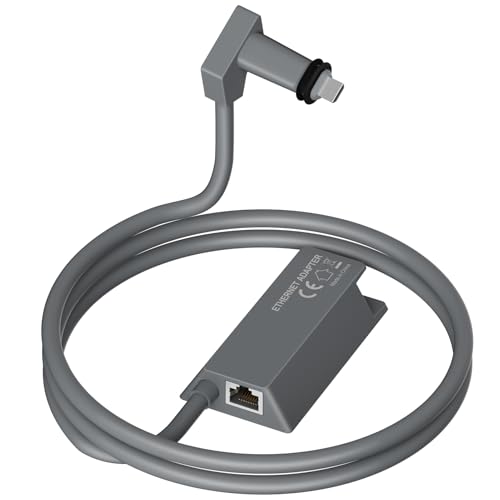
| Premium Certified Choice | Starlink Compatibility: Gen 2 (Actuated) | Number of Ports: 1 RJ45 port | Data Transfer Speed: Up to 1 Gbps | VIEW LATEST PRICE | Read Our Analysis |
| Nogoal Dual-Port Starlink Ethernet Adapter Gen 2 |

| Dual-Port Powerhouse | Starlink Compatibility: Gen 2 | Number of Ports: 2 Gigabit ports | Data Transfer Speed: 1 Gbps | VIEW LATEST PRICE | Read Our Analysis |
| Ethernet Adapter for Starlink Gen 2 (1 Gbps) |

| Simple & Reliable | Starlink Compatibility: Gen 2 (Standard Actuated) | Number of Ports: 1 RJ45 port | Data Transfer Speed: Up to 1 Gbps | VIEW LATEST PRICE | Read Our Analysis |
| Starlink Gen 3 Mini Ethernet Adapter with 4 RJ45 Ports |
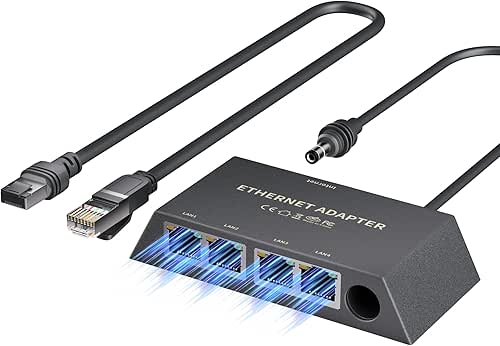
| Gen 3 Multi-Port | Starlink Compatibility: Gen 3 Standard and Mini | Number of Ports: 4 RJ45 ports | Data Transfer Speed: Up to 1 Gbps | VIEW LATEST PRICE | Read Our Analysis |
| Starlink Ethernet Adapter for Wired Network (Gen 2) |

| Interference-Free Performance | Starlink Compatibility: Gen 2 | Number of Ports: 1 port | Data Transfer Speed: Up to 1000 Mbps | VIEW LATEST PRICE | Read Our Analysis |
| Starlink Ethernet Adapter Gen 3/Mini with RJ45 Coupler |
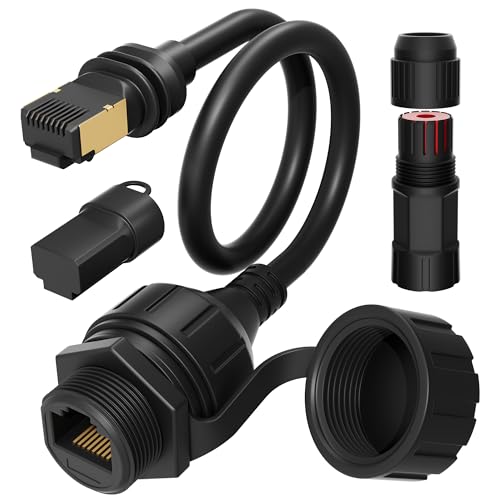
| Outdoor-Ready Solution | Starlink Compatibility: Gen 3 Standard and Mini | Number of Ports: 1 RJ45 port (female coupler) | Data Transfer Speed: Unspecified | VIEW LATEST PRICE | Read Our Analysis |
More Details on Our Top Picks
Starlink Ethernet Adapter for Rectangular Satellite V2
Want a faster, more stable internet connection without relying on WiFi? The Starlink Ethernet Adapter for Rectangular Satellite V2 connects directly to your Gen 2 Starlink Router, providing wired connections up to 1 Gbps. You’ll plug this compact grey adapter into your router’s Ethernet port, then connect compatible devices like desktops, smart TVs, or third-party routers. Setup requires no drivers—it’s plug-and-play. Note that it only works with Starlink Actuated Gen 2 kits, not the Standard Kit with kickstand base. Wired connections reduce network interference, offering you more reliable speeds than wireless alternatives. The adapter carries a 30-day return guarantee and maintains a 4.6-star rating.
- Starlink Compatibility:Gen 2 (Actuated)
- Number of Ports:1 RJ45 port
- Data Transfer Speed:Up to 1 Gbps
- Installation Type:Plug-and-play
- Warranty:30-day return guarantee
- Cable/Connector Type:RJ45 Ethernet
- Additional Feature:Reduces network interference via wired link
- Additional Feature:Compatible with third-party routers/switches
- Additional Feature:Grey compact accessory design
Multi Port Starlink Ethernet Adapter (4 Devices)
If you’re running multiple devices that require wired internet connections simultaneously, the Multi Port Starlink Ethernet Adapter delivers the connectivity you need without compromising speed. This adapter features four Gigabit Ethernet ports, allowing you to connect up to four devices at once. It’s compatible with Starlink Gen3 and Starlink Mini systems. Installation requires no configuration—simply plug the adapter into your Starlink dish and connect your devices to the available ports. The adapter underwent 72-hour full-load testing, demonstrating stable performance without speed drops or interruptions. This makes it suitable for work, entertainment, and smart home management applications where consistent, reliable connections matter.
- Starlink Compatibility:Gen 3 and Mini
- Number of Ports:4 Gigabit Ethernet ports
- Data Transfer Speed:Gigabit speeds (unspecified)
- Installation Type:Plug-and-play
- Warranty:Unspecified
- Cable/Connector Type:Gigabit Ethernet ports
- Additional Feature:Tested 72 hours full load
- Additional Feature:Supports multiple devices simultaneously
- Additional Feature:No speed drops/interruptions
LUCMO Starlink Gen 2 Ethernet Adapter
The LUCMO Starlink Gen 2 Ethernet Adapter is designed exclusively for users with Starlink Standard Actuated Gen 2 dishes who need hardwired internet connections for gaming consoles, PCs, and smart TVs. Installation requires you to simply connect the adapter between your Gen 2 Starlink router and cable, ensuring both ends click firmly into place. You’ll experience lower latency, reduced wireless interference, and smoother streaming immediately after connection. If the adapter doesn’t work initially, verify both connections are secure and restart your router. This plug-and-play solution requires no drivers or complex setup. Confirm your dish model before purchasing to ensure compatibility, as this adapter won’t work with Gen 3, Flat High-Performance, or other Starlink models.
- Starlink Compatibility:Gen 2 (Standard Actuated)
- Number of Ports:1 RJ45 port
- Data Transfer Speed:Unspecified
- Installation Type:Plug-and-play
- Warranty:Unspecified
- Cable/Connector Type:RJ45
- Additional Feature:Lower latency for gaming
- Additional Feature:Lag-free 4K video conferencing
- Additional Feature:Avoids wireless interference direct
Mwin Starlink Ethernet Adapter for Gen 2
You’ll want the Mwin adapter if you’re using Starlink’s rectangular Gen 2 dish and need a wired connection instead of relying on Wi-Fi. This Star Link certified accessory connects directly to your router and delivers Gigabit speeds up to 1 Gbps with minimal latency. Setup requires no drivers—just plug it into your Gen 2 router and connect your device via the RJ45 port. It’s compatible with computers, smart TVs, and third-party routers. The adapter weighs 0.15 kilograms, comes in grey, and works with macOS 14 Sonoma or Windows 11 and later. Amazon’s 30-day return guarantee backs your purchase.
- Starlink Compatibility:Gen 2 (Actuated)
- Number of Ports:1 RJ45 port
- Data Transfer Speed:Up to 1 Gbps
- Installation Type:Plug-and-play
- Warranty:30-day return guarantee
- Cable/Connector Type:RJ45 Ethernet
- Additional Feature:Star Link certified accessory
- Additional Feature:Easy mesh node expansion
- Additional Feature:Minimizes interference design focus
Nogoal Dual-Port Starlink Ethernet Adapter Gen 2
Need a straightforward way to connect two devices simultaneously to your Starlink Gen 2 system without adding bulky network switches? The Nogoal Dual-Port adapter delivers two Gigabit ports in a compact 2.8 oz design. Simply plug it into your Gen 2 router using its precision-molded connector, then connect your devices via RJ45 cables up to 150 feet away. You’ll get <1ms latency with military-grade shielding and gold-plated corrosion-resistant ports rated for 50,000+ insertion cycles. Setup takes 18 seconds with no configuration needed. This adapter suits NAS drives, mesh routers, security systems, and multi-device households. The 2-year warranty covers manufacturer defects.
- Starlink Compatibility:Gen 2
- Number of Ports:2 Gigabit ports
- Data Transfer Speed:1 Gbps
- Installation Type:Plug-and-play
- Warranty:2-year manufacturer warranty
- Cable/Connector Type:RJ45
- Additional Feature:<1ms latency military-grade shielding
- Additional Feature:50,000+ insertion cycle durability
- Additional Feature:Smart Length Guard technology
Ethernet Adapter for Starlink Gen 2 (1 Gbps)
Looking for a straightforward way to connect wired devices to your Starlink Gen 2 system? This adapter supports speeds up to 1 Gbps and works directly with your Starlink Gen 2 router. Installation is simple: plug the RJ45 cable into the adapter and connect it to your device. You can place it inline with your dish cable or attach it directly to the router. If you need multiple ports, connect a network switch to the adapter. The compact grey design fits easily indoors or in your living room, making it practical for video calls, gaming, and everyday internet use.
- Starlink Compatibility:Gen 2 (Standard Actuated)
- Number of Ports:1 RJ45 port
- Data Transfer Speed:Up to 1 Gbps
- Installation Type:Plug-and-play
- Warranty:Unspecified
- Cable/Connector Type:RJ45 wired network
- Additional Feature:Place inline with dish
- Additional Feature:Connect to network switch
- Additional Feature:Addresses network fidelity issues
Starlink Gen 3 Mini Ethernet Adapter with 4 RJ45 Ports
The EAZUSE Starlink Gen 3 Mini Ethernet Adapter provides dependable wired connectivity for users who need to connect multiple devices concurrently to their Starlink system. This adapter features four RJ45 ports, enabling you to link multiple devices at speeds up to 1 Gbps. You’ll receive the adapter and one RJ45 cable in the package. The Cat 6 Ethernet cable ensures stable performance for videoconferencing, online gaming, and general browsing. Setup requires minimal effort—just connect the adapter to your Starlink dish and plug in your devices using standard Ethernet cables. The premium build quality supports both indoor and outdoor use, making it versatile for various installation locations.
- Starlink Compatibility:Gen 3 Standard and Mini
- Number of Ports:4 RJ45 ports
- Data Transfer Speed:Up to 1 Gbps
- Installation Type:Plug-and-play
- Warranty:1-year warranty
- Cable/Connector Type:RJ45 Ethernet (Cat 6)
- Additional Feature:Includes RJ45 Cat 6 cable
- Additional Feature:Premium materials construction quality
- Additional Feature:Indoor/outdoor capability usage
Starlink Ethernet Adapter for Wired Network (Gen 2)
If you’re running a Starlink Gen 2 system and want a more stable internet connection with lower latency, you’ll need a direct wired setup rather than relying solely on wireless. This Ethernet adapter converts your Starlink Gen 2 plug into a standard LAN port, enabling direct connection to your computer or house router. The adapter uses bare copper conductor with insulating aluminum foil to prevent signal interference while supporting speeds up to 1000Mbps. Installation is straightforward: connect the adapter to your Starlink Gen 2 unit, then plug an Ethernet cable into the resulting port. This wired connection delivers improved stability and reduced latency compared to wireless alternatives.
- Starlink Compatibility:Gen 2
- Number of Ports:1 port
- Data Transfer Speed:Up to 1000 Mbps
- Installation Type:Plug-and-play
- Warranty:Unspecified
- Cable/Connector Type:High-quality copper conductor
- Additional Feature:Bare copper conductor inside
- Additional Feature:Insulating aluminum foil layer
- Additional Feature:Optimizes Starlink Gen 2 performance
Starlink Ethernet Adapter Gen 3/Mini with RJ45 Coupler
For Starlink Gen 3 Standard and Mini users who need a straightforward ethernet solution, this 11-inch adapter combines the integrated Starlink plug with a female RJ45 connector in a single cable, eliminating the hassle of cutting or crimping your original cables. The adapter includes a waterproof kit that protects both connection ends from moisture and dirt, ensuring reliable outdoor performance. Install it using Cat6 or higher ethernet cables without couplers or extenders, keeping total cable length under 175 feet. For extended runs or RV setups requiring couplers, upgrade to Cat6A cables with 23 AWG or thicker wiring to maintain stable connections and optimal performance.
- Starlink Compatibility:Gen 3 Standard and Mini
- Number of Ports:1 RJ45 port (female coupler)
- Data Transfer Speed:Unspecified
- Installation Type:Plug-and-play
- Warranty:Unspecified
- Cable/Connector Type:RJ45 Ethernet with waterproof kit
- Additional Feature:Fully waterproof both ends
- Additional Feature:Eliminates cable cutting/crimping
- Additional Feature:11 inches integrated cable length
Factors to Consider When Choosing a Starlink Ethernet Adapter
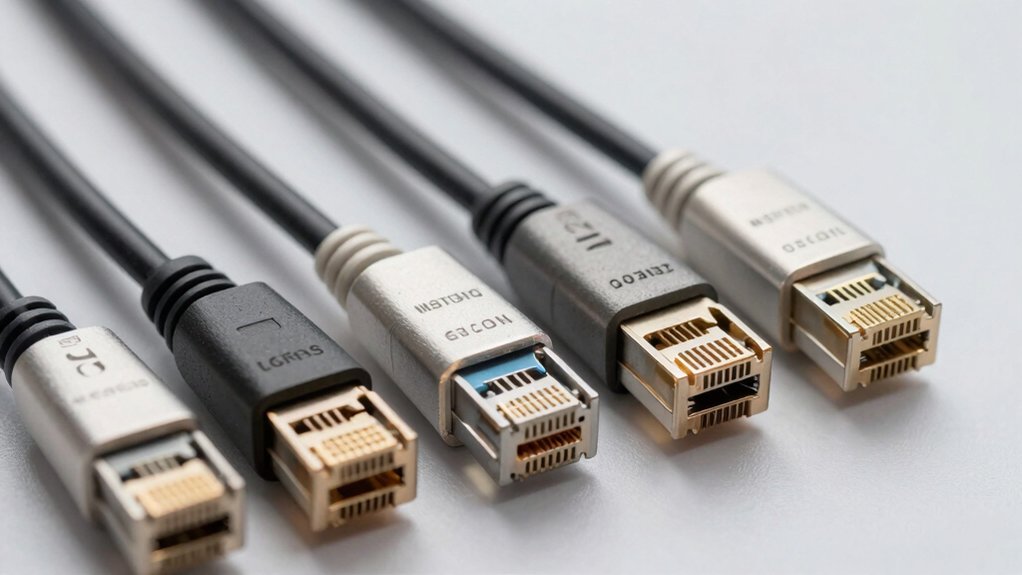
When selecting a Starlink Ethernet adapter, you’ll need to verify compatibility with your specific Starlink dish model, confirm that the port count matches your device needs, and check whether it supports the speed standards your internet plan requires. Next, evaluate the installation process to ensure you can set it up without technical assistance, and examine the adapter’s build quality and materials to confirm it’ll withstand regular use. These five factors—compatibility, ports, speed, installation ease, and durability—form the foundation of choosing an adapter that meets your household’s requirements.
Compatibility With Your Dish
Since Starlink offers different dish generations—Gen 2, Gen 3, and Mini—you’ll need to verify that your adapter matches your specific hardware before purchasing. For Gen 2 systems, select adapters designed for Actuated Gen 2 with rectangular dishes and Starlink Router, not Standard Kit versions. If you have a Gen 3 or Mini dish, choose adapters marketed as compatible with Starlink Gen 3 Standard or Mini to guarantee proper connection. Check the compatibility notes carefully to confirm whether the adapter supports only one generation or multiple versions. Some adapters are labeled exclusively for Gen 2 or Gen 3 and won’t work with other dish generations. Installing an incompatible adapter wastes money and prevents your system from functioning correctly.
Port Count And Device Support
How many devices do you need to connect with a wired connection? Your answer determines which adapter you’ll select. Two-port adapters support dual devices like a PC and gaming console simultaneously. Four-port models accommodate more peripherals—such as a NAS, smart TV, and multiple computers—without requiring an additional network switch. Gen 3 and Mini adapters typically offer four RJ45 outputs, while Gen 2 options commonly provide one or two ports. When choosing, evaluate your current setup and anticipate future expansion. Connecting too many devices to a limited-port adapter creates bottlenecks that reduce performance. Plan ahead by selecting a configuration that matches both your immediate needs and potential growth, ensuring reliable wired connectivity across all your equipment.
Speed And Performance Standards
After you’ve determined how many devices you’ll connect, you’ll next need to evaluate the speed and performance standards that your adapter can deliver. Most Starlink Ethernet adapters support speeds up to 1 Gbps, which matches full-gigabit wired throughput. Check whether your adapter specifies 1000 Mbps data transfer rates to confirm it delivers maximum performance. Multi-port adapters maintain these speeds across all ports simultaneously without reducing individual bandwidth. To sustain advertised speeds, use Cat 6 cables or higher and keep cable lengths under 175 feet, as longer distances and lower-quality cables cause interference and speed reduction. Some manufacturers conduct extended testing under full load for 72 hours to verify stability at peak speeds.
Installation Ease And Setup
Most Starlink Ethernet adapters are plug-and-play devices, meaning you won’t need to install drivers or follow complex setup procedures—just connect the adapter between your Starlink router and your wired device, and it’ll work immediately. This straightforward installation makes setup accessible for anyone, regardless of technical experience.
When setting up your adapter, ensure you secure both Ethernet cable ends with firm clicks for reliable operation. Check your adapter’s compatibility with your specific Starlink router generation, as some models only work with Gen 2 or Gen 3 units. If you need to connect multiple devices, choose a 4-port adapter or attach a separate network switch. For outdoor installations, select waterproof or weather-resistant models and follow cable length recommendations for stable performance.
Build Quality And Durability
When you’re selecting a Starlink Ethernet adapter, what separates a reliable device from one that’ll fail within months? You’ll want to examine the housing material first—look for heat- and impact-resistant construction that withstands daily handling. Next, inspect the connectors closely. Gold-plated or corrosion-resistant RJ45 ports prevent degradation over time. Check the cable quality; Cat6 or higher specifications maintain stable performance. Verify mounting and strain-relief features to protect ports from tugging and movement damage. Choose compact designs that fit alongside your Starlink equipment without obstruction. Finally, confirm the adapter uses certified, durable materials throughout. These durability factors directly impact how long your adapter functions reliably under regular use conditions.
Warranty And Return Protection
Why should you prioritize warranty coverage when buying a Starlink Ethernet adapter? Warranties protect your investment if the adapter fails or malfunctions after purchase. Most adapters offer a 30-day Amazon return policy, allowing you to request refunds or replacements within this window. Many manufacturers include 1-year warranties that cover defects in materials and workmanship. Before purchasing, check the product page for exact warranty terms, including duration and coverage details. Verify compatibility limitations—some adapters work only with Gen 2 systems, not Gen 3, which may affect warranty eligibility if you use them incorrectly. Review the manufacturer’s return process requirements to understand what documentation you’ll need. Look for adapters that include troubleshooting support or plug-and-play setup guidance, as these accompany warranty coverage and simplify problem-solving if issues arise.
Final Thoughts
To get the best Starlink Ethernet adapter, you’ll need to identify your system’s generation (Gen 2, Gen 3, or Mini), then pick between 2-port and 4-port models based on how many devices you’re connecting. Use Cat 6 cables for peak performance, verify warranty coverage, and ensure the adapter’s shielded design matches your setup. Install it directly into your dish’s power supply port for plug-and-play connectivity without extra configuration.

Meet Ry, “TechGuru,” a 36-year-old technology enthusiast with a deep passion for tech innovations. With extensive experience, he specializes in gaming hardware and software, and has expertise in gadgets, custom PCs, and audio.
Besides writing about tech and reviewing new products, he enjoys traveling, hiking, and photography. Committed to keeping up with the latest industry trends, he aims to guide readers in making informed tech decisions.