


You’re looking for a reliable open-source router that won’t limit your network control. Whether you need VPN protection, advanced firewall settings, or expandable storage, several platforms deliver what tech-savvy users actually depend on. The key is understanding which devices match your specific needs—from portable travel models to high-performance gaming routers. Let’s examine eight options that stand out.
| Banana Pi OpenWrt One WiFi 6 Router (MT7981B) |

| Developer-Focused Board | Operating System: OpenWrt preinstalled | VPN Support: Not specified | RAM: 1 GB DDR4 | VIEW LATEST PRICE | Read Our Analysis |
| GL.iNet GL-SFT1200 Portable WiFi Travel Router with VPN |

| Best Travel Router | Operating System: OpenWrt-based | VPN Support: OpenVPN, WireGuard pre-installed; 30+ VPN providers compatible | RAM: 128 MB | VIEW LATEST PRICE | Read Our Analysis |
| Linksys Dual-Band Gigabit WiFi Router (WRT1900ACS) |

| Best Overall | Operating System: Open Source Ready (customizable) | VPN Support: Not specified | RAM: Not specified | VIEW LATEST PRICE | Read Our Analysis |
| TP-Link ER605 V2 Gigabit VPN Router |

| Professional Grade | Operating System: Not specified (enterprise-focused) | VPN Support: IPsec (20×), OpenVPN (16×), L2TP (16×), PPTP (16×) | RAM: Not specified | VIEW LATEST PRICE | Read Our Analysis |
| WayPonDEV Banana Pi WiFi 6 OpenWrt Router Board |

| Advanced DIY Pick | Operating System: OpenWrt (development board) | VPN Support: Not specified | RAM: 1 GB DDR4 | VIEW LATEST PRICE | Read Our Analysis |
| GL.iNet GL-MT300N-V2 Portable WiFi Router with VPN |
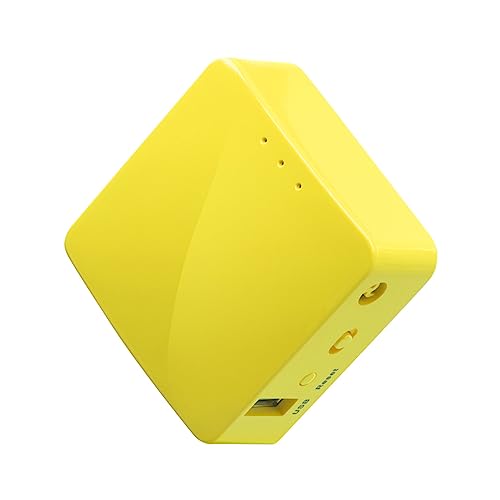
| Most Portable | Operating System: OpenWrt preinstalled | VPN Support: OpenVPN, WireGuard pre-installed; 30+ VPN providers compatible | RAM: 128 MB | VIEW LATEST PRICE | Read Our Analysis |
| GL.iNet GL-MT6000 WiFi 6 Gaming Router |

| Best Performance | Operating System: Linux-based OpenWrt | VPN Support: OpenVPN and WireGuard integrated | RAM: 1 GB DDR4 | VIEW LATEST PRICE | Read Our Analysis |
| Pyramid Pi 4000 Superfast VPN Travel Router Dual-Band |

| Best For Beginners | Operating System: OpenWrt 23.05+ with PiFi firmware | VPN Support: OpenVPN, WireGuard pre-installed; compatible with dozens of VPN providers | RAM: 1 GB | VIEW LATEST PRICE | Read Our Analysis |
More Details on Our Top Picks
Banana Pi OpenWrt One WiFi 6 Router (MT7981B)
If you’re building a custom network setup or managing IoT devices across multiple locations, the Banana Pi OpenWrt One delivers the flexibility you need with OpenWrt preinstalled on its MediaTek Filogic 810 processor. You get 1 GB of DDR4 RAM and 256 MiB of NAND storage for running complex network configurations. The router features a 2.5G WAN port and 1G LAN port, plus an M.2 NVMe SSD interface for expanding storage capacity. WiFi 6 dual-band coverage handles 3×3 and 2×2 streams across frequencies. You can deploy it as an access point, enable parental controls, or configure remote access. An RTC supports scheduled tasks, while PoE capability powers the device through Ethernet connections. MikroBUS socket expansion lets you add compatible modules for specialized functions.
- Operating System:OpenWrt preinstalled
- VPN Support:Not specified
- RAM:1 GB DDR4
- WiFi Standard:WiFi 6 dual-band (3×3/2×2)
- Primary Use Case:Network management, IoT projects, custom networking
- Warranty:Amazon return policy included
- Additional Feature:M.2 NVMe SSD expansion
- Additional Feature:2.5G WAN port connectivity
- Additional Feature:MikroBUS socket expandability
GL.iNet GL-SFT1200 Portable WiFi Travel Router with VPN
The GL.iNet GL-SFT1200 Opal stands out as the ideal choice for travelers and remote workers who need a compact, secure router they can carry anywhere. At 145 grams, it fits in your pocket while delivering AC1200 speeds across dual bands. You’ll get pre-installed OpenVPN and WireGuard support compatible with 30+ VPN providers, plus a physical toggle switch for quick VPN activation. The device includes two Gigabit LAN ports and one WAN port, retractable antennas, and repeater functionality that converts public WiFi into a private network. Setup requires accessing the admin panel to configure your preferred VPN client, then connecting via ethernet, USB, or WiFi.
- Operating System:OpenWrt-based
- VPN Support:OpenVPN, WireGuard pre-installed; 30+ VPN providers compatible
- RAM:128 MB
- WiFi Standard:WiFi 5 (AC1200; 802.11a/b/g/n/ac)
- Primary Use Case:Travel router, portable, hotel/apartment setup
- Warranty:2-year warranty; 30-day return policy
- Additional Feature:Retractable dual antennas
- Additional Feature:Physical VPN toggle switch
- Additional Feature:145g ultra-lightweight design
Linksys Dual-Band Gigabit WiFi Router (WRT1900ACS)
Linksys’s WRT1900ACS stands out for tech enthusiasts who want both high performance and full customization control over their network hardware. You get simultaneous dual-band speeds: 600 Mbps on 2.4 GHz and 1300 Mbps on 5 GHz. The dual-core 1.6 GHz ARM processor handles multiple tasks efficiently. Four adjustable external antennas strengthen signal coverage throughout your space. USB 3.0 and eSATA ports let you connect external storage for fast file sharing across your network. You can prioritize devices, enable parental controls, and monitor network activity through the Network Map interface. The open-source architecture lets you customize firmware directly, giving you unrestricted access to modify router functionality according to your specific needs.
- Operating System:Open Source Ready (customizable)
- VPN Support:Not specified
- RAM:Not specified
- WiFi Standard:Wireless AC (AC1900; dual-band)
- Primary Use Case:Home/network customization
- Warranty:Not specified
- Additional Feature:Four detachable external antennas
- Additional Feature:eSATA fast data transfers
- Additional Feature:Open source customization ready
TP-Link ER605 V2 Gigabit VPN Router
For IT professionals and network administrators who need robust VPN connectivity across multiple office locations, you’ll want the TP-Link ER605 V2’s enterprise-grade capabilities. This wired gigabit router supports up to 20 LAN-to-LAN IPsec connections, 16 OpenVPN tunnels, and 16 L2TP protocols simultaneously. You’ll get five gigabit ports—one dedicated WAN, two configurable WAN/LAN, and two LAN ports—plus USB mobile broadband backup. The advanced firewall includes DoS defense, IP/MAC/URL filtering, and SPI protection. Omada SDN integration simplifies network management across multiple devices. Multi-WAN load balancing distributes traffic efficiently. You’ll receive a five-year manufacturer warranty covering the unit, power adapter, and installation guide.
- Operating System:Not specified (enterprise-focused)
- VPN Support:IPsec (20×), OpenVPN (16×), L2TP (16×), PPTP (16×)
- RAM:Not specified
- WiFi Standard:Not applicable (wired only)
- Primary Use Case:Enterprise VPN routing, multi-WAN management
- Warranty:5-year manufacturer warranty
- Additional Feature:Multi-WAN load balancing
- Additional Feature:20x LAN-to-LAN IPsec
- Additional Feature:USB 4G/3G modem backup
WayPonDEV Banana Pi WiFi 6 OpenWrt Router Board
Want a router board built specifically for OpenWrt development and customization? The WayPonDEV Banana Pi WiFi 6 gives you a MediaTek MT7981B processor with dual ARM cores running at 1.3 GHz. You get 1 GB of DDR4 RAM and 256 MB of SPI NAND storage, plus 16 MB protected memory for system backups. The board includes one 2.5 GbE WAN port, one Gigabit LAN port, and WiFi 6 dual-band connectivity. For expansion, you’ll find an M.2 NVMe slot, USB 2.0 Type-A port, and a mikroBUS expansion port. Five GPIO pins and one UART port support additional applications and custom projects.
- Operating System:OpenWrt (development board)
- VPN Support:Not specified
- RAM:1 GB DDR4
- WiFi Standard:WiFi 6 dual-band (MT7976C)
- Primary Use Case:OpenWrt development, IoT applications, network communication
- Warranty:Not specified
- Additional Feature:M.2 2230/2242 NVMe expansion
- Additional Feature:Five GPIO pins available
- Additional Feature:MikroBUS expansion port support
GL.iNet GL-MT300N-V2 Portable WiFi Router with VPN
The GL-MT300N-V2 Mango router stands out as the ideal choice if you’re traveling frequently and need to secure your connection on public networks. This compact device weighs only 1.41 ounces and measures 2.3 x 2.3 x 1 inches, fitting easily in your pocket or bag. You can power it via USB from your laptop or power bank. The router runs OpenWrt and includes pre-installed OpenVPN, supporting over 30 VPN providers. You’ll access 128MB RAM and 16MB Flash storage for configuration. Set it up through the mobile app or web admin panel within minutes. Connect to public Wi-Fi, then broadcast a secure private network for your devices. The dual Ethernet ports let you convert wired connections to wireless ones, perfect for hotel rooms.
- Operating System:OpenWrt preinstalled
- VPN Support:OpenVPN, WireGuard pre-installed; 30+ VPN providers compatible
- RAM:128 MB
- WiFi Standard:2.4GHz only
- Primary Use Case:Travel router, public WiFi conversion, portable
- Warranty:2-year warranty
- Additional Feature:39g pocket-sized design
- Additional Feature:USB power bank compatible
- Additional Feature:USB disk extendable storage
GL.iNet GL-MT6000 WiFi 6 Gaming Router
Gaming and streaming demand routers that deliver ultra-low latency and sustained high speeds—which is where GL.iNet’s GL-MT6000 (Flint 6) excels as a WiFi 6 option for tech enthusiasts who won’t settle for standard performance. You’ll get 6000 Mbps total data transfer across dual-band 802.11ax with eight-stream capability. The router includes two 2.5G Ethernet ports for fiber connections and four 1G ports for additional devices. You can integrate OpenVPN and WireGuard for bandwidth control, achieving speeds up to 900 Mbps with WireGuard. The system supports over one hundred connected devices simultaneously, making it suitable for households running multiple high-demand applications. You’ll appreciate WPA3 security, AdGuard Home DNS filtering, and access modes including Guest Mode for network management.
- Operating System:Linux-based OpenWrt
- VPN Support:OpenVPN and WireGuard integrated
- RAM:1 GB DDR4
- WiFi Standard:WiFi 6 dual-band (802.11ax; 6 Gbps)
- Primary Use Case:Gaming, home/business, high-speed routing
- Warranty:2-year warranty; 30-day return policy
- Additional Feature:2x 2.5G Ethernet ports
- Additional Feature:6000 Mbps total speed
- Additional Feature:Supports 100+ connected devices
Pyramid Pi 4000 Superfast VPN Travel Router Dual-Band
If you’re looking for a portable router that runs open-source firmware and lets you secure your internet connection anywhere you travel, the Pyramid Pi 4000 delivers both capabilities in a single device. This Raspberry Pi 4-powered router includes OpenVPN and WireGuard pre-installed, compatible with dozens of VPN providers. You’ll get dual-band WiFi reaching 1300 Mbps combined speeds, with wired connections supporting up to 890 Mbps. The Pyramid app lets you manage VPN profiles and most functions without needing technical knowledge. You receive three months of free VPN access, a gigabit ethernet cable, and power adapters for UK, US, and EU outlets. AdGuard Home blocks ads and trackers automatically.
- Operating System:OpenWrt 23.05+ with PiFi firmware
- VPN Support:OpenVPN, WireGuard pre-installed; compatible with dozens of VPN providers
- RAM:1 GB
- WiFi Standard:Dual-band WiFi (AC1300; 5GHz)
- Primary Use Case:Travel router, portable VPN, dual-band WiFi
- Warranty:1-year manufacturer warranty; 30-day return policy
- Additional Feature:Raspberry Pi 4b powered
- Additional Feature:Dedicated VPN LED indicator
- Additional Feature:3-month free VPN included
Factors to Consider When Choosing Open Source Routers

When you’re selecting an open source router, you’ll need to evaluate several key factors: hardware performance and specs that match your network demands, memory and storage capacity sufficient for your firmware and configurations, wireless standards and coverage that serve your space adequately, and security features plus VPN support that protect your data. Start by assessing your current network speed requirements and the size of your physical space, then match those needs against each router’s processor power, RAM, and Wi-Fi standards like Wi-Fi 6. Finally, verify that your candidate routers include the security protocols and VPN capabilities your household or business actually requires.
Factors to Consider When Choosing Open Source Routers
What specifications should you prioritize when selecting an open source router? First, evaluate your CPU and RAM requirements based on device count and desired throughput. A dual-core ARM processor with 1GB RAM handles basic tasks, while heavier loads need more power. Second, check firmware compatibility with OpenWrt and verify community activity for ongoing support. Third, identify which features you need: OpenVPN, WireGuard, AdGuard Home, or advanced firewall options. Fourth, assess expansion capabilities like M.2 NVMe, USB ports, or mikroBUS slots if you plan adding storage or IoT modules. Finally, match the form factor to your deployment—travel routers offer portability, while rack-mounted boards suit permanent installations. Confirm power requirements fit your environment before purchasing.
Hardware Performance And Specs
How do you know which hardware specs actually matter for your open source router? Start by checking RAM capacity—128 MB to 1 GB determines how many tasks your router handles simultaneously. Next, examine the SoC type; MT7981B and ARM cores directly affect VPN speed, QoS performance, and routing efficiency. Then evaluate storage: 16 MB NOR suffices for basic firmware, while 256 MB NAND or 8 GB eMMC enable advanced features and logging. Compare WiFi standards—802.11n/ac/ax support determines your maximum speeds, from 600 Mbps at 2.4 GHz to AC1900 total bandwidth. Finally, assess interface options: count Gigabit ports, USB versions, and M.2 NVMe slots for expandability needs. These specifications directly impact your router’s real-world functionality.
Memory And Storage Capacity
Your router’s memory and storage directly determine what it can do and how well it’ll perform under load. RAM capacity—typically 128 MB to 1 GB—controls how many concurrent interfaces and VPN tunnels you can run simultaneously without slowdowns. Storage capacity, whether NAND, NOR flash, or eMMC, limits how many packages, logs, and custom modules you can install locally. For solid performance, aim for at least 1 GB RAM paired with 256 MB or more flash storage. If you need expanded capabilities, consider boards with USB or NVMe interfaces to attach external storage for logging, caching, and plugin data. Dual-channel DDR4 architecture improves throughput compared to single-channel setups, enhancing responsiveness under OpenWrt’s filesystem loads.
Wireless Standards And Coverage
Once you’ve confirmed your router has sufficient memory and storage for your needs, the next consideration is its wireless capabilities—specifically, which standards it supports and how effectively it’ll deliver signal throughout your space. Check whether your router supports Wi-Fi 6 (802.11ax), Wi-Fi 5 (802.11ac), or Wi-Fi 4 (802.11n). Newer standards enable faster speeds and better performance in congested environments. Next, verify if your router operates on dual-band (2.4 GHz and 5 GHz) or tri-band configurations, which reduce interference. Examine the antenna setup—multiple external antennas typically provide stronger range than single integrated antennas. Finally, test actual coverage in your space, accounting for walls and obstacles, since real-world performance differs from theoretical maximums.
Security Features And VPN Support
Security in an open source router hinges on three interconnected components: encryption protocols, firewall capabilities, and VPN functionality. You’ll want to verify that your chosen router supports multiple encryption options like OpenVPN, WireGuard, or L2TP, as these directly impact both security level and performance. Check whether the router includes pre-installed VPN clients for immediate secure tunneling without additional configuration. Next, confirm built-in firewall features including SPI stateful inspection, DoS protection, and IP/MAC/URL filtering to shield your local network from VPN-related exposure. Finally, enable DNS filtering or AdGuard Home to block malicious domains accessed through VPN-protected clients. For complex setups, verify multi-WAN and VPN server capabilities to maintain resilience across your network topology.
Expansion Ports And Connectivity Options
The expansion and connectivity capabilities of an open source router directly determine how much you can customize and extend its functionality beyond basic networking. First, check for M.2 NVMe slots and USB ports that let you add storage or external modules. Next, verify Ethernet options—look for 2.5G WAN, Gigabit LAN, and multi-WAN support for reliable connections. Then examine wireless expansion features like dual-band Wi-Fi and external antenna options to improve coverage in your space. Additionally, assess storage interfaces such as eSATA or USB disk support for networked storage. Finally, confirm compatibility with UART/GPIO access and open APIs that enable custom firmware and plugins. These expansion options directly increase your router’s adaptability to specific networking demands.
Final Thoughts
You’ll find the right open-source router by matching your needs to device specs. Start by identifying your required features: VPN support, WiFi 6, portability, or gaming performance. Next, compare RAM, storage, and interface options across models. Finally, review each router’s OpenWrt compatibility and community support. Your choice depends on balancing budget, performance demands, and expandability requirements for your network setup.

Meet Ry, “TechGuru,” a 36-year-old technology enthusiast with a deep passion for tech innovations. With extensive experience, he specializes in gaming hardware and software, and has expertise in gadgets, custom PCs, and audio.
Besides writing about tech and reviewing new products, he enjoys traveling, hiking, and photography. Committed to keeping up with the latest industry trends, he aims to guide readers in making informed tech decisions.