
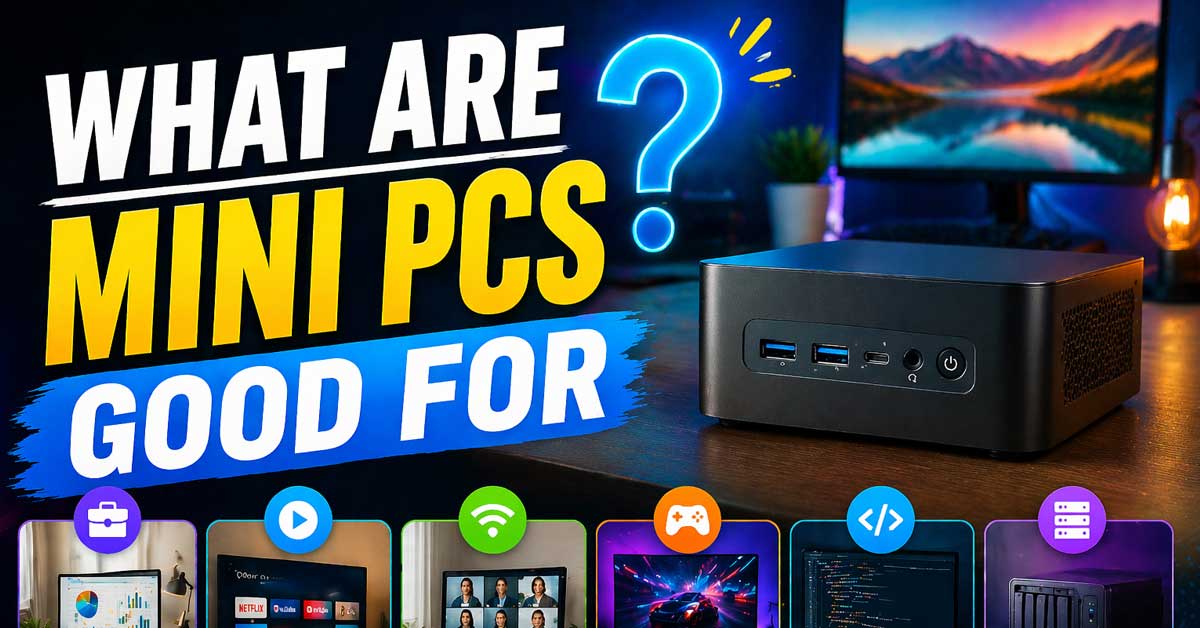

A focused machine for specific use cases — here’s where they genuinely excel
Mini PCs occupy a specific niche in the computing landscape — smaller than a traditional desktop, more powerful and flexible than a streaming stick, and more capable than most people expect from something the size of a paperback book.
They’re not good for everything, but for the right use cases they’re the best tool available.
Here’s where mini PCs genuinely shine and where they fall short.
Home Theater and Media Centers
This is arguably the strongest use case for mini PCs and the one where they offer the clearest advantage over alternatives. A mini PC connected to a TV delivers a full Windows or Linux computing environment on the big screen — access to every streaming service, local media playback, a full web browser, gaming through services like Xbox Cloud Gaming or GeForce Now, and any other application you’d run on a desktop.
Compared to a smart TV’s built-in apps, a mini PC provides a real operating system with no restrictions on what software runs. Compared to a streaming stick, it handles 4K local file playback including demanding codecs like HEVC and AV1. Compared to a full desktop tower, it sits invisibly behind the TV or in an entertainment unit without cable clutter.
Modern mini PCs handle 4K video playback without effort. Many support HDMI 2.1 for 4K at 120Hz. The fan is quiet enough for living room use during typical media playback. For households that want a full PC experience on the TV rather than the compromises of a smart TV platform, a mini PC is the right tool.
![Mini Portable Projector 4K WiFi 6 BT 5.2 Upgraded Portable Projector Full HD Supported for Phone /PC /TV /HDMI /PS5 /Laptop Auto Keystone Home Theater 180° Rotation [Built-in App] White](https://m.media-amazon.com/images/I/41BENoJ6zpL._SL500_.jpg)
1. Direct projection from iPhone/Android brings exceptional visual quality: This portable mini projector allows you to easily enjoy high-definition image quality. Whether it's a home theater, a business presentation or outdoor entertainment, you can enjoy smooth and clear images and an immersive visual feast with just one click.

Upgraded 1080P Full HD: PJ108 Portable Projector adopts the 2025 latest Projection Technology and LCD color calibration and high light transmittance with native 1920x1080P resolution, 10000:1 high dynamic contrast ratio, shows a more clearer, brighter, and richer picture. Video projector Combining an innovative high-refraction 7 layers glassed lens, this 4K projector brightness rating of 180ANSI, have a longer service life
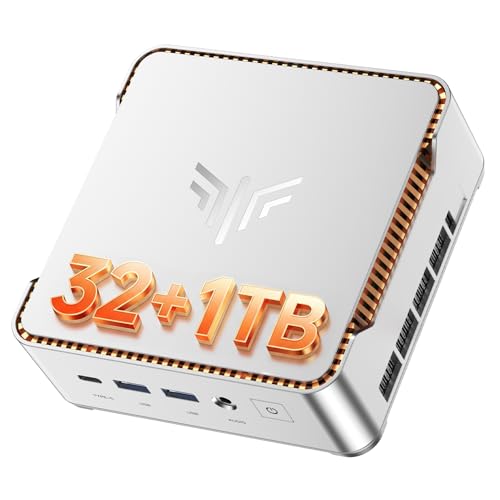
【GPU IN-TEL LRIS XE GRAPHICS - CPU CORE 12600H】The KAMRUI mini pc W-11 pro is equipped with an 12th Gen In·tel Core 12600H flagship mobile processor with a turbo frequency of up to 4.5 GHz and a 18MB L3, 12-core 16-thread design.It delivers desktop-level performance and handles a wide range of high-load challenges with ease.
Home Servers and Always-On Computing
Mini PCs running continuously as home servers make more economic sense than any other desktop form factor because their power consumption is dramatically lower. A mini PC drawing 10 to 15 watts continuously costs a fraction of what a desktop drawing 100 to 150 watts costs annually in electricity.
Common home server use cases where mini PCs excel:
Plex or Jellyfin media servers — transcoding and serving media to other devices in the home. Most modern mini PCs handle multiple simultaneous transcodes without difficulty.
Home Assistant or similar smart home hubs — always-on automation controllers that manage lighting, thermostats, security cameras, and other smart home devices.
Network-attached storage (NAS) alternatives — a mini PC with external drives attached runs more software than a dedicated NAS device while consuming similar power.
Pi-hole or AdGuard Home — network-wide ad blocking running on a dedicated low-power device.
VPN server — a home VPN endpoint that lets you securely access your home network remotely.
Self-hosted services — Nextcloud, Bitwarden, Home Assistant, and similar self-hosted applications run well on mini PC hardware.
The low power draw combined with a full x86 processor makes mini PCs the most versatile always-on home computing option available.
![GEEKOM Mini PC[Business Cost-Saving Star] IT12(3-Year Coverage) with 12th Gen Intel i5-12450H Mini Computers,16 RAM/512GB SSD(Not LPDDR) Windows 11 Pro Desktop PC (Low-Power),Dual USB 4/8K(UHS-II)](https://m.media-amazon.com/images/I/41fBvVWjyNL._SL500_.jpg)
➊【Outstanding Service That Surpasses Industry Standards】The Geekom NUC12 Mini PC comes pre‑installed with genuine Windows 11 Pro and supports smooth operation of mainstream applications such as Plex Media Server. It is backed by a three‑year warranty with US‑based customer support and local repair options to minimize service delays. Quick troubleshooting and replacement services are available, alongside dedicated remote assistance for enterprise users. The device meets multiple safety and compliance certifications (CE, FCC, CB, CCC) and offers volume‑order pricing—suitable for business and institutional deployments.

⚡【Smooth & Light weight】Beelink Mini PC comes with Intel Twin Lake 4-Cores N150(up to 3.6GHz). This mini pc is suitable for Zoom meetings/Skype, allows to run Office, PS, surf the internet and watch stream video at the same time. The Mini Computer measures only 115 x 102 x 41mm, which is ideal for diverse usage scenarios such as office, online education, entertainment, industry, etc

【Speed Controllable】Easy Cloud axial fan 120v allows you to freely adjust the computer cooling fan speed according to your needs. This flexibility allows you to adjust fan operation to a level that best suits your environment, whether you require powerful cooling or a quiet work environment
Office and Productivity Work
For the tasks that define most office workloads — documents, spreadsheets, email, video calls, web browsing, and cloud-based applications — mini PCs are fully capable without compromise. The CPU performance in a modern mini PC with an Intel Core Ultra or AMD Ryzen processor handles every common productivity task as smoothly as a traditional desktop costing significantly more.
The size advantage is particularly relevant in office environments where desk space is at a premium. A mini PC mounted on the back of a monitor with a VESA mount eliminates the computer from the desk entirely — just a monitor, keyboard, and mouse with no visible tower.
For organizations deploying many workstations, mini PCs also offer advantages in deployment, management, and replacement — easier to ship, easier to mount, easier to swap out when hardware ages.

【Adjustable Wall Mount】Suitable for almost any device that is less than 2.8" thick Compatible with Streaming Media Player, Nintendo switch, WII,Cable Boxes, Modems,Router,Power,DVD Players, and More.
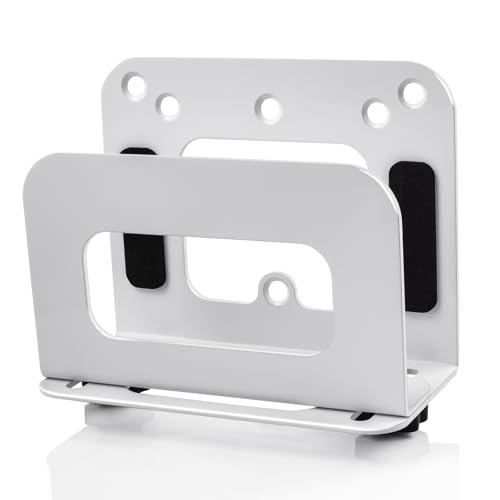
Adjustable Wall Mount Size: Min 1.2” to Max 2.8” (30mm to 72 mm)!!! Please confirm the product size before purchasing to ensure the correct purchase(Please refer to the picture for the specific dimensions of the product)

Superior Sound with Active Denoise: Experience exceptional sound clarity with the GoorDik USB C wireless lavalier mic featuring advanced active denoise technology. With dual noise reduction modes – noise reduction mode and original sound mode. The wireless clip-on C port mic is equipped with 2 furry outdoor microphone windscreen muffs and 4 extra foam mic covers, ensuring crystal-clear audio even in noisy and windy environments
Digital Signage and Kiosk Applications
Mini PCs are widely used in commercial digital signage — powering display screens in retail stores, restaurants, airports, lobbies, and public spaces. The reasons are practical: they’re small enough to mount directly behind or inside a display, they run full Windows or Linux software that can drive complex interactive content, and they consume little power for continuous operation.
For anyone setting up a display kiosk — a menu board, an information display, a waiting room entertainment screen, a trade show booth — a mini PC provides more flexibility than dedicated signage players at comparable cost.
Developer Workstations and Light Development
Many software developers find modern mini PCs capable workstations for typical development tasks — writing and compiling code, running local web servers, working with containers and virtual machines, managing databases, and using IDEs like VS Code or JetBrains tools.
Mini PCs with 16GB or 32GB of RAM handle most development workflows comfortably. Running Docker containers, spinning up local development environments, and working across multiple projects simultaneously are well within the capability of current mini PC hardware.
The limitations appear at the high end of development compute — building large codebases, training machine learning models locally, or running GPU-intensive development tasks — where a dedicated workstation with a discrete GPU remains the better tool.
Secondary or Supplemental Computer
A mini PC as a second computer — a dedicated machine for a specific purpose running alongside a primary workstation — is a common and practical use. Examples include:
A dedicated streaming PC that handles OBS, streaming software, and Discord while the primary machine handles the game.
A second machine for a home office setup where work and personal computing need to be separated on different hardware.
A kids’ computer for homework, educational software, and entertainment that’s separate from the household’s primary machine.
A dedicated machine for a specific application — a retro gaming emulation station, a photo editing workstation, a music production setup — that benefits from dedicated hardware without the full cost of another tower desktop.
Thin Client Replacement
In enterprise and education environments, mini PCs replace aging thin clients and legacy desktop hardware for remote desktop and virtual desktop infrastructure (VDI) use cases. Users connect to remote virtual machines hosted on servers while the mini PC handles display, input, and network connectivity locally.
The combination of low cost, low power, small form factor, and sufficient processing power for remote desktop work makes mini PCs a practical replacement for both thin clients (more flexibility) and aging desktop towers (lower cost and energy consumption).
Retro Gaming and Emulation
Mini PCs handle retro gaming emulation extremely well — emulating consoles through the PS2/GameCube/Wii era and older is well within the capability of current mini PC hardware. Running RetroArch, Dolphin, PCSX2, and similar emulators at full speed and with graphical enhancements is straightforward.
Connected to a living room TV with a wireless controller, a mini PC running an emulation frontend like Batocera or EmulationStation provides a clean console-like experience from a tiny device.
Modern mini PCs with AMD integrated RDNA graphics handle PS3 emulation (RPCS3) and Switch emulation (Yuzu/Ryujinx) for many titles — something that wasn’t possible on integrated graphics even a few years ago.
Point of Sale and Business Terminals
The same characteristics that make mini PCs good for digital signage — small size, low power, full OS support — make them practical for point of sale terminals, business kiosk applications, and specialized workstations in retail, hospitality, and healthcare environments. Running POS software, inventory management, patient check-in systems, or other specialized business applications on a full Windows environment mounted behind a touchscreen display is a common commercial deployment.
Education and Lab Environments
Schools and educational institutions use mini PCs extensively for computer labs and classroom computing. The low cost per unit, simple mounting, long service life, and ability to run educational software on a full Windows or Linux environment make them practical for large deployments.
Students doing research, word processing, light programming, web browsing, and standard educational applications encounter no limitations on mini PC hardware. The lower cost compared to traditional desktops allows institutions to deploy more computers within the same budget.
Where Mini PCs Are Not the Right Choice
Being honest about limitations:
Gaming with modern AAA titles. Any game that benefits from a discrete GPU — current generation titles at medium or high settings — requires hardware that mini PCs can’t accommodate. Integrated graphics handle older games, indie titles, and cloud gaming well, but a dedicated gaming PC with a discrete GPU outperforms any mini PC for serious gaming.
Video production and 3D rendering. GPU-accelerated rendering, color grading, VFX work, and 4K video editing with complex timelines benefit from discrete GPU compute that mini PCs don’t have. A workstation with a dedicated GPU handles these workloads significantly better.
Machine learning and AI development. Training models locally requires GPU memory and compute that far exceeds what integrated graphics provide.
Users who upgrade hardware over time. A traditional desktop’s modular architecture allows GPU, CPU, RAM, and storage upgrades across years of ownership. Mini PCs are largely fixed configurations — when the processor is obsolete, the whole unit is replaced.
A Quick Reference by Use Case
| Use Case | Mini PC Suitability |
|---|---|
| Home theater and media playback | Excellent |
| Home server and always-on services | Excellent |
| Office productivity | Excellent |
| Digital signage and kiosks | Excellent |
| Light software development | Very good |
| Retro gaming and emulation | Very good |
| Secondary or dedicated computer | Very good |
| Education and lab computing | Very good |
| Modern AAA gaming | Poor |
| GPU-intensive video production | Poor |
| Machine learning development | Poor |
The Bottom Line
Mini PCs are genuinely excellent for home theater, always-on home servers, office productivity, digital signage, light development, and retro gaming — use cases where their size, low power consumption, and quiet operation are advantages rather than compromises. For these workloads, a mini PC isn’t a lesser alternative to a desktop — it’s the better tool.
The limitations are real and meaningful for GPU-intensive workloads — gaming at high settings, 3D rendering, video production, and machine learning all require discrete GPU hardware that mini PCs can’t accommodate. For those workloads, a traditional desktop remains the right choice.
Mini PCs are best when the computer should disappear — behind the TV, in a server closet, on the back of a monitor, or quietly running 24/7 without drawing attention or power.

【High capacity storage】The Beelink Me Mini NAS comes with 6 M.2 NVMe SSD slots (supporting 2230/2242/2280), each slot supporting up to 4TB capacity, for a total of up to 24TB capacity. This will enable the machine to store approximately 11000 movies, 2.23 million songs, 4.46 million photos, or 11.17 million documents.

Next-Gen Performance in a Compact Powerhouse: Meet the KAMRUI Pinova P1 Mini PC—powered by the AMD Ryzen 4300U processor (4 cores / 4 threads, base 2.7GHz, boost up to 3.7GHz). With a 25% higher base clock and ~10% better multi-threaded performance than typical entry-level chips like N-series, it outperforms the i3-10110U by 50% and the Ryzen 5 3500U by 15%, it handles demanding tasks—like multitasking, light video editing, or even basic 3D rendering—with noticeably smoother responsiveness

【Compact Yet Mighty】 Mini PC Desktop houses the robust 12th Gen Processor N100, combining high-performance cores and intelligent optimization for seamless multitasking and light gaming, all within a compact form factor.Unmatched After-Sales Service: Nimo offers market-leading support with a 90-day free return and exchange policy, plus a two-year warranty. Enjoy peace of mind and reliability with your Mini PC Desktop.

Meet Ry, “TechGuru,” a 36-year-old technology enthusiast with a deep passion for tech innovations. With extensive experience, he specializes in gaming hardware and software, and has expertise in gadgets, custom PCs, and audio.
Besides writing about tech and reviewing new products, he enjoys traveling, hiking, and photography. Committed to keeping up with the latest industry trends, he aims to guide readers in making informed tech decisions.