
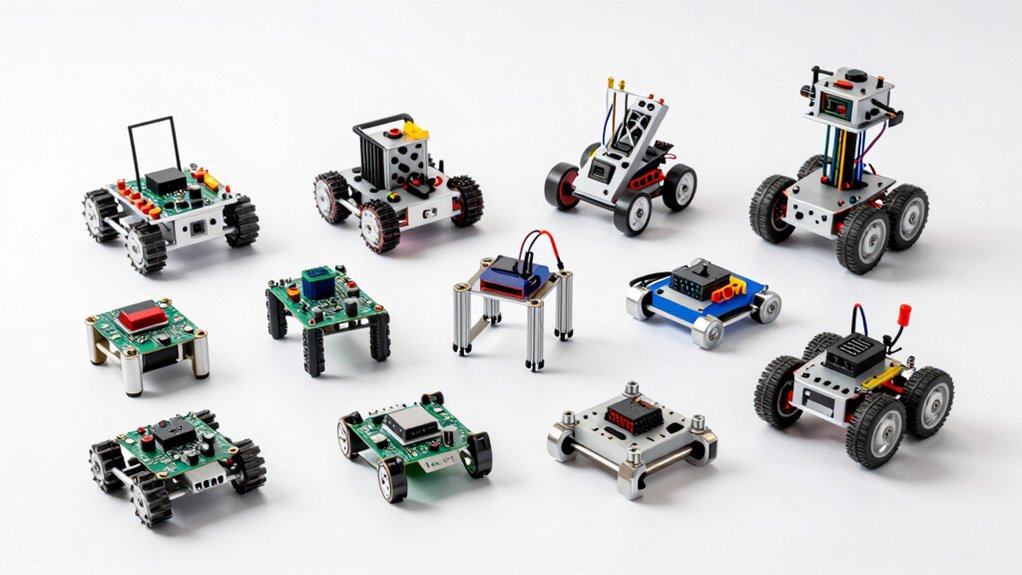

You’re looking to build hands-on robotics skills, and Arduino robot kits offer practical ways to learn coding and engineering. You’ll find kits ranging from simple car models with obstacle avoidance features to complex robotic arms with multiple joints. Each kit comes with specific components, programming requirements, and difficulty levels. Choosing the right one depends on your goals and experience level—but how do you know which fits your needs?
| ELEGOO UNO R3 Smart Robot Car Kit for Arduino |

| Best For Beginners | Robot Type: Wheeled car with obstacle avoidance/line tracing | Target Age Group: Ages 8+ | Primary Control Methods: Android/iOS app, infrared remote | VIEW LATEST PRICE | Read Our Analysis |
| ELEGOO Conqueror Robot Tank Kit for Arduino STEM |
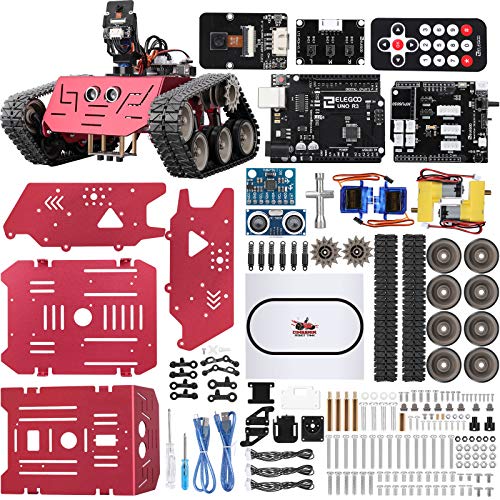
| Best Overall Value | Robot Type: Tank with camera gimbal and FPV control | Target Age Group: Ages 8-16+ | Primary Control Methods: Smartphone app, infrared remote | VIEW LATEST PRICE | Read Our Analysis |
| Makeblock mBot Robot Kit Learn to Code STEM Toy |

| Easiest To Build | Robot Type: Wheeled car with line-following and obstacle avoidance | Target Age Group: Ages 8-12 | Primary Control Methods: Smartphone app, infrared remote | VIEW LATEST PRICE | Read Our Analysis |
| LAFVIN Smart Robot Car 2WD Chassis Kit Arduino |

| Budget-Friendly Pick | Robot Type: Wheeled car with ultrasonic sensor | Target Age Group: Beginners/all ages | Primary Control Methods: Infrared remote control | VIEW LATEST PRICE | Read Our Analysis |
| Robot Arm for Arduino Learning Kit |

| Best Robotic Arm | Robot Type: Robotic arm with 4-axis gripper | Target Age Group: Ages 13+ | Primary Control Methods: Manual programming and playback | VIEW LATEST PRICE | Read Our Analysis |
| Makeblock mBot Robot Kit STEM Coding for Kids |

| Best Learning Path | Robot Type: Wheeled car with line-following and obstacle avoidance | Target Age Group: Ages 8-12 | Primary Control Methods: Smartphone app, infrared remote | VIEW LATEST PRICE | Read Our Analysis |
| ACEBOTT Smart Robot Car Kit with Camera STEM Toy |

| Best Camera Features | Robot Type: Wheeled car with camera and mecanum wheels | Target Age Group: Ages 8-16+ | Primary Control Methods: Smartphone app, infrared remote | VIEW LATEST PRICE | Read Our Analysis |
| ACEBOTT Smart Robot Car Kit Compatible with Arduino |
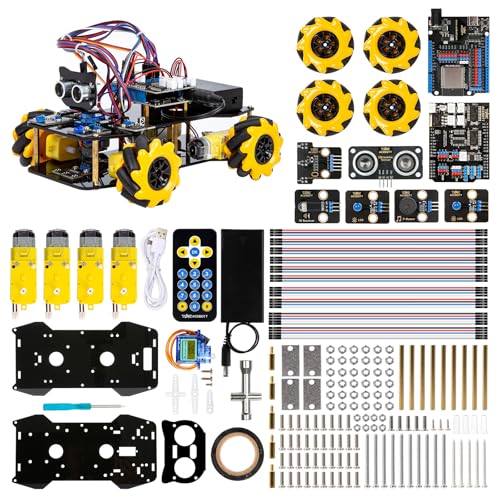
| Most Versatile | Robot Type: Wheeled car with mecanum wheels and expandable modules | Target Age Group: Kids and teens | Primary Control Methods: Smartphone app, infrared remote | VIEW LATEST PRICE | Read Our Analysis |
| SunFounder GalaxyRVR Mars Rover Kit with ESP32 CAM |

| Best Terrain Navigation | Robot Type: Mars rover with rocker-bogie suspension and FPV camera | Target Age Group: Beginners/all ages | Primary Control Methods: Smartphone app, infrared remote | VIEW LATEST PRICE | Read Our Analysis |
| Official Arduino Starter Kit with 12 DIY Projects |
![Official Arduino Starter Kit [K000007] - 12 DIY Projects with](https://m.media-amazon.com/images/I/617sMRpfODL._AC_SL500_QL70_ML2_.jpg)
| Official Arduino Pick | Robot Type: General electronics starter kit with 12 projects | Target Age Group: Beginners/all ages | Primary Control Methods: Manual projects (no remote control) | VIEW LATEST PRICE | Read Our Analysis |
| Robotic Arduino Car Kit with AI Camera Vision Recognition |

| Best AI Vision | Robot Type: Wheeled car with AI camera and mecanum wheels | Target Age Group: Ages 12-16+ | Primary Control Methods: Smartphone app, infrared remote | VIEW LATEST PRICE | Read Our Analysis |
| ACEBOTT 4 DOF ESP32 Robotic Arm Kit for Kids |

| Best Arm Kit | Robot Type: Robotic arm with 4-axis gripper and ESP32 control | Target Age Group: Ages 8-12 | Primary Control Methods: Joystick, web/app control | VIEW LATEST PRICE | Read Our Analysis |
| OSOYOO 2WD Robot Car Starter Kit for Arduino |

| Most Control Options | Robot Type: Wheeled car with WiFi/Bluetooth/infrared control | Target Age Group: Beginners/all ages | Primary Control Methods: WiFi app, Bluetooth, infrared remote | VIEW LATEST PRICE | Read Our Analysis |
| Robotic Arm with Arduino 5DOF STEM Educational Kit |

| Advanced Programmer Pick | Robot Type: Robotic arm with 5-axis articulation and open source | Target Age Group: Ages 17+ | Primary Control Methods: Knob controller, Bluetooth, app control | VIEW LATEST PRICE | Read Our Analysis |
| MaxArm Robotic Arm Kit for Arduino ESP32 Programming |

| Most Precision Control | Robot Type: Robotic arm with inverse kinematics and trajectory planning | Target Age Group: Beginners/all ages | Primary Control Methods: App, PC, wireless controller, mouse | VIEW LATEST PRICE | Read Our Analysis |
More Details on Our Top Picks
ELEGOO UNO R3 Smart Robot Car Kit for Arduino
Are you looking for an educational robotics kit that teaches programming, electronics assembly, and hands-on problem-solving simultaneously? The ELEGOO UNO R3 Smart Robot Car Kit V4 delivers exactly that. You’ll assemble a fully functional robot car using 24 module parts, including obstacle avoidance and line-tracing sensors. The XH2.54 ports simplify connections and reduce assembly errors. You can control your car via Android or iOS apps, infrared remote, or programmed sequences. The kit includes HD assembly instructions and necessary code tutorials. It’s designed for ages 8 and up, though younger users benefit from adult guidance during the building process.
- Robot Type:Wheeled car with obstacle avoidance/line tracing
- Target Age Group:Ages 8+
- Primary Control Methods:Android/iOS app, infrared remote
- Programming Language Support:Arduino IDE with provided code
- Key Sensors/Modules Included:Ultrasonic, line tracing, infrared receiver
- Assembly Complexity:Easy/beginner-friendly with XH2.54 ports
- Additional Feature:XH2.54 port simplification
- Additional Feature:Android/iOS app control
- Additional Feature:Obstacle avoidance included
ELEGOO Conqueror Robot Tank Kit for Arduino STEM
The ELEGOO Conqueror Robot Tank Kit with UNO R3 is an ideal choice if you’re looking to build hands-on Arduino skills through assembly and programming, especially for learners between ages 8 and 16. You’ll assemble a stainless steel tank measuring 8.58 by 8.78 by 7.4 inches and weighing 3.4 pounds. The kit features a two-degree-of-freedom gimbal with adjustable camera angle, enabling first-person perspective control. You’ll develop concentration and construction skills during assembly, then apply graphical block-based programming to operate diverse car functions. The lithium battery powers your completed tank, and you’ll access rich Arduino learning resources to expand your capabilities and creativity.
- Robot Type:Tank with camera gimbal and FPV control
- Target Age Group:Ages 8-16+
- Primary Control Methods:Smartphone app, infrared remote
- Programming Language Support:Arduino programming
- Key Sensors/Modules Included:Camera, servo gimbal, infrared receiver
- Assembly Complexity:Moderate (requires assembly)
- Additional Feature:FPV first-person perspective
- Additional Feature:Two-degree gimbal camera
- Additional Feature:Lithium battery powered
Makeblock mBot Robot Kit Learn to Code STEM Toy
Looking for a robot kit that’ll teach your child programming fundamentals while building real hardware skills? The Makeblock mBot Robot Kit offers a structured learning path from Scratch to Arduino programming. You’ll assemble the robot in approximately 15 minutes using clear instructions, gaining hands-on experience with electronics and robotics components. The kit includes remote-control features, line-following, and obstacle-avoidance capabilities. Three free Makeblock apps and mBlock software enable programming and project creation. The open-source system supports 100+ electronic modules and 500+ compatible parts, plus LEGO integration. Note that you’ll need to purchase CR2025 and four AA batteries separately. This kit suits children aged 8-12 interested in STEM exploration.
- Robot Type:Wheeled car with line-following and obstacle avoidance
- Target Age Group:Ages 8-12
- Primary Control Methods:Smartphone app, infrared remote
- Programming Language Support:Scratch and Arduino
- Key Sensors/Modules Included:Line-following, obstacle avoidance modules
- Assembly Complexity:Easy (15 minutes assembly)
- Additional Feature:15-minute quick assembly
- Additional Feature:100+ compatible modules
- Additional Feature:LEGO parts compatible
LAFVIN Smart Robot Car 2WD Chassis Kit Arduino
If you’re starting out with Arduino robotics and need a complete, ready-to-build solution, the LAFVIN Smart Robot Car 2WD Chassis Kit offers everything you’ll require in one package. The kit includes an R3 Board, L298N motor driver, HC-SR04 ultrasonic sensor, servo motor, two wheels, IR receiver module, and acrylic chassis plates. You’ll also get twenty lessons and tutorials covering obstacle avoidance and remote control programming. Assembly involves mounting components onto the acrylic frame using provided screws and nuts, then connecting hardware via dupont wires following the instruction manual. The kit’s dimensions are approximately 11 by 7 by 2 inches, making it portable for classroom or home learning environments.
- Robot Type:Wheeled car with ultrasonic sensor
- Target Age Group:Beginners/all ages
- Primary Control Methods:Infrared remote control
- Programming Language Support:Arduino IDE with tutorials
- Key Sensors/Modules Included:Ultrasonic sensor, infrared receiver, servo motor
- Assembly Complexity:Moderate with step-by-step tutorials
- Additional Feature:HC-SR04 ultrasonic sensor
- Additional Feature:10+ lesson tutorials
- Additional Feature:L298N motor driver
Robot Arm for Arduino Learning Kit
You’ll find this 4-axis robot arm kit ideal if you’re a beginner, teen, or adult looking to develop practical skills in electronics, programming, and robotics. The arm features a flexible design with a clip that opens 260°, a wrist that rotates 180°, an elbow that rotates 180°, and a base that rotates 180°. You can record up to 170 actions and replay them, allowing you to program complex movement sequences. The kit includes step-by-step assembly instructions and programming tutorials. Measuring 3.2 x 3 x 9.6 inches and weighing 1.23 pounds, it requires two nonstandard batteries. The manufacturer recommends this kit for ages 13 and up.
- Robot Type:Robotic arm with 4-axis gripper
- Target Age Group:Ages 13+
- Primary Control Methods:Manual programming and playback
- Programming Language Support:Arduino programming
- Key Sensors/Modules Included:No additional sensors (memory/playback focus)
- Assembly Complexity:Easy with step-by-step instructions
- Additional Feature:170-action memory recording
- Additional Feature:4-axis flexible gripper
- Additional Feature:Movement replay capability
Makeblock mBot Robot Kit STEM Coding for Kids
The Makeblock mBot Robot Kit works best for children aged 8-12 who’re ready to learn coding through hands-on robotics projects. You’ll assemble the robot in approximately 15 minutes using comprehensive building manuals. The kit includes four programming projects: line-following, obstacle avoidance, remote control, and additional learning tasks. You’ll start with block-based Scratch coding, then transition to Arduino programming. The kit delivers immediate feedback and real-world results as you code. You’ll develop programming, problem-solving, and logical-thinking skills through structured tutorials with visual instructions and troubleshooting tips. This educational approach progresses you from imitation to creation, providing hands-on experience with programming, electronics, and robotics applications.
- Robot Type:Wheeled car with line-following and obstacle avoidance
- Target Age Group:Ages 8-12
- Primary Control Methods:Smartphone app, infrared remote
- Programming Language Support:Scratch and Arduino
- Key Sensors/Modules Included:Line-following, obstacle avoidance modules
- Assembly Complexity:Easy (15 minutes assembly)
- Additional Feature:Block-building style coding
- Additional Feature:4 programming projects
- Additional Feature:Scratch to Arduino
ACEBOTT Smart Robot Car Kit with Camera STEM Toy
ACEBOTT’s Smart Robot Car Kit stands out as an ideal choice for learners ages 8–16 who want hands-on experience with both hardware assembly and programming. You’ll build the robot using the ESP32 controller, then program it via Arduino or Scratch. The built-in 3MP camera streams live video to your smartphone, letting you see what the robot sees in real time. Control movement through the IR remote or mobile app while the Mecanum wheels enable 360° omnidirectional navigation. You’ll access 16 story-based tutorials on the ACEBOTT website to guide assembly and coding. Once proficient, you can expand capabilities with modular add-ons like robotic arms or solar panels for continued skill development.
- Robot Type:Wheeled car with camera and mecanum wheels
- Target Age Group:Ages 8-16+
- Primary Control Methods:Smartphone app, infrared remote
- Programming Language Support:Arduino and Scratch
- Key Sensors/Modules Included:3MP camera, infrared receiver
- Assembly Complexity:Moderate with 16 story-based tutorials
- Additional Feature:3MP HD camera streaming
- Additional Feature:Mecanum wheel omnidirectional
- Additional Feature:Modular add-on support
ACEBOTT Smart Robot Car Kit Compatible with Arduino
If you’re seeking a robot kit that grows alongside your skills, the ACEBOTT Smart Robot Car Kit offers a structured pathway from beginner to advanced projects. The ESP32 controller board supports systematic learning through 16 comprehensive tutorials covering programming and electronics fundamentals. You’ll start with basic movement using the omnidirectional mecanum wheels, which enable 360° motion in any direction. As you progress, you can attach expansion packs for a camera, robotic arm, or tank base. These additions unlock new capabilities: image recognition, voice control, autonomous navigation, and obstacle avoidance. The kit supports App and IR remote operation, making it versatile for different learning stages. Note that batteries aren’t included with your purchase.
- Robot Type:Wheeled car with mecanum wheels and expandable modules
- Target Age Group:Kids and teens
- Primary Control Methods:Smartphone app, infrared remote
- Programming Language Support:Arduino and Scratch
- Key Sensors/Modules Included:Ultrasonic and infrared sensors, expandable
- Assembly Complexity:Moderate with tutorial support
- Additional Feature:360° omnidirectional movement
- Additional Feature:Follow mode autonomous
- Additional Feature:Multi-direction obstacle avoidance
SunFounder GalaxyRVR Mars Rover Kit with ESP32 CAM
For learners who want hands-on experience with real-time video feedback and autonomous navigation, SunFounder’s GalaxyRVR Mars Rover Kit delivers a complete smart robot platform built around the ESP32 CAM microcontroller and compatible with Arduino Uno R3. You’ll build a sturdy aluminum chassis using a rocker-bogie suspension system that handles sand, rocks, grass, and mud. The kit includes ultrasonic and infrared sensors for obstacle avoidance, RGB light strips for visibility, and solar charging capability. You’ll control the rover remotely while receiving live FPV video feed. Comprehensive tutorials and video lessons guide your assembly and programming. The active community forum and technical support help you troubleshoot issues efficiently.
- Robot Type:Mars rover with rocker-bogie suspension and FPV camera
- Target Age Group:Beginners/all ages
- Primary Control Methods:Smartphone app, infrared remote
- Programming Language Support:Arduino programming
- Key Sensors/Modules Included:Ultrasonic and infrared sensors, RGB LED lights
- Assembly Complexity:Moderate with comprehensive tutorials
- Additional Feature:ESP32 CAM FPV
- Additional Feature:Rocker-bogie suspension system
- Additional Feature:Solar charging enabled
Official Arduino Starter Kit with 12 DIY Projects
The Official Arduino Starter Kit [K000007] is your best choice when you’re ready to learn electronics and coding through hands-on projects, regardless of whether you’re a complete beginner or someone rejuvenating your skills. You’ll work through twelve structured DIY projects that teach both circuit design and programming concepts systematically. The kit includes a comprehensive English project book with step-by-step guidance for each activity, making it accessible for classroom use, hobbyist exploration, and STEM learning. You’ll receive genuine Arduino components sourced from Italy, ensuring durability and reliability across your projects. This kit serves as both a learning tool and a platform for hands-on experimentation that fosters innovation in electronics and microcontroller programming.
- Robot Type:General electronics starter kit with 12 projects
- Target Age Group:Beginners/all ages
- Primary Control Methods:Manual projects (no remote control)
- Programming Language Support:Arduino IDE
- Key Sensors/Modules Included:Various electronics components (no robot sensors)
- Assembly Complexity:Moderate (12 project-based assembly)
- Additional Feature:12 DIY projects
- Additional Feature:Genuine Italian components
- Additional Feature:English project book
Robotic Arduino Car Kit with AI Camera Vision Recognition
Are you searching for a robotics kit that combines Arduino programming with advanced vision capabilities? This kit features an Arduino UNO R3 controller paired with an ESP32-S3 vision module that enables WiFi video transmission. You’ll build a car with Mecanum wheels for 360° movement across complex surfaces. The vision system supports line following, face recognition, and color tracking. A 4-channel line follower enables autonomous driving with crossroad recognition and traffic light detection. You can attach the optional robot gripper for object transportation projects. This kit develops your programming, electronics, and mechanical assembly skills simultaneously, making it ideal for ages 12 and up.
- Robot Type:Wheeled car with AI camera and mecanum wheels
- Target Age Group:Ages 12-16+
- Primary Control Methods:Smartphone app, infrared remote
- Programming Language Support:Arduino and Scratch
- Key Sensors/Modules Included:ESP32-S3 vision module, line follower, infrared receiver
- Assembly Complexity:Moderate with step-by-step guidance
- Additional Feature:ESP32-S3 vision module
- Additional Feature:Traffic light detection
- Additional Feature:Robot gripper expansion
ACEBOTT 4 DOF ESP32 Robotic Arm Kit for Kids
If you’re looking to build hands-on robotics skills while learning Arduino programming, the ACEBOTT 4 DOF ESP32 Robotic Arm Kit delivers a complete learning platform designed for kids ages 8–12. The kit features four servo motors that power a flexible manipulator with 260° clamp opening, 180° wrist rotation, 180° elbow rotation, and 180° base rotation. You’ll control the arm through joystick, web application, or three-axis control modes. The step-by-step instruction guide includes preset coding files compatible with ACEBOTT Scratch or Arduino IDE, making setup straightforward. You’ll need to supply your own power source. The kit emphasizes STEM education principles and supports multi-directional grasping across front/back, up/down, and left/right axes.
- Robot Type:Robotic arm with 4-axis gripper and ESP32 control
- Target Age Group:Ages 8-12
- Primary Control Methods:Joystick, web/app control
- Programming Language Support:Scratch and Arduino IDE
- Key Sensors/Modules Included:Servo motors, no additional sensors included
- Assembly Complexity:Easy with preset coding and instructions
- Additional Feature:260° clamp opening
- Additional Feature:Joystick control option
- Additional Feature:Web/app control modes
OSOYOO 2WD Robot Car Starter Kit for Arduino
Looking for a robotics kit that doesn’t require you to have programming experience before you start? The OSOYOO 2WD Robot Car Starter Kit gives you multiple control options to learn Arduino and robotics fundamentals. You’ll build a smart car capable of auto-driving, infrared control, Bluetooth control, and WiFi app control through the OSOYOO mobile app. The upgraded Model-X motor driver features improved wiring sockets that reduce setup errors and ensure stable operation. You receive step-by-step assembly instructions, detailed online tutorials, circuit diagrams, sample code, and videos that progress you from a basic car to a fully functional smart robot. This kit works well for classroom instruction, homeschool settings, or independent learning projects.
- Robot Type:Wheeled car with WiFi/Bluetooth/infrared control
- Target Age Group:Beginners/all ages
- Primary Control Methods:WiFi app, Bluetooth, infrared remote
- Programming Language Support:Arduino programming
- Key Sensors/Modules Included:Infrared remote, line tracking sensors, WiFi/Bluetooth
- Assembly Complexity:Easy with detailed online tutorials
- Additional Feature:WiFi Shield integration
- Additional Feature:Real-time WiFi control
- Additional Feature:Imitation driving mode
Robotic Arm with Arduino 5DOF STEM Educational Kit
The Robotic Arm with Arduino 5DOF STEM Educational Kit works best for learners aged 17 and up who want hands-on experience building and programming robotics. You’ll assemble the arm using high-precision digital servos across five axes of movement. The kit includes a six-channel knob controller and Bluetooth module for real-time operation. You can program the arm using Arduino’s open-source software and access learning tutorials for secondary development. Choose between the Starter Kit or Standard Kit, which adds sensors like an ultrasonic detector, touch sensor, accelerometer, and ESP32 camera. These sensors expand your capabilities for creating custom applications. The arm measures five by thirteen by eight inches and weighs 2.81 pounds, making it portable for classroom or home use.
- Robot Type:Robotic arm with 5-axis articulation and open source
- Target Age Group:Ages 17+
- Primary Control Methods:Knob controller, Bluetooth, app control
- Programming Language Support:Arduino programming
- Key Sensors/Modules Included:High-precision servos, expansion ports for sensors
- Assembly Complexity:Moderate with secondary development support
- Additional Feature:6-channel knob controller
- Additional Feature:Bluetooth module included
- Additional Feature:Secondary development examples
MaxArm Robotic Arm Kit for Arduino ESP32 Programming
Want to learn robotics while building a functional mechanical arm you can actually program and control? The MaxArm kit gives you a complete system with an ESP32 controller, smart bus servos, and inverse kinematics software. You’ll program the arm using Python or Arduino code to execute precise movements across x, y, and z axes. Control options include wireless apps, PC software, mouse input, or dedicated controllers. The kit includes integrated components like LEDs, buzzers, and USB ports, plus expandable sensor ports for adding cameras or distance sensors. You’ll develop real automation skills while working with WiFi and Bluetooth connectivity for wireless project integration and app-based control.
- Robot Type:Robotic arm with inverse kinematics and trajectory planning
- Target Age Group:Beginners/all ages
- Primary Control Methods:App, PC, wireless controller, mouse
- Programming Language Support:Python and Arduino
- Key Sensors/Modules Included:Smart bus servos, LED/buzzer, expansion ports
- Assembly Complexity:Moderate with programming-focused assembly
- Additional Feature:Inverse kinematics enabled
- Additional Feature:Trajectory planning algorithm
- Additional Feature:Heavy payload support
Factors to Consider When Choosing Arduino Robot Kits
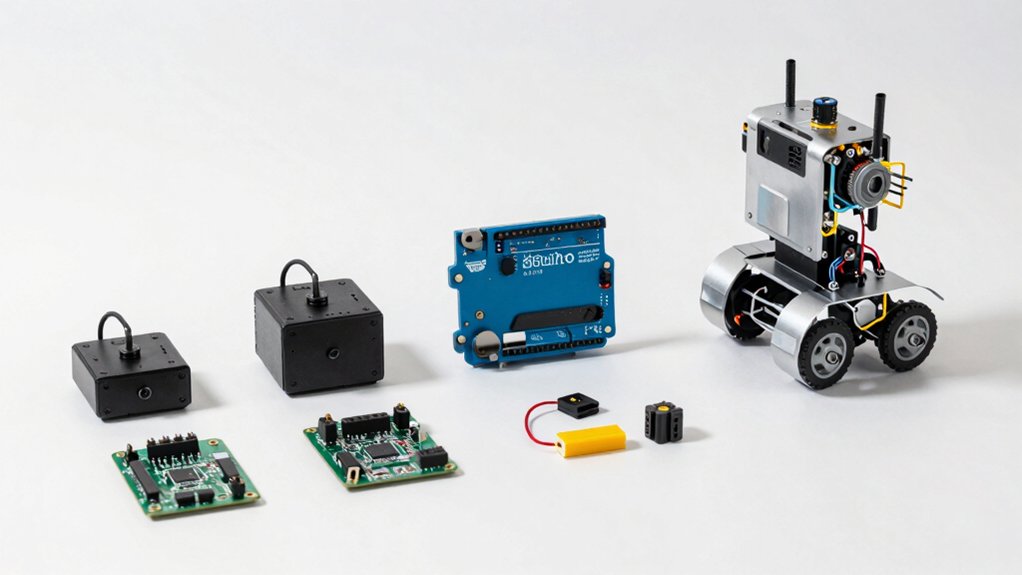
You’ll want to evaluate five key factors before purchasing an Arduino robot kit: your age and skill level, your specific learning objectives, the assembly complexity and time required, the programming language and platform used, and the kit’s expandability for future projects. Start by matching the kit’s difficulty to your experience—beginners should choose kits with pre-assembled components and visual programming, while advanced users can handle kits requiring soldering and text-based coding. Next, confirm the kit supports your goals, whether you’re learning robotics basics, improving coding skills, or building competition-ready machines, and check if it uses popular platforms like C++ or block-based programming that align with your learning path.
Age And Skill Level
How do you match an Arduino robot kit to your learner’s age and abilities?
Start by checking the manufacturer’s recommended age range. Kits targeting ages 8–12 use beginner-friendly instructions and simpler mechanics, often requiring adult supervision. Kits marked 13+ or 17+ involve more complex hardware and advanced programming concepts.
Next, assess the programming method. Block-based platforms like Scratch suit first-time programmers, while Arduino IDE and Python indicate intermediate-to-advanced difficulty. Consider whether your learner needs remote controls or app-based interfaces for easier interaction.
Then evaluate expandability options. Many kits offer multiple programming pathways, allowing gradual skill progression from beginner to intermediate levels. This flexibility lets your learner grow without outgrowing the kit.
Finally, review instruction clarity and support resources. Clear documentation and community forums help beginners troubleshoot problems independently, while advanced learners benefit from open-ended exploration opportunities.
Learning Objectives And Goals
Beyond matching a kit to your learner’s age, you’ll also need to clarify what skills and knowledge you want them to gain. Start by identifying the programming language: does your learner need block-based coding like Scratch, Arduino C/C++, or Python? Next, determine which technical competencies matter most—electronics assembly, robotics fundamentals, or sensor operation (ultrasonic, infrared, camera). Then select a kit with project-based milestones that track progress, such as line following, obstacle avoidance, or remote control tasks. Verify the kit includes structured tutorials and lesson plans that build from basic concepts to advanced applications. Finally, confirm the kit offers expandable modules so your learner can advance as their skills grow. This approach ensures the kit directly supports your educational goals.
Assembly Complexity And Time
What’s the actual build time for your robot kit, and does it match your schedule? Assembly complexity varies markedly based on included components. Simple 2WD chassis kits typically assemble in 15 minutes, while omnidirectional mecanum bases require considerably longer. Review your kit’s step-by-step tutorials and HD visuals before purchasing to estimate realistic construction time. Many kits feature updated XH2.54 ports that minimize wiring and reduce assembly errors, cutting your build duration. Beginner kits provide guided learning paths with predefined projects, streamlining your initial construction process. Check component complexity carefully: fewer sensors and modules mean faster assembly. Starter kits balance quick setup with educational value, letting you begin programming sooner. Match your available time against the kit’s documented assembly requirements to ensure successful completion without frustration.
Programming Language And Platform
Does your robot kit support the programming environment you’re most comfortable using? You’ll find most Arduino kits work with multiple platforms, so evaluate your options carefully.
Many kits support Scratch-based block coding, which suits beginners, and Arduino IDE for text-based C++ programming as you advance. ESP32-based kits offer built-in WiFi and Bluetooth alongside Arduino compatibility, expanding your capabilities.
Check whether your kit includes step-by-step tutorials and downloadable code libraries. These resources help you transition smoothly from blocks to text coding.
Some kits feature mobile apps for remote control and smartphone-based programming practice. Verify cross-platform compatibility with microcontrollers like UNO R3, as this determines which programming languages and tools you can actually use. Match the platform to your learning goals and current skill level.
Expandability And Long-Term Growth
As your skills develop and projects become more ambitious, you’ll want a robot kit that grows with you rather than one you’ll outgrow within months. Choose kits offering modular expansion options like additional arms, tracks, cameras, or sensors that you can add progressively. Check whether the platform provides official expansion packs or compatible third-party add-ons to support advancing project complexity. Verify the kit has open interfaces including GPIO headers and expansion boards that enable future integrations. Select platforms supporting multiple programming languages—Scratch, Arduino, and Python—so you can develop skills across different levels. Finally, confirm that documented tutorials and active community resources exist for scalable projects. These features ensure your investment remains valuable as your expertise increases.
Final Thoughts
You’ll find the right Arduino robot kit by matching your skill level and interests to available options. Start with beginner kits like the ELEGOO UNO R3 if you’re new to robotics. Choose tank or rover models for navigation projects, arm kits for mechanical learning, or car kits for sensor integration. Review each kit’s included components, programming requirements, and project complexity. Test your choice with the provided tutorials before advancing to custom modifications.

Meet Ry, “TechGuru,” a 36-year-old technology enthusiast with a deep passion for tech innovations. With extensive experience, he specializes in gaming hardware and software, and has expertise in gadgets, custom PCs, and audio.
Besides writing about tech and reviewing new products, he enjoys traveling, hiking, and photography. Committed to keeping up with the latest industry trends, he aims to guide readers in making informed tech decisions.