

You’ll compare four HDMI RF modulators by purpose: choose one with built-in HD encoding and multi-standard RF outputs for simple setup; pick another with HDMI input, solid GUI, and 720p/1080p support to minimize latency and lip-sync issues; check for factory-calibrated output stages to ensure stable signal with less loss; verify durable build and clear warranty terms for long-term reliability, then consider how each option fits your home theater or retro-gaming hub, before selecting your next step.
Thor HDMI to Coax Modulator for HDTV Channels
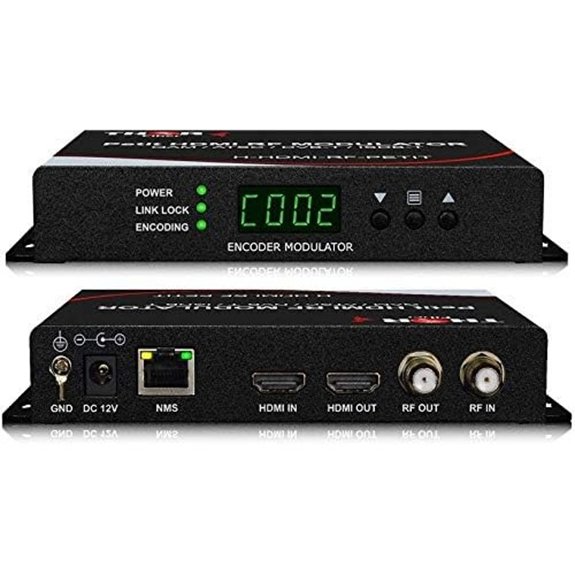
If you need a single device that converts HDMI sources into traditional TV channels, the Thor HDMI to Coax Modulator stands out for its built‑in encoding and versatile RF outputs. You connect HDMI devices like a set‑top box, Blu‑ray player, or PC, then use Thor’s GUI to manage settings. The unit encodes HD MPEG2 with AC3 audio and outputs DVB-C/T/ATSC/ISDB‑T RF signals, supporting 720p, 1080i, and 1080p. It’s compact, weighs about 9.6 ounces, and measures 4.06 by 2.52 by 0.94 inches. Use the built‑in modulator for CATV QAM or ATSC channels across TVs.
RF Coax to HDMI UHF/VHF Modulator for VCRs to HDTV
https://m.media-amazon.com/images/I/61gCRAUwepL._AC_SX679_.jpg
This RF Coax to HDMI UHF/VHF Modulator is a practical choice for retro setups that need to display VCR or classic game console output on modern HDMI TVs. Connect your RF coax source to the ANT input. Use the HDMI output to your display. The device converts VHF/UHF signals (CH3/CH4) to digital HDMI, compatible with NTSC and PAL. It supports many old devices, from Atari to Betamax and VCRs. Use the remote for on/off, timer, and channel reservation. Ensure HDMI 1.3 compatibility and set the display to the modulator’s input. Verify projector or monitor accepts HDMI.
Thor H-HDMI-RF-PETIT HDMI RF Digital Modulator
https://m.media-amazon.com/images/I/51sOkIcZMyL._AC_SX679_.jpg
The Thor H-HDMI-RF-PETIT HDMI RF Digital Modulator stands out for its all-in-one design, combining HD MPEG2 encoding with an internal digital modulator to turn any HDMI source into DVB-C/T/ATSC/ISDB-T RF signals. You connect an HDMI source, then choose the RF channel you want. The device encodes HD 720p, 1080i, or 1080p and outputs DVB-C/T/ATSC/ISDB-T signals. Use Thor Broadcasts GUI for simple PC control, then monitor from multiple TVs. It supports common inputs like STB, camera, DVD, PC, or ROKU, and provides plug-and-play setup with clear, practical steps.
RF Modulator RCA Coaxial Adapter, TV-TX200 VHF UHF Analog TV Transmitter
https://m.media-amazon.com/images/I/61rlc80vT7L._AC_SX679_.jpg
Choose the RF Modulator RCA Coaxial Adapter, TV-TX200 VHF UHF Analog TV Transmitter when you need a straightforward way to send HDMI content to an analog TV. You will connect HDMI input, then use the analog output to your TV. The device supports HD 1080p input and converts to N and P formats for compatibility. Use CVBS for additional legacy devices. Select channels by pressing VHF/5-12 or UHF/13-68 as needed, then adjust the telescopic antenna for best reception. Configure sound with 4.5–6.5 kHz range, and test both short and long-distance transmission.
Factors to Consider When Choosing Best-Hdmi-Rf-Modulator
First, check HDMI source compatibility to confirm your device outputs a supported format and resolution, noting any adapters needed. Then compare modulation standards and channel flexibility to ensure the modulator covers your intended TV bands and allows easy channel changes, with concrete examples like 2V or 4V modulation and manual or auto channel scan. Finally, evaluate resolution and format support as well as any networked control features, listing steps to verify upscaling, HDCP handling, and remote management compatibility with your setup.
HDMI Source Compatibility
Need to guarantee your HDMI source works with the modulator across different setups? Start by checking common HDMI inputs, including set-top boxes, Blu-ray players, computers, and cameras, to ensure they can feed the RF modulator. Confirm the device supports standard HD resolutions, specifically 720p, 1080i, and 1080p, so your source remains compatible. If the source uses embedded audio, verify whether the modulator encodes HDMI with MPEG2 and AC3 Dolby Audio for a single RF stream. Use the GUI or networked control to select the HDMI input, adjust encoding settings, and assign the RF channel. Be aware that some units support multiple RF standards (DVB-C/T/ATSC/ISDB-T); choose accordingly for your region. Test playback on a nearby display to validate signal integrity.
Modulation Standards Supported
Modulation standards determine how your HDMI video is mapped onto RF channels, so start by identifying which standards your region and TVs support. Check the modulator’s listed options: DVB-C, DVB-T, ATSC, and ISDB-T. If you need broad compatibility, look for dual- or multi-standard units that handle DVB-C/T/ATSC/ISDB-T in one device. The standard affects error correction, payload structure, and how the signal is framed for decoding. Verify HD compatibility (720p, 1080i, 1080p) with the chosen standard to ensure proper channel allocation. Use the device GUI or network controls to set the target standard, matching your televisions or headend. Prioritize modulators that clearly label supported standards and include straightforward switching between them.
Channel Flexibility Options
Channel flexibility is about how easily a modulator supports multiple RF standards and channel ranges in your setup. You assess standard support first, looking for DVB-C/T, ATSC, and ISDB-T compatibility. Next, check HD channel handling, noting whether 720p, 1080i, and 1080p are supported so you can distribute the right picture quality on chosen RF channels. Review channel range options, such as selectable VHF/UHF bands like channels 3–68, to fit your environment. Confirm how internal tuners and demodulators affect usable bands and standards with your existing CATV or terrestrial systems. Finally, examine control methods, ensuring you can map HDMI sources to RF channels via remote or GUI for precise planning and coexistence.
Resolution and Format Support
Start by confirming which HD resolutions your HDMI-to-RF modulator supports, since this determines what your displays can show. Verify supported formats and measure how they map to your RF outputs. Most modulators support 720p, 1080i, and 1080p, so check if all are available at your preferred DVB-C, DVB-T, ATSC, or ISDB-T standards. Review the typical encoding: HD MPEG-2 with AC-3 audio for DVB/ATSC outputs. If you need multiple standards, confirm the device preserves resolution when switching standards or channels. Look for plug-and-play control with a PC GUI, enabling easy configuration of resolution, audio, and channel parameters. Assess whether the unit handles varied channel bandwidths and modulation schemes to maintain 720p or 1080p quality on different TV tuners.
Networked Control Features
Networked control features let you manage HDMI-to-RF modulators remotely, which is essential for scalable setups. You start by confirming the device supports a proprietary GUI over the network. Next, verify options for RF channel, modulation type (DVB-C/T/ATSC/ISDB-T), and HD encoding settings are configurable from the central interface. Assess real-time monitoring options, such as stream status, error reporting, and device health, and ensure these appear in the GUI. Examine remote control capabilities for multi-device management within a single network, and plan deployment across distributed sites. Review security features like authentication, encryption, and access control to prevent unauthorized changes. Create a management checklist with step-by-step actions for configuration, monitoring, and secure access. Validate options against your network and use case.
Build Quality & Size
When evaluating build quality and size, start by checking the enclosure dimensions to guarantee it fits your setup. Look for compact units about 4–10 inches long and under 3 inches tall to suit small spaces, noting that the H-HDMI-RF-PETIT at 9.5 x 5.8 x 2.4 inches is toward the larger end. Prioritize a sturdy chassis and solid weight, roughly 1–2 pounds, to ensure durability and stable mounting. Verify the form factor supports HDMI inputs and RF outputs without bulky adapters. Favor devices with integrated encoding and modulation in a single unit to minimize external parts and reduce signal loss. Consider hardware-focused, factory-calibrated RF output stages to maintain consistent channel performance across DVB-C/T/ATSC/ISDB-T in a compact package.
Audio Encoding Capabilities
Audio encoding capability matters because it determines how cleanly the HDMI input can be converted to an RF signal. You should check if the modulator uses embedded audio within the HD MPEG-2/4 pipeline, and whether it supports AC-3 (Dolby Digital) for broadcast compatibility. Prefer models that integrate audio encoding and modulation in one chassis to reduce external dependencies. Look for outputs that carry the encoded audio stream alongside video inside the RF channel, with compliant decoders required at the receiver. Confirm which formats are supported, typically stereo 2.0, and whether surround formats are available, noting firmware limits. Review encoder settings and bitrates in the device GUI, and test for playback latency and lip-sync accuracy before finalizing your choice.
Power and Warranty Details
Power and warranty details are essential to guarantee long-term reliability and minimal downtime. You should check the manufacturer’s warranty duration and what it covers or excludes. Look for a dedicated link or support page that clearly states terms, not just references on a listing. Compare power requirements and consumption to ensure compatibility with your power supply and voltage standards. Verify whether you must register or keep a copy of the proof of purchase for the warranty to stay valid. Consider if the device notes power efficiency or heat generation, as this affects reliability and energy use over time. If information is vague, contact support for exact figures, installation steps, and warranty claim procedures. Make a documented note of all findings.
Final Thoughts
To pick the right HDMI RF modulator, identify your setup: HDMI source, channel bandwidth, and required outputs. If you need compact, all-in-one with built-in encoding, choose a model that supports MPEG-2, AC3, and DVB-C/T/ATSC/ISDB-T. For minimal latency, select units with HDMI input, robust GUI, and 720p/1080p support. Ensure factory-calibrated output stages for signal stability. Check build durability and warranty. Compare options like Thor models and TV-TX200, then verify installation steps and channel mapping before deployment.

Meet Ry, “TechGuru,” a 36-year-old technology enthusiast with a deep passion for tech innovations. With extensive experience, he specializes in gaming hardware and software, and has expertise in gadgets, custom PCs, and audio.
Besides writing about tech and reviewing new products, he enjoys traveling, hiking, and photography. Committed to keeping up with the latest industry trends, he aims to guide readers in making informed tech decisions.