


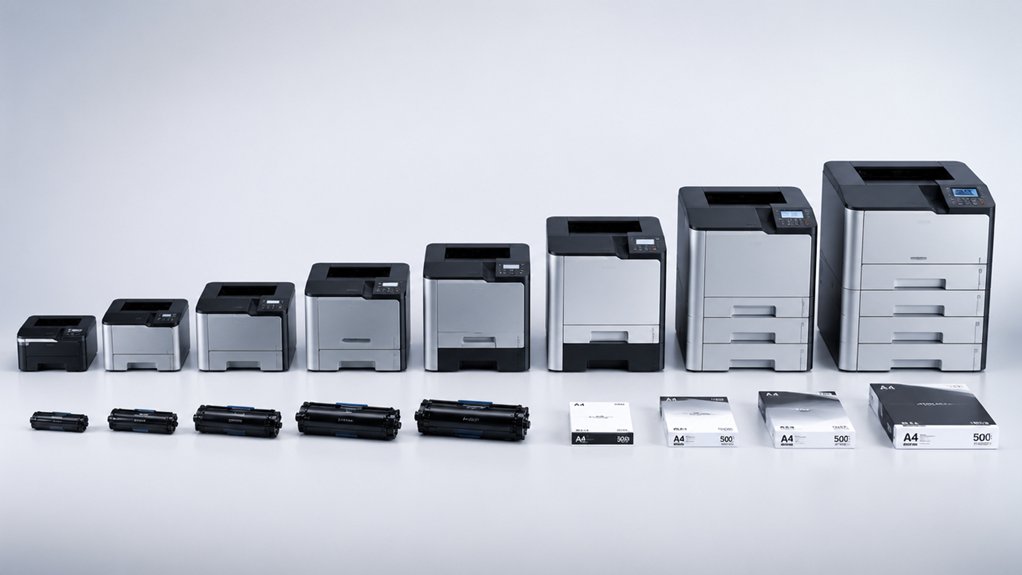
When you’re shopping for a monochrome laser printer, you need to look beyond the sticker price. You’ll want to compare total cost of ownership—which includes toner, maintenance, and energy use over several years. You can cut expenses considerably by choosing models with high-yield cartridges, duplex printing, and durable components. Brother and HP offer solid options across different budgets and office sizes. But which specific printer matches your actual needs and spending limits?
| Brother HL-L2460DW Wireless Monochrome Laser Printer |

| Best for Home Offices | Print Speed: 36 ppm | Printer Type: Print only | Wireless Connectivity: Dual-band wireless (2.4GHz/5GHz) | VIEW LATEST PRICE | Read Our Analysis |
| Brother DCP-L2640DW Wireless Monochrome Laser Printer |

| Best 3-in-1 Value | Print Speed: 36 ppm | Printer Type: 3-in-1 (print, scan, copy) | Wireless Connectivity: Dual-band wireless (2.4GHz/5GHz) | VIEW LATEST PRICE | Read Our Analysis |
| Brother MFC-L2820DW Wireless Monochrome All-in-One Laser Printer |

| Most Versatile Features | Print Speed: 36 ppm | Printer Type: 4-in-1 (print, scan, copy, fax) | Wireless Connectivity: Dual-band wireless (2.4GHz/5GHz) | VIEW LATEST PRICE | Read Our Analysis |
| HP LaserJet M110w Wireless Black & White Printer |
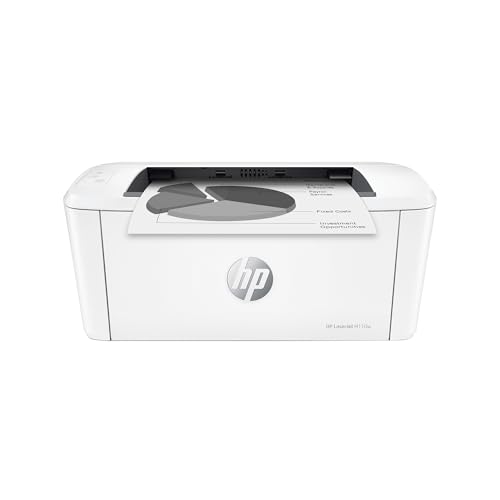
| Most Compact | Print Speed: 21 ppm | Printer Type: Print only | Wireless Connectivity: Wireless with self-reset | VIEW LATEST PRICE | Read Our Analysis |
| Brother Professional Laser Printer HL-6210DW Wireless |

| Professional Grade | Print Speed: 50 ppm | Printer Type: Print only | Wireless Connectivity: Dual-band wireless networking | VIEW LATEST PRICE | Read Our Analysis |
| Brother HL-L2460DW Wireless Monochrome Laser Printer |

| Best Overall | Print Speed: 36 ppm | Printer Type: Print only | Wireless Connectivity: Dual-band wireless (2.4GHz/5GHz) | VIEW LATEST PRICE | Read Our Analysis |
| HP LaserJet M209d Laser Printer (8J9L0F) |

| Budget-Friendly Pick | Print Speed: 30 ppm | Printer Type: Print only | Wireless Connectivity: USB only (no wireless) | VIEW LATEST PRICE | Read Our Analysis |
| HP Laserjet Pro 3001dw Wireless Printer (3G65OF) |

| Best for Teams | Print Speed: 35 ppm | Printer Type: Print only | Wireless Connectivity: Intelligent Wi-Fi with Ethernet and Bluetooth | VIEW LATEST PRICE | Read Our Analysis |
More Details on Our Top Picks
Brother HL-L2460DW Wireless Monochrome Laser Printer
Are you managing printing needs for a home office or small team? The Brother HL-L2460DW delivers consistent, professional output at 36 ppm with automatic duplex printing to cut paper costs. Set up wireless connectivity via dual-band (2.4GHz/5GHz) or Ethernet, then use the Brother Mobile Connect App to print remotely and monitor toner levels. Load your 250-sheet paper tray or feed envelopes manually. Reduce supply expenses by subscribing to Refresh EZ Print, which offers up to 50% savings on genuine TN830 or TN830XL toner cartridges. Brother backs your investment with a one-year warranty and lifetime phone, chat, and online support.
- Print Speed:36 ppm
- Printer Type:Print only
- Wireless Connectivity:Dual-band wireless (2.4GHz/5GHz)
- Paper Tray Capacity:250 sheets
- Automatic Duplex Printing:Yes
- Toner Subscription Option:Refresh EZ Print Subscription (up to 50% savings)
- Additional Feature:Mobile Connect App management
- Additional Feature:Manual feed specialty paper
- Additional Feature:Lifetime free support
Brother DCP-L2640DW Wireless Monochrome Laser Printer
Looking for a printer that won’t drain your budget? The Brother DCP-L2640DW combines printing, scanning, and copying in one compact unit. You’ll achieve 36 ppm print speeds and access wireless connectivity via 2.4GHz or 5GHz bands. The 50-page auto document feeder and 250-sheet paper tray handle routine jobs efficiently. Enroll in the Refresh EZ Print Subscription to reduce toner costs by up to 50 percent. This ENERGY STAR compliant, EPEAT Silver-rated machine includes automatic duplex printing, lowering paper consumption. The device weighs 25 pounds and ships with starter toner and drum components, letting you begin work immediately.
- Print Speed:36 ppm
- Printer Type:3-in-1 (print, scan, copy)
- Wireless Connectivity:Dual-band wireless (2.4GHz/5GHz)
- Paper Tray Capacity:250 sheets
- Automatic Duplex Printing:Yes
- Toner Subscription Option:Refresh EZ Print Subscription (up to 50% savings)
- Additional Feature:50-page auto document feeder
- Additional Feature:Scanner and copier included
- Additional Feature:ENERGY STAR compliant
Brother MFC-L2820DW Wireless Monochrome All-in-One Laser Printer
The Brother MFC-L2820DW combines printing, copying, scanning, and faxing into one compact device that won’t strain your office budget or space. You’ll print at 36 pages per minute and scan at 23.6 images per minute using its 50-page automatic document feeder. Connect via dual-band wireless, Ethernet, or USB. The 2.7-inch touchscreen lets you navigate functions easily. Access cloud services like Google Drive and Dropbox directly. Download the Brother Mobile Connect app to print and scan remotely while tracking toner levels. Enroll in the Refresh EZ Print Subscription Service to receive toner automatically and save up to 50 percent on supplies, avoiding unexpected depletion.
- Print Speed:36 ppm
- Printer Type:4-in-1 (print, scan, copy, fax)
- Wireless Connectivity:Dual-band wireless (2.4GHz/5GHz)
- Paper Tray Capacity:250 sheets
- Automatic Duplex Printing:Yes
- Toner Subscription Option:Refresh EZ Print Subscription (up to 50% savings)
- Additional Feature:2.7″ touchscreen display
- Additional Feature:Fax capability included
- Additional Feature:Cloud app integration
HP LaserJet M110w Wireless Black & White Printer
Small teams working with limited desk space should consider HP’s most compact laser printer option. The M110w prints 21 pages per minute and connects wirelessly to your devices through the HP Smart app. You’ll need original HP cartridges, as the printer blocks non-HP cartridge circuitry. Set up takes minutes using your smartphone, tablet, or computer. The 150-sheet tray handles plain paper, envelopes, labels, and card stock. Output resolution reaches 600×600 dpi for clear documents. Initial page printing takes roughly 8.3 seconds. The printer weighs 8.3 pounds and occupies minimal workspace at 13.63 inches wide.
- Print Speed:21 ppm
- Printer Type:Print only
- Wireless Connectivity:Wireless with self-reset
- Paper Tray Capacity:150 sheets
- Automatic Duplex Printing:No
- Toner Subscription Option:Not offered
- Additional Feature:Worlds smallest laser class
- Additional Feature:150-sheet paper capacity
- Additional Feature:HP Smart app included
Brother Professional Laser Printer HL-6210DW Wireless
Need professional-grade printing that won’t drain your budget? The Brother HL-6210DW delivers 50 ppm output speed with monochrome laser precision for high-volume printing. You’ll expand capacity from 520 sheets to 1,660 sheets using optional trays, accommodating various workflow demands. Ultra high-yield toner cartridges produce up to 18,000 pages each, significantly reducing per-page costs. Connect via Gigabit Ethernet or dual-band wireless networking to share across your business network and enable mobile device printing. Advanced Triple Layer Security protects your network, devices, and documents during transmission and printing, addressing essential workplace security requirements.
- Print Speed:50 ppm
- Printer Type:Print only
- Wireless Connectivity:Dual-band wireless networking
- Paper Tray Capacity:520 sheets (expandable to 1,660 sheets)
- Automatic Duplex Printing:Yes (implied via professional specs)
- Toner Subscription Option:Not mentioned
- Additional Feature:50 ppm high-speed output
- Additional Feature:1,660-sheet expandable capacity
- Additional Feature:Triple Layer Security features
Brother HL-L2460DW Wireless Monochrome Laser Printer
For home offices and small teams handling regular document printing, the Brother HL-L2460DW delivers the core capabilities you’ll need without unnecessary features. This printer produces 36 pages per minute and supports automatic two-sided printing to reduce paper costs. Connect via wireless, Ethernet, or USB based on your setup requirements. The 250-sheet paper tray handles standard documents, while the manual feed slot accommodates envelopes and specialty paper. Use the Brother Mobile Connect app to print remotely, track toner usage, and order supplies. The printer includes one year of limited warranty coverage plus lifetime phone and live chat support for troubleshooting.
- Print Speed:36 ppm
- Printer Type:Print only
- Wireless Connectivity:Dual-band wireless (2.4GHz/5GHz)
- Paper Tray Capacity:250 sheets
- Automatic Duplex Printing:Yes
- Toner Subscription Option:Refresh subscription trial available
- Additional Feature:Mobile Connect App management
- Additional Feature:Manual feed specialty paper
- Additional Feature:Lifetime free support
HP LaserJet M209d Laser Printer (8J9L0F)
The HP LaserJet M209d is your budget-friendly pick if you’re running a home office or small business on a tight printing budget. This monochrome printer delivers 30 pages per minute with automatic duplex printing, cutting paper costs in half. Its compact design fits snugly on any desk without sacrificing performance. You’ll appreciate the reliable USB connectivity and included cable for straightforward setup. The 150-sheet input tray handles standard documents efficiently. Energy-efficient operation keeps your utility bills low. One-year limited warranty covers hardware issues. Note that this printer works exclusively with HP cartridges, so factor genuine supplies into your long-term cost calculations when evaluating total savings.
- Print Speed:30 ppm
- Printer Type:Print only
- Wireless Connectivity:USB only (no wireless)
- Paper Tray Capacity:150 sheets
- Automatic Duplex Printing:Yes
- Toner Subscription Option:Not offered
- Additional Feature:USB cable included
- Additional Feature:30 ppm print speed
- Additional Feature:Compact space-saving design
HP Laserjet Pro 3001dw Wireless Printer (3G65OF)
Looking to equip your office or small team with a reliable workhorse? The HP LaserJet Pro 3001dw delivers professional black-and-white documents at 35 pages per minute with automatic two-sided printing. You’ll connect wirelessly across multiple devices—phones, tablets, PCs, and Macs—using intelligent Wi-Fi that maintains consistent online readiness. The printer includes Ethernet and Bluetooth options for flexible connectivity. Security features through HP Wolf Pro protect your information with customizable settings. Note that this printer accepts only HP cartridges with original chips; non-HP cartridges won’t function. Plan for periodic firmware updates to maintain security effectiveness.
- Print Speed:35 ppm
- Printer Type:Print only
- Wireless Connectivity:Intelligent Wi-Fi with Ethernet and Bluetooth
- Paper Tray Capacity:Not specified
- Automatic Duplex Printing:Yes
- Toner Subscription Option:Not mentioned
- Additional Feature:Wolf Pro Security built-in
- Additional Feature:Intelligent Wi-Fi connection
- Additional Feature:Bluetooth connectivity included
Factors to Consider When Choosing Monochrome Laser Printers

When you’re selecting a monochrome laser printer, you’ll want to evaluate your print speed requirements based on your monthly volume, check the connectivity options (USB, Ethernet, Wi-Fi) that match your office setup, and assess the paper handling capacity to ensure it supports your typical job sizes. Next, calculate the total cost of ownership by comparing the printer’s upfront price, toner cartridge expenses, and maintenance costs over several years rather than focusing only on the initial purchase. Finally, determine whether you need multifunctional features like scanning, copying, or faxing, or if a dedicated printer better fits your budget and workspace.
Print Speed Requirements
How fast do you actually need your printer to work? Print speed, measured in pages per minute (ppm), directly affects your productivity. Entry-level models print around 21 ppm, while mid-range options reach 36+ ppm. For high-volume environments or tight deadlines, faster speeds reduce total print time on large jobs. Evaluate your typical monthly print volume first. If you print under 500 pages monthly, 21 ppm suffices. For 500+ pages monthly, choose 36 ppm or higher. Don’t rely solely on stated speeds; consider warm-up time and first-page-out time, which impact real-world throughput. Duplex printing capability effectively doubles output over time for multi-page documents. Match your printer’s speed to your actual workflow demands for cost-effective operation.
Connectivity Options Available
Once you’ve matched your printer’s speed to your workflow, you’ll want to contemplate how you’ll actually connect to it. Most models offer dual-band wireless (2.4GHz/5GHz) and Ethernet connections, letting you share the printer across your team without running cables to each computer. USB 2.0 provides a direct PC connection when you need immediate setup. Choose wireless if your office spans multiple rooms or desks. Select Ethernet for stable, dedicated performance in permanent workstations. Use USB for single-computer setups or troubleshooting. Many printers bundle USB cables for quick installation. Mobile printing apps like Brother Mobile Connect enable printing from smartphones and tablets. Cloud printing features let you send jobs remotely. Evaluate your office layout and device types before deciding which connectivity path suits your needs best.
Paper Handling Capacity
Why does paper capacity matter when you’re selecting a monochrome laser printer? Higher capacity trays reduce how often you’ll need to reload paper, which cuts interruptions during busy printing sessions. Standard configurations hold 150 to 520 sheets, while expandable options reach up to 1,660 sheets. For high-volume office environments, larger capacity is essential. Consider your typical printing volume. If you print hundreds of pages daily, choose a printer with at least 520 sheets. Check whether the model includes a multipurpose tray for specialty paper. Some printers offer auto document feeders with 50-page capacity for scanning and copying. Duplex printing features further stretch your paper supply by printing on both sides automatically, maximizing efficiency alongside tray capacity.
Total Cost Ownership
When you’re calculating total cost of ownership for a monochrome laser printer, you’ll need to look beyond the initial purchase price and account for consumables, maintenance, and operational expenses that accumulate over the printer’s lifetime. Compare high-yield toner cartridge options like TN830XL, which deliver up to 18,000 pages and reduce replacement frequency. Evaluate subscription services that save 50% on toner costs. Check duty-cycle ratings to understand how many pages your printer handles monthly without degradation. Verify ENERGY STAR compliance and duplex printing capabilities to lower electricity and paper expenses. Review warranty coverage and maintenance component needs, including drum replacement intervals. Finally, assess networking features like Gigabit Ethernet and mobile printing to eliminate unnecessary device purchases and centralize printing across your workspace.
Multifunctional Features Needed
Beyond calculating costs, you’ll want to examine what your printer can actually do for your workflow. A 3-in-1 or 4-in-1 model combines printing, scanning, copying, and faxing, eliminating the need for separate devices. This consolidation saves space and reduces your overall equipment investment.
Next, consider a 50-page auto document feeder (ADF) if you handle multi-page tasks regularly. This feature accelerates scanning and copying while enabling batch processing without manual intervention.
Duplex capability—automatic two-sided printing—directly lowers paper consumption and long-term costs. Evaluate your connectivity needs: USB, Ethernet, and dual-band Wi-Fi ensure flexible placement and network access.
Finally, assess cloud and mobile integration. Print-to-cloud and scan-to-cloud apps support remote work, while mobile management enhances on-the-go productivity. These features streamline your operational efficiency.
Workspace Size Constraints
How much desk or shelf space do you actually have available? Measure your workspace width and height, then compare those dimensions to printer specifications. Compact monochrome models like the HL-L2460DW and M209d typically measure 13–16 inches wide and 6–13 inches tall, weighing 7–9 kg. These fit standard desks and small shelves. Next, evaluate paper tray capacity. Choose a single tray holding 150–250 sheets, which minimizes footprint while handling daily printing. Consider optional multipurpose trays only if you have adjacent counter space. Finally, review connectivity options. Integrated USB, wireless, and Ethernet ports eliminate extra networking hardware that consumes additional desk real estate. Duplex printing reduces paper storage needs, further conserving your workspace.
Final Thoughts
You’ll save money long-term by selecting a monochrome laser printer with high-yield toner cartridges, duplex printing, and strong total cost of ownership. Compare Brother and HP models based on your volume needs. Calculate monthly expenses including toner, maintenance, and energy use. Choose printers offering toner subscription programs for significant savings. Verify wireless connectivity and paper capacity match your workflow requirements before purchasing.

TechGuru
Meet Ry, "TechGuru," a 36-year-old technology enthusiast with a deep passion for tech innovations. With extensive experience, he specializes in gaming hardware and software, and has expertise in gadgets, custom PCs, and audio.
Besides writing about tech and reviewing new products, he enjoys traveling, hiking, and photography. Committed to keeping up with the latest industry trends, he aims to guide readers in making informed tech decisions.
Read author profile →

